服务
🌐 Services
Page summary:服务存储可重用的函数,以保持控制器简洁并遵循 DRY 原则。本文件说明了如何使用
createCoreService生成或扩展服务,以及如何为 API 或插件组织它们。
服务是一组可重用的功能。它们对于遵循“不要重复自己”(DRY)编程理念以及简化控制器的逻辑特别有用。
🌐 Services are a set of reusable functions. They are particularly useful to respect the "don’t repeat yourself" (DRY) programming concept and to simplify controllers logic.
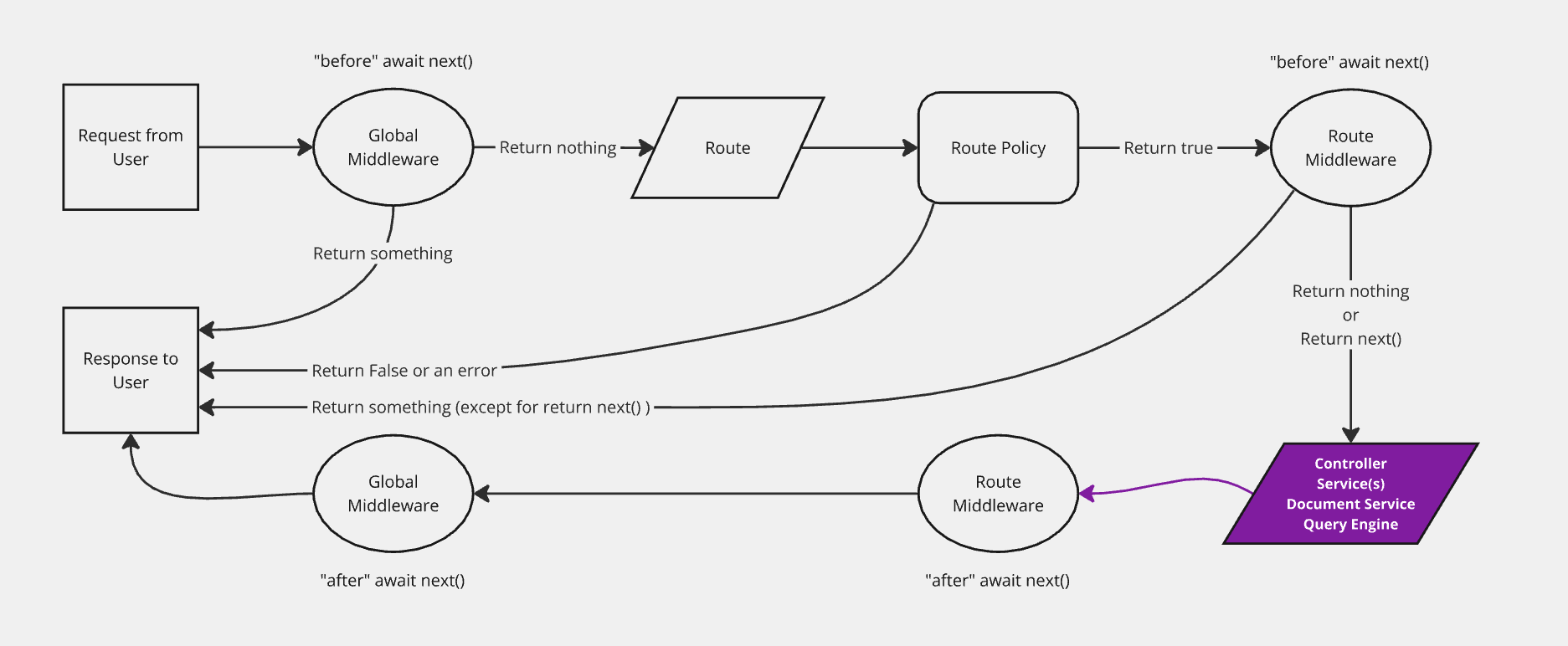
实现
🌐 Implementation
服务可以手动生成或添加。Strapi 提供了一个 createCoreService 工厂函数,能够自动生成核心服务,并允许构建自定义服务或扩展或替换生成的服务。
🌐 Services can be generated or added manually. Strapi provides a createCoreService factory function that automatically generates core services and allows building custom ones or extend or replace the generated services.
添加新服务
🌐 Adding a new service
可以实现一个新的服务:
🌐 A new service can be implemented:
- 使用 交互式 CLI 命令
strapi generate - 或者通过在相应的文件夹中创建一个 JavaScript 文件手动完成(参见 项目结构):
./src/api/[api-name]/services/用于 API 服务- 或用于插件服务的
./src/plugins/[plugin-name]/services/。
要手动创建一个服务,请导出一个工厂函数,该函数返回服务实现(即包含方法的对象)。该工厂函数接收 strapi 实例:
🌐 To manually create a service, export a factory function that returns the service implementation (i.e. an object with methods). This factory function receives the strapi instance:
- JavaScript
- TypeScript
const { createCoreService } = require('@strapi/strapi').factories;

module.exports = createCoreService('api::restaurant.restaurant', ({ strapi }) =>  ({
  // Method 1: Creating an entirely new custom service
  async exampleService(...args) {
    let response = { okay: true }

    if (response.okay === false) {
      return { response, error: true }
    }

    return response
  },

  // Method 2: Wrapping a core service (leaves core logic in place)
  async find(...args) {
    // Calling the default core controller
    const { results, pagination } = await super.find(...args);

    // some custom logic
    results.forEach(result => {
      result.counter = 1;
    });

    return { results, pagination };
  },

  // Method 3: Replacing a core service
  async findOne(documentId, params = {}) {
    return strapi.documents('api::restaurant.restaurant').findOne({
        documentId,
        // Use super to keep core fetch parameter formatting
        ...super.getFetchParams(params),
     });
  }
}));
import { factories } from '@strapi/strapi';

export default factories.createCoreService('api::restaurant.restaurant', ({ strapi }) =>  ({
  // Method 1: Creating an entirely custom service
  async exampleService(...args) {
    let response = { okay: true }

    if (response.okay === false) {
      return { response, error: true }
    }

    return response
  },

  // Method 2: Wrapping a core service (leaves core logic in place)
  async find(...args) {
    // Calling the default core controller
    const { results, pagination } = await super.find(...args);

    // some custom logic
    results.forEach(result => {
      result.counter = 1;
    });

    return { results, pagination };
  },

  // Method 3: Replacing a core service
  async findOne(documentId, params = {}) {
    return strapi.documents('api::restaurant.restaurant').findOne({
       documentId,
       // Use super to keep core fetch parameter formatting
       ...super.getFetchParams(params) }) as any;
  }
}));
要开始创建你自己的服务,请参阅 Strapi 的内置函数,详见 文档服务 API 文档。
🌐 To get started creating your own services, see Strapi's built-in functions in the Document Service API documentation.
自定义电子邮件服务示例(使用 Nodemailer)
服务的目标是存储可重复使用的函数。一个 sendNewsletter 服务可能在我们的代码库中从不同函数发送电子邮件时非常有用,这些函数有特定的用途:
🌐 The goal of a service is to store reusable functions. A sendNewsletter service could be useful to send emails from different functions in our codebase that have a specific purpose:
- JavaScript
- TypeScript
const { createCoreService } = require('@strapi/strapi').factories;
const nodemailer = require('nodemailer'); // Requires nodemailer to be installed (npm install nodemailer)

// Create reusable transporter object using SMTP transport.
const transporter = nodemailer.createTransport({
  service: 'Gmail',
  auth: {
    user: 'user@gmail.com',
    pass: 'password',
  },
});

module.exports = createCoreService('api::restaurant.restaurant', ({ strapi }) => ({
  sendNewsletter(from, to, subject, text) {
    // Setup e-mail data.
    const options = {
      from,
      to,
      subject,
      text,
    };

    // Return a promise of the function that sends the email.
    return transporter.sendMail(options);
  },
}));
import { factories } from '@strapi/strapi';
const nodemailer = require('nodemailer'); // Requires nodemailer to be installed (npm install nodemailer)

// Create reusable transporter object using SMTP transport.
const transporter = nodemailer.createTransport({
  service: 'Gmail',
  auth: {
    user: 'user@gmail.com',
    pass: 'password',
  },
});

export default factories.createCoreService('api::restaurant.restaurant', ({ strapi }) => ({
  sendNewsletter(from, to, subject, text) {
    // Setup e-mail data.
    const options = {
      from,
      to,
      subject,
      text,
    };

    // Return a promise of the function that sends the email.
    return transporter.sendMail(options);
  },
}));
该服务现在可以通过 strapi.service('api::restaurant.restaurant').sendNewsletter(...args) 全局变量使用。它可以在代码库的其他部分使用,例如在以下控制器中:
🌐 The service is now available through the strapi.service('api::restaurant.restaurant').sendNewsletter(...args) global variable. It can be used in another part of the codebase, like in the following controller:
- JavaScript
- TypeScript
module.exports = createCoreController('api::restaurant.restaurant', ({ strapi }) =>  ({
  // GET /hello
  async signup(ctx) {
    const { userData } = ctx.body;

    // Store the new user in database.
    const user = await strapi.service('plugin::users-permissions.user').add(userData);

    // Send an email to validate his subscriptions.
    strapi.service('api::restaurant.restaurant').sendNewsletter('welcome@mysite.com', user.email, 'Welcome', '...');

    // Send response to the server.
    ctx.send({
      ok: true,
    });
  },
}));
export default factories.createCoreController('api::restaurant.restaurant', ({ strapi }) =>  ({
  // GET /hello
  async signup(ctx) {
    const { userData } = ctx.body;

    // Store the new user in database.
    const user = await strapi.service('plugin::users-permissions.user').add(userData);

    // Send an email to validate his subscriptions.
    strapi.service('api::restaurant.restaurant').sendNewsletter('welcome@mysite.com', user.email, 'Welcome', '...');

    // Send response to the server.
    ctx.send({
      ok: true,
    });
  },
}));
当创建新的 内容类型 时,Strapi 会生成一个带有占位符代码的通用服务,准备进行自定义。
🌐 When a new content-type is created, Strapi builds a generic service with placeholder code, ready to be customized.
扩展核心服务
🌐 Extending core services
核心服务是为每种内容类型创建的,可以被控制器使用,以在 Strapi 项目中执行可重用的逻辑。核心服务可以自定义以实现你自己的逻辑。以下代码示例应能帮助你入门。
🌐 Core services are created for each content-type and could be used by controllers to execute reusable logic through a Strapi project. Core services can be customized to implement your own logic. The following code examples should help you get started.
核心服务可以完全通过创建自定义服务来替代,并将其命名为与核心服务相同(例如 find、findOne、create、update 或 delete)。
🌐 A core service can be replaced entirely by creating a custom service and naming it the same as the core service (e.g. find, findOne, create, update, or delete).
集合类型示例
- find()
- findOne()
- create()
- update()
- delete()
async find(params) {
  // some logic here
  const { results, pagination } = await super.find(params);
  // some more logic

  return { results, pagination };
}
async findOne(documentId, params) {
  // some logic here
  const result = await super.findOne(documentId, params);
  // some more logic

  return result;
}
async create(params) {
  // some logic here
  const result = await super.create(params);
  // some more logic

  return result;
}
async update(documentId, params) {
  // some logic here
  const result = await super.update(documentId, params);
  // some more logic

  return result;
}
async delete(documentId, params) {
  // some logic here
  const result = await super.delete(documentId, params);
  // some more logic

  return result;
}
单类型示例
- find()
- update()
- delete()
async find(params) {
  // some logic here
  const document = await super.find(params);
  // some more logic

  return document;
}
async createOrUpdate({ data, ...params }) {
  // some logic here
  const document = await super.createOrUpdate({ data, ...params });
  // some more logic

  return document;
}
async delete(params) {
  // some logic here
  const document = await super.delete(params);
  // some more logic

  return document;
}
使用
🌐 Usage
一旦服务被创建,就可以从控制器或其他服务访问它:
🌐 Once a service is created, it's accessible from controllers or from other services:
// access an API service
strapi.service('api::apiName.serviceName').FunctionName();
// access a plugin service
strapi.service('plugin::pluginName.serviceName').FunctionName();
在上面的语法示例中,serviceName 是 API 服务的服务文件名称,或者用于将服务文件导出到 services/index.js 的插件服务使用的名称。
🌐 In the syntax examples above, serviceName is the name of the service file for API services or the name used to export the service file to services/index.js for plugin services.
要列出所有可用的服务,请运行 yarn strapi services:list。
🌐 To list all the available services, run yarn strapi services:list.
核心服务方法
🌐 Core service methods
使用 createCoreService 生成的服务继承了封装 文档服务 API 的方法。可用的方法取决于内容类型:
🌐 Services generated with createCoreService inherit methods that wrap the Document Service API. The available methods depend on the content-type:
集合类型
🌐 Collection types
| 方法 | 描述 |
|---|---|
find(params) | findMany 的封装;返回文档的分页列表。 |
findOne(documentId, params) | findOne 的封装器;通过其 documentId 返回单个文档。 |
create(params) | create 的封装器;创建一个新文档。 |
update(documentId, params) | update 的封装器;更新现有文档。 |
delete(documentId, params) | delete 的封装器;删除一个文档。 |
count(params) | count 的封装器;返回匹配文档的数量。 |
publish(documentId, params) | publish 的封装器;发布草稿文档。 |
unpublish(documentId, params) | unpublish 的封装;取消发布文档。 |
discardDraft(documentId, params) | discardDraft 的封装器;删除草稿副本。 |
单一类型
🌐 Single types
| 方法 | 描述 |
|---|---|
find(params) | 返回单个文档(内部使用 findFirst)。 |
createOrUpdate({ data, ...params }) | 如果文档不存在则创建,或更新文档(使用 update)。 |
delete(params) | 删除文档(使用 delete)。 |
count(params) | 计算匹配过滤条件的文档数量(使用 count)。 |
publish(params) | 发布草稿文档(使用 publish)。 |
unpublish(params) | 取消发布文档(使用 unpublish)。 |
discardDraft(params) | 删除草稿副本(使用 discardDraft)。 |
参数和默认行为
🌐 Parameters and default behavior
核心服务方法接受与其底层的 Document Service API 调用相同的参数,例如 fields、filters、sort、pagination、populate、locale 和 status。当未提供 status 时,Strapi 会自动设置 status: 'published',因此只返回已发布的内容。要查询草稿文档,请明确传递 status: 'draft' 或 Document Service 支持的其他值。
🌐 Core service methods accept the same parameters as their underlying Document Service API calls, such as fields, filters, sort, pagination, populate, locale, and status. When no status is provided, Strapi automatically sets status: 'published' so only published content is returned. To query draft documents, explicitly pass status: 'draft' or another value supported by the Document Service.
createCoreService 工厂还提供了一个 getFetchParams(params) 辅助工具,它可以将控制器的查询对象转换为这些方法期望的参数格式。在重写核心方法以将清理后的参数传递给 strapi.documents() 时,可以重复使用此辅助工具。
🌐 The createCoreService factory also exposes a getFetchParams(params) helper that converts a controller's query object into the parameter format expected by these methods. This helper can be reused when overriding core methods to forward sanitized parameters to strapi.documents().