升级工具
🌐 Upgrade tool
Page summary:升级工具是一个 CLI 命令,它通过更新依赖并将代码修改应用到代码库中,自动将 Strapi 应用升级到新版本。
🌐 The upgrade tool is a CLI command that automatically upgrades Strapi applications to a new version by updating dependencies and applying codemods to the codebase.
升级工具帮助 Strapi 用户将其 Strapi 应用依赖和代码升级到特定版本。
🌐 The upgrade tool assists Strapi users in upgrading their Strapi application dependencies and code to a specific version.
运行升级工具会触发应用依赖的更新、安装,以及执行一系列代码修改工具(codemods) ,这些工具会根据目标版本之前引入的破坏性更改自动编辑应用代码库。
升级工具是一个 Strapi 包,可以从 CLI 运行。
🌐 The upgrade tool is a Strapi package and can be run from the CLI.
范围
🌐 Scope
虽然升级工具有助于升级应用和插件,但它并未涵盖其各个方面。
🌐 While the upgrade tool helps upgrade applications and plugins, it doesn't cover every aspect of it.
✅ 升级工具支持:
- 更新项目的依赖
- 将自动代码转换应用于现有文件
- 为项目安装或重新安装正确的依赖
❌ 升级工具不支持:
- 通过添加、删除或移动文件和目录来修改文件树
- 迁移应用的数据。这由 Strapi 数据库迁移处理
在升级工具完成执行后,强烈建议在重新运行应用或插件之前,审查所做的修改。
🌐 After the upgrade tool completes its execution, it is strongly recommended to review the modifications made before re-running the app or plugin.
版本类型
🌐 Version types
Strapi 版本号遵循 semantic versioning 约定:
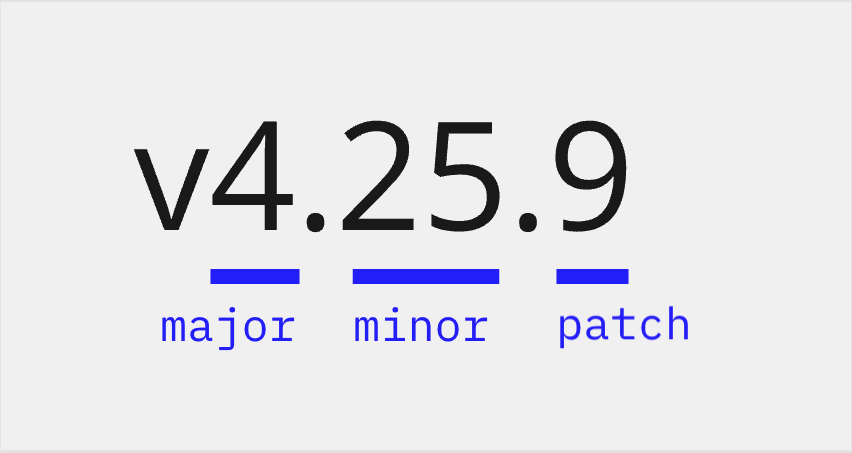

- 第一个数字是主要版本号。
- 第二个数字是次要版本号。
- 第三个数字是补丁版本号。
升级工具允许升级到主要版本、次要版本或补丁版本。
🌐 The upgrade tool allows upgrading to a major, minor, or patch version.
升级工具的作用取决于最新的现有版本和你运行的命令。
🌐 What the upgrade tool does depends on the latest existing version and the command you run.
例如,如果最新的 Strapi v4 版本是 v4.25.9:
🌐 For instance, if the latest Strapi v4 version is v4.25.9:
| 我的 Strapi 应用目前是… | 如果我运行… | 我的 Strapi 应用将升级到… |
|---|---|---|
| v4.25.1 | npx @strapi/upgrade patch | v4.25.9 (因为 v4.25.9 是 v4.25 小版本的最新修补版本) |
| v4.14.1 | npx @strapi/upgrade minor | v4.25.9 |
| v4.14.1 | npx @strapi/upgrade major | 无变化。 我需要先运行 npx @strapi/upgrade minor 才能升级到 v4.25.9。 |
| v4.25.9 | npx @strapi/upgrade major | v5.0.0 |
| v4.14.1 | npx @strapi/upgrade latest | v5.1.2 会出现确认提示,以确保这是一次有意的主版本升级。 |
升级到新版本
🌐 Upgrade to a new version
在运行升级过程之前,请确保你已经创建了代码库和数据库的备份。
🌐 Before running the upgrade process, make sure you've created a backup of your codebase and database.
升级到主要版本
🌐 Upgrade to a major version
使用 major 参数运行升级工具,将项目升级到 Strapi 的下一个主要版本:
🌐 Run the upgrade tool with the major parameter to upgrade the project to the next major version of Strapi:
npx @strapi/upgrade major
在升级过程中,将更新和安装应用依赖,并执行相关的代码修改。
🌐 During the upgrade process, the application dependencies are updated and installed, and the related codemods are executed.
如果你的应用尚未在当前主版本中运行最新的小版本和补丁版本,major 升级将被阻止,你首先需要升级到当前主版本中的最新 小版本.补丁 版本。这意味着从 v4.14.4 升级到 v5.0.0 是一个两步过程,因为最新的 v4 版本是 v4.16.2。
🌐 If your application is not already running the latest minor and patch version in the current major, the major upgrade is prevented, and you will first need to upgrade to the latest minor.patch version in the current major version. This means that moving from v4.14.4 to v5.0.0 is a 2-step process because the latest v4 version is v4.16.2.
升级到小版本
🌐 Upgrade to a minor version
使用带有 minor 参数的升级工具,将项目升级到 Strapi 的最新小版本和补丁版本:
🌐 Run the upgrade tool with the minor parameter to upgrade the project to the latest minor and patch version of Strapi:
npx @strapi/upgrade minor
在升级过程中,项目依赖会更新和安装,并执行相关的 codemod(如果有)。
🌐 During the upgrade process, the project dependencies are updated and installed, and the related codemods are executed (if any).
升级到补丁版本
🌐 Upgrade to a patch version
使用带有 patch 参数的升级工具,将项目升级到当前 Strapi 的次版本和主版本中的最新补丁版本:
🌐 Run the upgrade tool with the patch parameter to upgrade the project to the latest patch version in the current minor and major version of Strapi:
npx @strapi/upgrade patch
在升级过程中,项目依赖会更新和安装,并执行相关的 codemod(如果有)。
🌐 During the upgrade process, the project dependencies are updated and installed, and the related codemods are executed (if any).
升级到最新版本
🌐 Upgrade to the latest version
使用 latest 参数运行升级工具,将项目升级到最新可用版本,而不管当前的 Strapi 版本:
🌐 Run the upgrade tool with the latest parameter to upgrade the project to the latest available version regardless of the current Strapi version:
npx @strapi/upgrade latest
在升级过程中,项目依赖会更新和安装,并执行相关的 codemod(如果有)。
🌐 During the upgrade process, the project dependencies are updated and installed, and the related codemods are executed (if any).
如果检测到 major 版本升级,升级工具会显示确认提示,以确保该更改是有意为之。
🌐 If a major version upgrade is detected, the upgrade tool displays a confirmation prompt to make sure the change is
intended.
在主要升级不是所需选项的情况下,请参见次要升级。
🌐 In the scenario where the major bump isn't the desired option, see the minor upgrade.
升级到特定版本
🌐 Upgrade to a specific version
使用 to 参数运行升级工具,然后跟上目标版本,将项目升级到该特定发布的 Strapi 版本:
🌐 Run the upgrade tool with the to parameter followed by a target version to upgrade the project to that specific published version of Strapi:
npx @strapi/upgrade to 5.42.0
当 latest 解析为被你的注册表策略阻止的版本时,请使用 to。例如,你的 .npmrc 可能会设置一个 min-release-age(在新发布的版本可以安装之前的一段延迟),以降低供应链风险。在这种情况下,最新发布的版本尚不可安装,因此你可以改为选择一个旧版本。
🌐 Use to when latest resolves to a version blocked by your registry policies. For example, your .npmrc might set a min-release-age (a delay before newly published versions can be installed) to mitigate supply-chain risks. In that case, the latest published version is not yet installable, so you can target an older version instead.
对于预发布版本,传递 --codemods-target 选项以选择要运行的 codemods 集。它默认为目标版本的 major.minor.patch 部分:
🌐 For pre-releases, pass the --codemods-target option to select which set of codemods to run. It defaults to the major.minor.patch portion of the target version:
npx @strapi/upgrade to 5.0.0-beta.951 --codemods-target 5.0.0
to 命令会跳过在进行重大升级之前要求项目处于当前主版本最新补丁的安全检查。它适用于那些知道自己想要升级到哪个版本的用户。
🌐 The to command skips the safety check that requires the project to be on the latest patch of its current major version before a major upgrade. It is intended for users who know which version they want to target.
仅运行 codemods
🌐 Run codemods only
使用带有 codemods 参数的升级工具来执行一个实用程序,该实用程序允许选择要执行的代码修改。使用此命令,仅运行代码修改,依赖不会更新或安装。
🌐 Run the upgrade tool with the codemods parameter to execute a utility that allows selecting the codemods to be executed. With this command, only the codemods are run, the dependencies are not updated nor installed.
要查看可用 codemod 的列表,请使用 ls 命令:
🌐 To view a list of the available codemods, use the ls command:
npx @strapi/upgrade codemods ls
要从可用的代码修改列表中选择并运行它们,请使用 run 命令:
🌐 To select from a list of available codemods and run them, use the run command:
npx @strapi/upgrade codemods run
要仅运行特定的 codemod,请使用 run,后跟从 ls 命令中找到的 UID:
🌐 To run only a specific codemod, use run followed by a UID found from the ls command:
npx @strapi/upgrade codemods run 5.0.0-strapi-codemod-uid
选项
🌐 Options
npx @strapi/upgrade [major|minor|patch] 命令可以接受以下选项:
🌐 The npx @strapi/upgrade [major|minor|patch] commands can accept the following options:
| 选项 | 描述 | 默认值 |
|---|---|---|
-n, --dry | 在不更新任何文件的情况下模拟升级 | false |
-d, --debug | 在调试模式下获取更多日志 | false |
-s, --silent | 不记录任何 | false |
-p, --project-path <project-path> | Strapi 项目的路径 | - |
-y, --yes | 自动对每个提示回答“是” | false |
以下选项可以单独使用 npx @strapi/upgrade 命令运行,也可以与 npx @strapi/upgrade [major|minor|patch] 命令一起运行:
🌐 The following options can be run either with the npx @strapi/upgrade command alone or with the npx @strapi/upgrade [major|minor|patch] commands:
| 选项 | 描述 |
|---|---|
-V, --version | 输出 版本号 |
-h, --help | 打印 命令行选项 |
模拟升级而不更新任何文件(演练运行)
🌐 Simulate the upgrade without updating any files (dry run)
当使用 -n 或 --dry 选项时,codemods 会被执行,但实际上不会编辑文件。package.json 不会被修改,依赖也不会被重新安装。使用此选项可以模拟代码库的升级,在不应用任何更改的情况下检查结果:
🌐 When passing the -n or --dry option, the codemods are executed without actually editing the files. The package.json will not be modified, and the dependencies will not be re-installed. Using this option allows simulating the upgrade of the codebase, checking the outcomes without applying any changes:
示例:
🌐 Examples:
npx @strapi/upgrade major --dry
npx @strapi/upgrade minor --dry
npx @strapi/upgrade patch --dry
为 Strapi 应用文件夹选择一个路径
🌐 Select a path for the Strapi application folder
当传递 -p 或 --project-path 选项并跟随有效路径时,你可以指定 Strapi 应用所在的文件夹。
🌐 When passing the -p or --project-path option followed by a valid path you can specify in which folder the Strapi application is located.
示例:
🌐 Example:
npx @strapi/upgrade major -p /path/to/the/Strapi/application/folder
获取当前版本
🌐 Get the current version
在使用 --version 选项(或其 -V 简写)时,会记录升级工具的当前版本。
🌐 When passing the --version option (or its -V shorthand), the current version of the upgrade tool is logged.
示例:
🌐 Example:
$ npx @strapi/upgrade -V
4.15.1
获取详细的调试信息
🌐 Get detailed debugging information
在使用 --debug 选项(或其 -d 简写)时,升级工具在运行过程中会提供更详细的日志:
🌐 When passing the --debug option (or its -d shorthand), the upgrade tool provides more detailed logs while running:
npx @strapi/upgrade --debug
静默执行升级
🌐 Execute the upgrade silently
当使用 --silent 选项(或其 -s 简写)时,该工具在执行升级时不会提供任何日志:
🌐 When passing the --silent option (or its -s shorthand), the tool executes the upgrade without providing any log:
npx @strapi/upgrade --silent
对每一个提示都回答是
🌐 Answer yes to every prompt
当使用 --yes 选项(或其 -y 简写)时,工具会自动对每个提示回答“是”:
🌐 When passing the --yes option (or its -y shorthand), the tool automatically answers "yes" to every prompt:
npx @strapi/upgrade --yes`
获取帮助
🌐 Get help
当使用 --help 选项(或其 -h 简写)时,会显示帮助信息,列出可用的选项:
🌐 When passing the --help option (or its -h shorthand), help information is displayed, listing the available options:
示例:
🌐 Examples:
- General help for the upgrade tool
- Specific help for upgrade major
$ npx @strapi/upgrade -h
Usage: upgrade <command> [options]

Options:
 -V, --version    output the version number
 -h, --help       Print command line options

Commands:
 latest [options]  Upgrade to the latest available version of Strapi
 major [options]   Upgrade to the next available major version of Strapi
 minor [options]   Upgrade to ...
 patch [options]   Upgrade to ...
to [options] <target> Upgrade to a specific version of Strapi
 help [command]    Print options for a specific command
$ npx @strapi/upgrade major -h
Usage: upgrade major [options]

Upgrade to the next available major version of Strapi

Options:
  -p, --project-path <project-path>  Path to the Strapi project
  -n, --dry                          Simulate the upgrade without updating any files (default: false)
  -d, --debug                        Get more logs in debug mode (default: false)
  -s, --silent                       Don't log anything (default: false)
  -h, --help                         Display help for command
  -y, --yes                          Automatically answer yes to every prompt