路线
🌐 Routes
Page summary:路由将传入的 URL 映射到控制器,并为每种内容类型预生成页面。本文档展示了如何添加或自定义核心和自定义路由,并附加策略或中间件以实现额外控制。
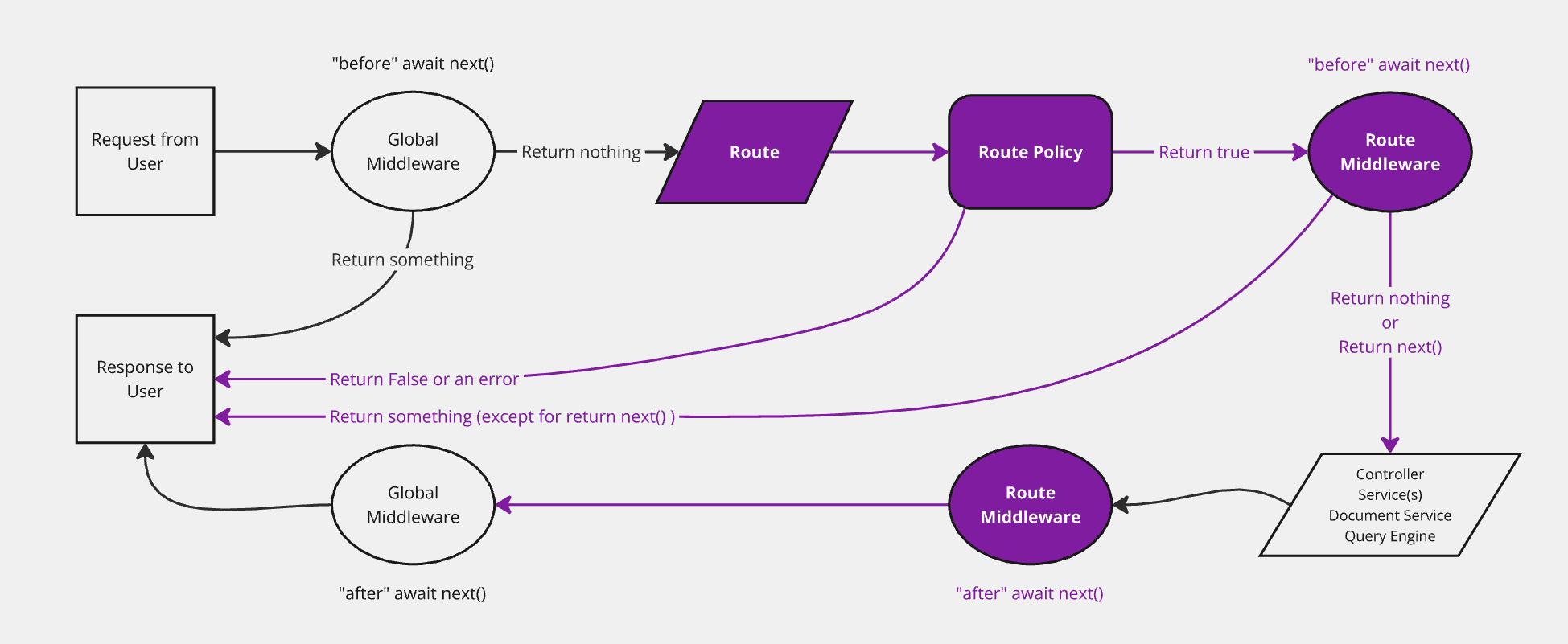
发送到 Strapi 上任何 URL 的请求都由路由处理。默认情况下,Strapi 会为所有内容类型生成路由(请参阅 REST API 文档)。路由可以被 添加 和配置:
🌐 Requests sent to Strapi on any URL are handled by routes. By default, Strapi generates routes for all the content-types (see REST API documentation). Routes can be added and configured:
一旦路由存在,访问它会执行由控制器处理的一些代码(参见 控制器文档)。要查看所有现有路由及其层级顺序,你可以运行 yarn strapi routes:list(参见 CLI 参考)。
🌐 Once a route exists, reaching it executes some code handled by a controller (see controllers documentation). To view all existing routes and their hierarchal order, you can run yarn strapi routes:list (see CLI reference).
如果你只是自定义 Strapi 为某个内容类型生成的默认控制器操作(find、findOne、create、update 或 delete),你可以保持路由不变。这些核心路由已经指向相同的处理程序名称,并会运行你新的控制器逻辑。只有在你需要一个全新的 HTTP 路径/方法或想要暴露自定义控制器操作时,才需要添加或编辑路由。
🌐 If you only customize the default controller actions (find, findOne, create, update, or delete) that Strapi generates for a content-type, you can leave the router as-is. Those core routes already target the same handler names and will run your new controller logic. Add or edit a route only when you need a brand-new HTTP path/method or want to expose a custom controller action.
实现
🌐 Implementation
实现一个新路由包括在 ./src/api/[apiName]/routes 文件夹中的路由文件中定义它(参见 项目结构)。
🌐 Implementing a new route consists in defining it in a router file within the ./src/api/[apiName]/routes folder (see project structure).
根据用例,有 2 种不同的路由文件结构:
🌐 There are 2 different router file structures, depending on the use case:
配置核心路由
🌐 Configuring core routers
核心路由(即 find、findOne、create、update 和 delete)对应于当创建新的 内容类型 时 Strapi 自动创建的 默认路由。
🌐 Core routers (i.e. find, findOne, create, update, and delete) correspond to default routes automatically created by Strapi when a new content-type is created.
Strapi 提供了一个 createCoreRouter 工厂函数,它会自动生成核心路由并允许:
🌐 Strapi provides a createCoreRouter factory function that automatically generates the core routers and allows:
- 将配置选项传递给每个路由
- 并禁用一些核心路由以创建自定义路由。
核心路由文件是一个 JavaScript 文件,导出对 createCoreRouter 调用的结果,该调用具有以下参数:
🌐 A core router file is a JavaScript file exporting the result of a call to createCoreRouter with the following parameters:
| 参数 | 描述 | 类型 |
|---|---|---|
prefix | 允许传入自定义前缀,添加到该模型的所有路由(例如 /test) | String |
only | 仅会加载的核心路由 数组中未包含的内容将被忽略。 | Array |
except | 不应加载的核心路由 在功能上与 only 参数相反。 | Array |
config | 配置路由的 策略、中间件 和 公共可用性 | Object |
- JavaScript
- TypeScript
const { createCoreRouter } = require('@strapi/strapi').factories;

module.exports = createCoreRouter('api::restaurant.restaurant', {
  prefix: '',
  only: ['find', 'findOne'],
  except: [],
  config: {
    find: {
      auth: false,
      policies: [],
      middlewares: [],
    },
    findOne: {},
    create: {},
    update: {},
    delete: {},
  },
});
import { factories } from '@strapi/strapi';

export default factories.createCoreRouter('api::restaurant.restaurant', {
  prefix: '',
  only: ['find', 'findOne'],
  except: [],
  config: {
    find: {
      auth: false,
      policies: [],
      middlewares: [],
    },
    findOne: {},
    create: {},
    update: {},
    delete: {},
  },
});
通用实现示例:
🌐 Generic implementation example:
- JavaScript
- TypeScript
const { createCoreRouter } = require('@strapi/strapi').factories;

module.exports = createCoreRouter('api::restaurant.restaurant', {
  only: ['find'],
  config: {
    find: {
      auth: false,
      policies: [],
      middlewares: [],
    }
  }
});
import { factories } from '@strapi/strapi';

export default factories.createCoreRouter('api::restaurant.restaurant', {
  only: ['find'],
  config: {
    find: {
      auth: false,
      policies: [],
      middlewares: [],
    }
  }
});
这只允许在核心 find 控制器 上对 /restaurants 路径发起 GET 请求,无需身份验证。当你在自定义路由中引用自定义控制器操作时,建议使用完整限定的 api::<api-name>.<controllerName>.<actionName> 形式以提高清晰度(例如,api::restaurant.restaurant.review)。
创建自定义路由
🌐 Creating custom routers
创建自定义路由包括创建一个导出对象数组的文件,每个对象都是具有以下参数的路由:
🌐 Creating custom routers consists in creating a file that exports an array of objects, each object being a route with the following parameters:
| 参数 | 描述 | 类型 |
|---|---|---|
method | 路由关联的方法(例如 GET、POST、PUT、DELETE 或 PATCH) | String |
path | 要访问的路径,以斜杠开头(例如 /articles) | String |
handler | 当路由被访问时执行的函数。 使用完整限定语法 api::api-name.controllerName.actionName(或 plugin::plugin-name.controllerName.actionName)。遗留项目中也可使用简短形式 <controllerName>.<actionName>。 | String |
config可选 | 用于处理路由的策略、中间件和公开访问的配置 | Object |
可以使用参数和正则表达式创建动态路由。这些参数将会在 ctx.params 对象中暴露。更多详情,请参阅 PathToRegex 文档。
路由文件按字母顺序加载。要在核心路由之前加载自定义路由,请确保适当地命名自定义路由(例如 01-custom-routes.js 和 02-core-routes.js)。
🌐 Routes files are loaded in alphabetical order. To load custom routes before core routes, make sure to name custom routes appropriately (e.g. 01-custom-routes.js and 02-core-routes.js).
handler 字符串充当指向应为该路由运行的控制器操作的指针。Strapi 支持以下格式:
🌐 The handler string acts as a pointer to the controller action that should run for the route. Strapi supports the following formats:
- API 控制器:
api::<api-name>.<controllerName>.<actionName>(例如api::restaurant.restaurant.exampleAction)。<controllerName>来自./src/api/<api-name>/controllers/内的控制器文件名。 - 插件控制器:当控制器位于插件中时为
plugin::<plugin-name>.<controllerName>.<actionName>。
为了向后兼容,Strapi 也接受 API 控制器的简短 <controllerName>.<actionName> 字符串,但使用完全限定的形式可以使路由更明确,并避免不同 API 和插件之间的命名冲突。
🌐 For backwards compatibility, Strapi also accepts a short <controllerName>.<actionName> string for API controllers, but using the fully-qualified form makes the route more explicit and avoids naming collisions across APIs and plugins.
使用 URL 参数和正则表达式进行路由的自定义路由示例
在以下示例中,自定义路由文件名以 01- 为前缀,以确保在核心路由之前访问该路由。
🌐 In the following example, the custom routes file name is prefixed with 01- to make sure the route is reached before the core routes.
- JavaScript
- TypeScript
/** @type {import('@strapi/strapi').Core.RouterConfig} */
const config = {
  type: 'content-api',
  routes: [
    { // Path defined with an URL parameter
      method: 'POST',
      path: '/restaurants/:id/review',
      handler: 'api::restaurant.restaurant.review',
    },
    { // Path defined with a regular expression
      method: 'GET',
      path: '/restaurants/:category([a-z]+)', // Only match when the URL parameter is composed of lowercase letters
      handler: 'api::restaurant.restaurant.findByCategory',
    }
  ]
}

module.exports = config
import type { Core } from '@strapi/strapi';

const config: Core.RouterConfig = {
  type: 'content-api',
  routes: [
    { // Path defined with a URL parameter
      method: 'GET',
      path: '/restaurants/:category/:id',
      handler: 'api::restaurant.restaurant.findOneByCategory',
    },
    { // Path defined with a regular expression
      method: 'GET',
      path: '/restaurants/:region(\\d{2}|\\d{3})/:id', // Only match when the first parameter contains 2 or 3 digits.
      handler: 'api::restaurant.restaurant.findOneByRegion',
    }
  ]
}

export default config
配置
🌐 Configuration
核心路由和自定义路由都有相同的配置选项。路由配置在一个 config 对象中定义,该对象可以用来处理策略和中间件,或将路由设为公开。
🌐 Both core routers and custom routers have the same configuration options. The routes configuration is defined in a config object that can be used to handle policies and middlewares or to make the route public.
政策
🌐 Policies
可以将策略添加到路由配置中:
- 通过指向在
./src/policies中注册的策略,无论是否传递自定义配置 - 或者通过直接声明策略实现,将其作为一个函数,该函数以
policyContext扩展 Koa's context (ctx) 和strapi实例作为参数(参见 策略文档)
- Core router policy
- Custom router policy
- JavaScript
- TypeScript
const { createCoreRouter } = require('@strapi/strapi').factories;

module.exports = createCoreRouter('api::restaurant.restaurant', {
  config: {
    find: {
      policies: [
        // point to a registered policy
        'policy-name',

        // point to a registered policy with some custom configuration
        { name: 'policy-name', config: {} },

        // pass a policy implementation directly
        (policyContext, config, { strapi }) => {
          return true;
        },
      ]
    }
  }
});
import { factories } from '@strapi/strapi';

export default factories.createCoreRouter('api::restaurant.restaurant', {
  config: {
    find: {
      policies: [
        // point to a registered policy
        'policy-name',

        // point to a registered policy with some custom configuration
        { name: 'policy-name', config: {} },

        // pass a policy implementation directly
        (policyContext, config, { strapi }) => {
          return true;
        },
      ]
    }
  }
});
- JavaScript
- TypeScript
module.exports = {
  routes: [
    {
      method: 'GET',
      path: '/articles/customRoute',
      handler: 'api::api-name.controllerName.functionName', // or 'plugin::plugin-name.controllerName.functionName' for a plugin-specific controller
      config: {
        policies: [
          // point to a registered policy
          'policy-name',

          // point to a registered policy with some custom configuration
          { name: 'policy-name', config: {} },

          // pass a policy implementation directly
          (policyContext, config, { strapi }) => {
            return true;
          },
        ]
      },
    },
  ],
};
export default {
  routes: [
    {
      method: 'GET',
      path: '/articles/customRoute',
      handler: 'api::api-name.controllerName.functionName', // or 'plugin::plugin-name.controllerName.functionName' for a plugin-specific controller
      config: {
        policies: [
          // point to a registered policy
          'policy-name',

          // point to a registered policy with some custom configuration
          { name: 'policy-name', config: {} },

          // pass a policy implementation directly
          (policyContext, config, { strapi }) => {
            return true;
          },
        ]
      },
    },
  ],
};
中间件
🌐 Middlewares
可以将中间件添加到路由配置中:
- 通过指向在
./src/middlewares中注册的中间件,无论是否传递自定义配置 - 或者直接通过声明中间件实现,作为一个函数,该函数以 Koa's context (
ctx) 和strapi实例作为参数:
- Core router middleware
- Custom router middleware
- JavaScript
- TypeScript
const { createCoreRouter } = require('@strapi/strapi').factories;

module.exports = createCoreRouter('api::restaurant.restaurant', {
  config: {
    find: {
      middlewares: [
        // point to a registered middleware
        'middleware-name',

        // point to a registered middleware with some custom configuration
        { name: 'middleware-name', config: {} },

        // pass a middleware implementation directly
        (ctx, next) => {
          return next();
        },
      ]
    }
  }
});
import { factories } from '@strapi/strapi';

export default factories.createCoreRouter('api::restaurant.restaurant', {
  config: {
    find: {
      middlewares: [
        // point to a registered middleware
        'middleware-name',

        // point to a registered middleware with some custom configuration
        { name: 'middleware-name', config: {} },

        // pass a middleware implementation directly
        (ctx, next) => {
          return next();
        },
      ]
    }
  }
});
- JavaScript
- TypeScript
module.exports = {
  routes: [
    {
      method: 'GET',
      path: '/articles/customRoute',
      handler: 'api::api-name.controllerName.functionName', // or 'plugin::plugin-name.controllerName.functionName' for a plugin-specific controller
      config: {
        middlewares: [
          // point to a registered middleware
          'middleware-name',

          // point to a registered middleware with some custom configuration
          { name: 'middleware-name', config: {} },

          // pass a middleware implementation directly
          (ctx, next) => {
            return next();
          },
        ],
      },
    },
  ],
};
export default  {
  routes: [
    {
      method: 'GET',
      path: '/articles/customRoute',
      handler: 'api::api-name.controllerName.functionName', // or 'plugin::plugin-name.controllerName.functionName' for a plugin-specific controller
      config: {
        middlewares: [
          // point to a registered middleware
          'middleware-name',

          // point to a registered middleware with some custom configuration
          { name: 'middleware-name', config: {} },

          // pass a middleware implementation directly
          (ctx, next) => {
            return next();
          },
        ],
      },
    },
  ],
};
将中间件应用于内容类型的所有核心路由
createCoreRouter 每个操作附加 middlewares。要在每个默认内容 API 操作(find、findOne、create、update、delete)上运行相同的中间件,可以在 config 的每个键下列出它,或者只构建一次该对象:
- JavaScript
- TypeScript
const { createCoreRouter } = require('@strapi/strapi').factories;

const audit = ['global::audit-log'];
const actions = ['find', 'findOne', 'create', 'update', 'delete'];

module.exports = createCoreRouter('api::restaurant.restaurant', {
  config: Object.fromEntries(actions.map((action) => [action, { middlewares: audit }])),
});
import { factories } from '@strapi/strapi';

const audit = ['global::audit-log'] as const;
const actions = ['find', 'findOne', 'create', 'update', 'delete'] as const;

export default factories.createCoreRouter('api::restaurant.restaurant', {
  config: Object.fromEntries(actions.map((action) => [action, { middlewares: [...audit] }])),
});
如果你使用 only 或 except,请构建 actions 数组以匹配你实际注册的路由,这样你就不会将中间件附加到已禁用的处理程序上。
🌐 If you use only or except, build the actions array to match the routes you actually register so you do not attach middlewares to disabled handlers.
路由级中间件是推荐用于在整个 API 中执行一致的填充规则的地方。这可以防止意外的过度获取,并确保响应大小可预测。请参阅 Strapi 博客上的 Building High-Performance Strapi Applications 。
公共路线
🌐 Public routes
默认情况下,路由受 Strapi 的身份验证系统保护,该系统基于API 令牌或使用用户与权限插件。
🌐 By default, routes are protected by Strapi's authentication system, which is based on API tokens or on the use of the Users & Permissions plugin.
在某些情况下,将某条路由公开并在正常的 Strapi 身份验证系统之外控制访问可能是有用的。这可以通过将路由的 auth 配置参数设置为 false 来实现:
🌐 In some scenarios, it can be useful to have a route publicly available and control the access outside of the normal Strapi authentication system. This can be achieved by setting the auth configuration parameter of a route to false:
- Core router with a public route
- Custom router with a public route
- JavaScript
- TypeScript
const { createCoreRouter } = require('@strapi/strapi').factories;

module.exports = createCoreRouter('api::restaurant.restaurant', {
  config: {
    find: {
      auth: false
    }
  }
});
import { factories } from '@strapi/strapi';

export default  factories.createCoreRouter('api::restaurant.restaurant', {
  config: {
    find: {
      auth: false
    }
  }
});
- JavaScript
- TypeScript
module.exports = {
  routes: [
    {
      method: 'GET',
      path: '/articles/customRoute',
      handler: 'api::api-name.controllerName.functionName', // or 'plugin::plugin-name.controllerName.functionName' for a plugin-specific controller
      config: {
        auth: false,
      },
    },
  ],
};
export default  {
  routes: [
    {
      method: 'GET',
      path: '/articles/customRoute',
      handler: 'api::api-name.controllerName.functionName', // or 'plugin::plugin-name.controllerName.functionName' for a plugin-specific controller
      config: {
        auth: false,
      },
    },
  ],
};
自定义内容 API 参数
🌐 Custom Content API parameters
你可以通过在 register 生命周期中注册,将允许在内容 API 路由上的 query 和 body 参数扩展。注册的参数随后会像核心参数一样被验证和清理。客户端可以发送额外的查询键(例如 ?search=...)或根级 body 键(例如 clientMutationId),而无需自定义路由或控制器。
🌐 You can extend the query and body parameters allowed on Content API routes by registering them in the register lifecycle. Registered parameters are then validated and sanitized like core parameters. Clients can send extra query keys (e.g. ?search=...) or root-level body keys (e.g. clientMutationId) without requiring custom routes or controllers.
| 什么 | 哪里 |
|---|---|
| 启用严格参数(拒绝未知的查询/主体键) | API 配置:在 ./config/api.js(或 ./config/api.ts)中设置 rest.strictParams: true。 |
| 添加允许的参数(应用) | 在 ./src/index.js 或 ./src/index.ts 的 注册 中调用 addQueryParams / addInputParams。 |
| 添加允许的参数(插件) | 在插件的 注册 生命周期中调用 addQueryParams / addInputParams。 |
当启用 rest.strictParams 时,仅接受核心参数和每个路由请求模式上的参数;你注册的参数会合并到该模式中。模式请使用来自 @strapi/utils(或 zod/v4)的 z 实例。
🌐 When rest.strictParams is enabled, only core parameters and parameters on each route's request schema are accepted; the parameters you register are merged into that schema. Use the z instance from @strapi/utils (or zod/v4) for schemas.
addQueryParams
strapi.contentAPI.addQueryParams(options) 注册额外的 query 参数。模式必须是标量或标量数组(字符串、数字、布尔值、枚举)。对于嵌套结构,请改用 addInputParams。每个条目可以有一个可选的 matchRoute: (route) => boolean 回调,仅将参数添加到回调返回 true 的路由。你不能将核心查询参数名称(例如 filters、sort、fields)注册为额外参数;它们是保留的。
addInputParams
strapi.contentAPI.addInputParams(options) 注册额外的输入参数:请求体中的根级键(例如与 data 并列),可以使用任何 Zod 类型。可选的 matchRoute 回调的作用与 addQueryParams 相同。你不能将保留名称如 id 或 documentId 注册为输入参数。
matchRoute
matchRoute 回调接收一个具有以下属性的 route 对象:
🌐 The matchRoute callback receives a route object with the following properties:
route.method:HTTP 方法('GET'、'POST'等)route.path:路线路径route.handler:控制器操作字符串route.info:关于路线的元数据
例如,要仅针对 GET 路由,请使用 matchRoute: (route) => route.method === 'GET'。要仅针对路径包含 articles 的路由,请使用 matchRoute: (route) => route.path.includes('articles')。
🌐 For example, to target only GET routes, use matchRoute: (route) => route.method === 'GET'. To target only routes whose path includes articles, use matchRoute: (route) => route.path.includes('articles').
- JavaScript
- TypeScript
module.exports = {
  register({ strapi }) {
    strapi.contentAPI.addQueryParams({
      search: {
        schema: (z) => z.string().max(200).optional(),
        matchRoute: (route) => route.path.includes('articles'),
      },
    });
    strapi.contentAPI.addInputParams({
      clientMutationId: {
        schema: (z) => z.string().max(100).optional(),
      },
    });
  },
};
export default {
  register({ strapi }) {
    strapi.contentAPI.addQueryParams({
      search: {
        schema: (z) => z.string().max(200).optional(),
        matchRoute: (route) => route.path.includes('articles'),
      },
    });
    strapi.contentAPI.addInputParams({
      clientMutationId: {
        schema: (z) => z.string().max(100).optional(),
      },
    });
  },
};