面向开发者和文档阅读者的 AI
🌐 AI for developers and documentation readers
Page summary:Strapi 文档网站包括免费的 AI 驱动工具,包括 AI 工具栏、由 Kapa 驱动的聊天机器人、
llms.txt文件和 MCP 服务器,以帮助开发者更有效地学习和集成 Strapi。🌐 The Strapi documentation site includes free AI-powered tools including an AI toolbar, chatbot powered by Kapa,
llms.txtfiles, and MCP servers to help developers learn and integrate Strapi more effectively.
Strapi 文档网站包括由 AI 支持的工具,帮助开发者更有效地学习、探索和集成 Strapi。这些工具免费使用,面向所有人开放。
🌐 The Strapi documentation site includes AI-powered tools to help developers learn, explore, and integrate Strapi more effectively. These tools are free to use and available to everyone.
In addition to docs and product features described on the present page, the strapi/strapi and strapi/documentation repositories also have their own AGENTS.md files. Use them to guide your AI-based tools when developing Strapi features or updating documentation.
人工智能工具栏
🌐 AI toolbar
每个文档页面在标题下方的页面顶部附近都包含一个 AI 工具栏。该工具栏提供对当前页面的所有 AI 相关操作的快速访问。
🌐 Every documentation page includes an AI toolbar near the top of the page, right after the title. The toolbar provides quick access to all AI-related actions for the current page.
点击下拉箭头会显示更多选项:
🌐 Clicking the dropdown arrow reveals additional options:
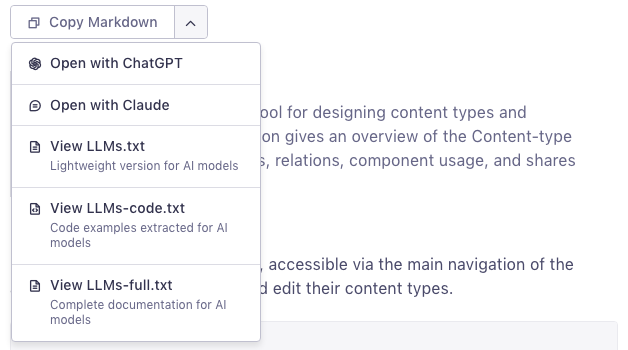
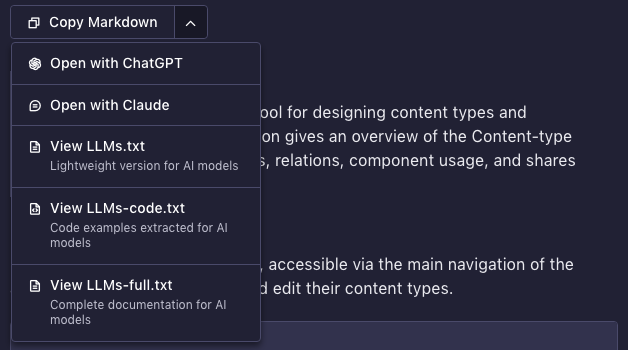
工具栏包括以下操作:
🌐 The toolbar includes the following actions:
| 操作 | 描述 |
|---|---|
| 复制 Markdown | 将当前页面的干净 Markdown 版本复制到剪贴板。在 Elegant 和 AI 模式下可用;在 Markdown 模式下,请使用工具栏旁的 以 .md 格式查看此页面 按钮。 |
| 以 Markdown 查看 | 在新标签页中打开当前页面的干净 Markdown 版本。 在 Elegant 和 AI 模式下可用;在 Markdown 模式下,它被工具栏旁显示的 " 以 .md 格式查看此页面" 按钮替代。 |
| 使用 ChatGPT 打开 | 打开一个新的 ChatGPT 对话,并预填充当前页面的 URL |
| 使用 Claude 打开 | 打开一个新的 Claude 对话,并将提示复制到剪贴板 |
| 查看 LLMs.txt | 打开 AI 模型的轻量级页面索引 |
| 查看 LLMs-code.txt | 打开 AI 模型的代码示例文件 |
| 查看 LLMs-full.txt | 打开 AI 模型的完整文档文件 |
复制 Markdown
🌐 Copy Markdown
工具栏中的主要操作。点击 复制 Markdown 会获取当前页面的干净 Markdown 版本(与页面的 .md URL 内容相同,布局组件已转换为纯 Markdown),并将其复制到剪贴板。然后,你可以将其粘贴到任何 AI 助手(ChatGPT、Claude、Gemini 等)中,用于:
🌐 The primary action in the toolbar. Clicking Copy Markdown fetches the clean Markdown version of the current page (the same content as the page's .md URL, with layout components resolved into plain Markdown) and copies it to your clipboard. You can then paste it into any AI assistant (ChatGPT, Claude, Gemini, etc.) for:
- 在有完整上下文的情况下询问有关特定页面的问题
- 总结或简化文档内容
- 根据已记录的 API 生成代码
- 将文档翻译成另一种语言
在 Markdown 模式下,工具栏的 复制 Markdown 和 以 Markdown 查看 操作被一个单独的 以 .md 查看此页面 按钮取代,该按钮显示在工具栏旁,点击可打开相同的干净 Markdown。你也可以通过在任何页面 URL 后添加 .md 直接访问它。
🌐 In Markdown mode, the toolbar's Copy Markdown and View as Markdown actions are replaced by a single View this page as .md button shown next to the toolbar, which opens the same clean Markdown. You can also reach it directly by adding .md to any page URL.
用大型语言模型打开
🌐 Open with LLM
使用 ChatGPT 打开 和 使用 Claude 打开 按钮会在相应的 AI 助手中打开一个新的对话,预先填充包含当前页面 URL 的提示。该提示会自动根据你的浏览器语言进行本地化。
🌐 The Open with ChatGPT and Open with Claude buttons open a new conversation in the respective AI assistant, prefilled with a prompt that includes the current page URL. The prompt is automatically localized to your browser's language.
对于 Claude,由于 URL 编码的工作方式不同,提示也会被复制到你的剪贴板。
🌐 For Claude, the prompt is also copied to your clipboard since URL encoding works differently.
人工智能聊天机器人
🌐 AI chatbot
由 Kapa 驱动的 AI 聊天机器人直接集成在文档网站中。它从完整的文档、社区论坛、博客文章以及其他 Strapi 资源中获取信息,以提供上下文相关的答案。
🌐 An AI chatbot powered by Kapa is integrated directly into the documentation site. It draws from the full documentation, community forums, blog posts, and other Strapi resources to provide contextual answers.
侧边栏入口
🌐 Sidebar entry point
点击左侧边栏(搜索栏旁边)的 询问 AI按钮,开启关于 Strapi 相关内容的对话。
你可以提出如下问题:
🌐 You can ask questions like:
- 我如何创建一个 Strapi 项目?
- 在 REST API 中,人口(population)是如何工作的?
- 我如何自定义管理面板?
对于复杂的问题,请启用深度思考模式以获得更全面(但更慢)的回答。
🌐 For complex questions, enable deep thinking mode for more thorough (but slower) answers.
代码块入口点
🌐 Code block entry point
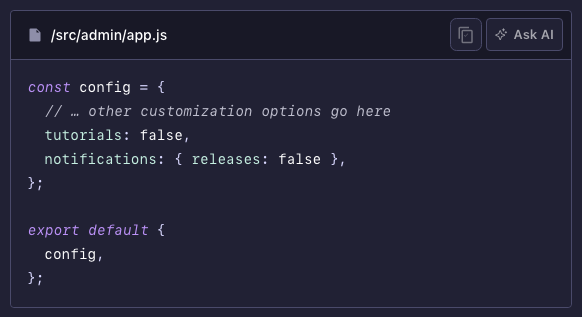
将鼠标悬停在文档页面的任何代码块上,以显示代码块右上角的Ask AI按钮。点击它会打开一个预填充代码片段的对话框,因此你可以请求解释或修改。
🌐 Hover over any code block on a documentation page to reveal an Ask AI button in the top-right corner of the block. Clicking it opens a conversation prefilled with the code snippet, so you can ask for an explanation or adaptation.
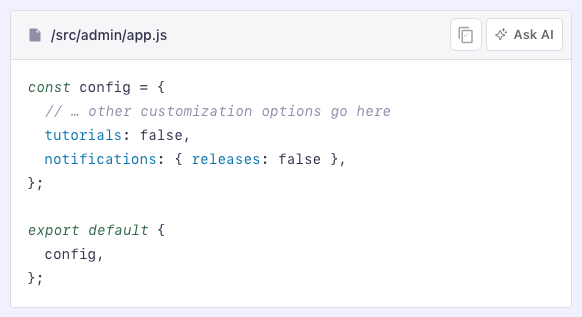
这对于理解配置示例、API 响应或生命周期钩子模式尤其有用。
🌐 This is particularly useful for understanding configuration examples, API responses, or lifecycle hook patterns.
人工智能模式入口
🌐 AI mode entry point
每个文档页面都可以使用页面顶部的模式选择器(在 Elegant 模式 和 Markdown 模式 旁边)切换到 AI 模式。AI 模式将页面分为两列:左侧为文档内容,右侧为 AI 助手面板。
🌐 Every documentation page can be switched to AI mode using the mode selector at the top of the page (next to Elegant mode and Markdown mode). AI mode splits the page into two columns: the documentation content on the left, and an AI assistant panel on the right.
该面板显示当前页面的 AI 生成摘要和一个问题框,这样你可以在不离开页面或打开单独窗口的情况下,一边阅读页面一边提问。问题将由同一个 Kapa 驱动的聊天机器人回答,范围限定在你正在阅读的页面上。
🌐 The panel shows an AI-generated summary of the current page and a question box, so you can read the page and ask questions about it side by side, without leaving the page or opening a separate window. Questions are answered with the same Kapa-powered chatbot, scoped to the page you are reading.
要退出 AI 模式,请通过模式选择器切换回 优雅模式 或 Markdown 模式,或点击 AI 面板右上角的 。
大型语言模型文本文件
🌐 LLMs text files
有3个文本文件可用于将 Strapi 文档内容直接提供给大型语言模型(LLM)。这些文件遵循 llms.txt 约定,并且旨在供 AI 工具以编程方式使用。
| 文件 | URL | 内容 | 最适合 |
|---|---|---|---|
llms.txt | /llms.txt | 所有页面的简明、链接丰富的概览 | 高层次上下文、导航、RAG 流水线 |
llms-full.txt | /llms-full.txt | 将整个文档放在一个文件中 | 在令牌限制允许的情况下获取完整站点上下文 |
llms-code.txt | /llms-code.txt | 所有代码示例,按页面分组 | 以代码为中心的工作、迁移、API 发现 |
何时使用每个文件
🌐 When to use each file
llms.txt:使用此方法可以向 AI 模型概述 Strapi 文档的内容,而不会消耗过多的令牌。非常适合用于 RAG(检索增强生成)系统,或作为深入研究之前的初步浏览。llms-full.txt:当你需要 AI 访问完整文档内容时使用此选项。这个文件很大;请确保你的模型的上下文窗口能够处理它。llms-code.txt:当你在编写代码时,并且想要将 Strapi 的所有文档代码示例提供给 AI 使用时,请使用此选项。每个代码片段都包含来源页面的 URL 和锚点以便追踪。
MCP 服务器
🌐 MCP servers
模型上下文协议(MCP) 是一个开放标准,可以让 AI 工具与外部服务互动。Strapi 提供了 2 个 MCP 服务器。点击下面的任意卡片了解更多信息:
🌐 The Model Context Protocol (MCP) is an open standard that lets AI tools interact with external services. 2 MCP servers are available for Strapi. Click on any of the following cards to learn more:
Inki
Inki 是一个自定义的 Claude Code 插件,它让为 Strapi 文档做贡献变得更简单。它整合了文档团队用来研究新内容放在哪儿、从正确的模板起草、根据风格指南审核并验证代码示例的技能、提示、模板和编辑规则,然后提交拉取请求。你可以从这个仓库的市场安装它,并通过 Claude Code 运行整个工作流程,或者只运行其中的某一步。
如果你不使用 Claude Code,你仍然可以从 Inki 中受益:它的提示和创作指南与 LLM 无关,因此你可以将任何 AI 代理(Cursor、GitHub Copilot、Cline、Windsurf 等)指向插件的文件夹,并重用其提示、模板、创作指南和编辑规则。其中大多数位于 references/ 下,技能和代理定义也是可阅读的 Markdown。
🌐 If you don't use Claude Code, you can still benefit from Inki: its prompts and authoring guides are LLM-agnostic, so you can point any AI agent (Cursor, GitHub Copilot, Cline, Windsurf, and others) at the plugin's folder and reuse its prompts, templates, authoring guides, and editorial rules. Most of these live under references/, and the skill and agent definitions are readable Markdown too.