Docs MCP 服务器
🌐 Docs MCP server
Page summary:一个 Docs MCP 服务器将 Strapi 文档暴露给 AI 编程工具。将它连接到你的 IDE,就可以在开发环境中直接获得与 Strapi 相关的代码建议和答案。位于
https://strapi-docs.mcp.kapa.ai的服务器需要 OAuth。没有携带令牌的请求,包括 MCPinitialize,会返回 401。受保护资源的元数据发布在https://strapi-docs.mcp.kapa.ai/.well-known/oauth-protected-resource。🌐 A Docs MCP server exposes the Strapi documentation to AI coding tools. Connect it to your IDE to get Strapi-aware code suggestions and answers directly in your development environment. The server at
https://strapi-docs.mcp.kapa.airequires OAuth. A request without a bearer token, including MCPinitialize, returns 401. Protected-resource metadata is published athttps://strapi-docs.mcp.kapa.ai/.well-known/oauth-protected-resource.
Docs MCP(模型上下文协议)服务器由 Kapa 提供支持,这也是文档网站上 Ask AI 按钮背后的服务。它使用完整的 Strapi 文档,包括指南、API 参考和代码示例。Docs MCP 服务器是 Strapi 提供的 开发者 AI 工具 的一部分。
🌐 The Docs MCP (Model Context Protocol) server is powered by Kapa, the same service behind the Ask AI button on the documentation website. It draws from the full Strapi documentation, including guides, API references, and code examples. The Docs MCP server is part of the AI tools for developers that Strapi offers.
Strapi 提供 2 种不同的 MCP 服务器:
🌐 Strapi offers 2 different MCP servers:
- 本页介绍的 Docs MCP 服务器,
- 以及用于内容管理的 Strapi MCP 服务器,详见其专用功能页面。
兼容工具
🌐 Compatible tools
MCP 服务器兼容任何支持 MCP 协议的工具,包括:
🌐 The MCP server works with any tool that supports the MCP protocol, including:
连接详情
🌐 Connection details
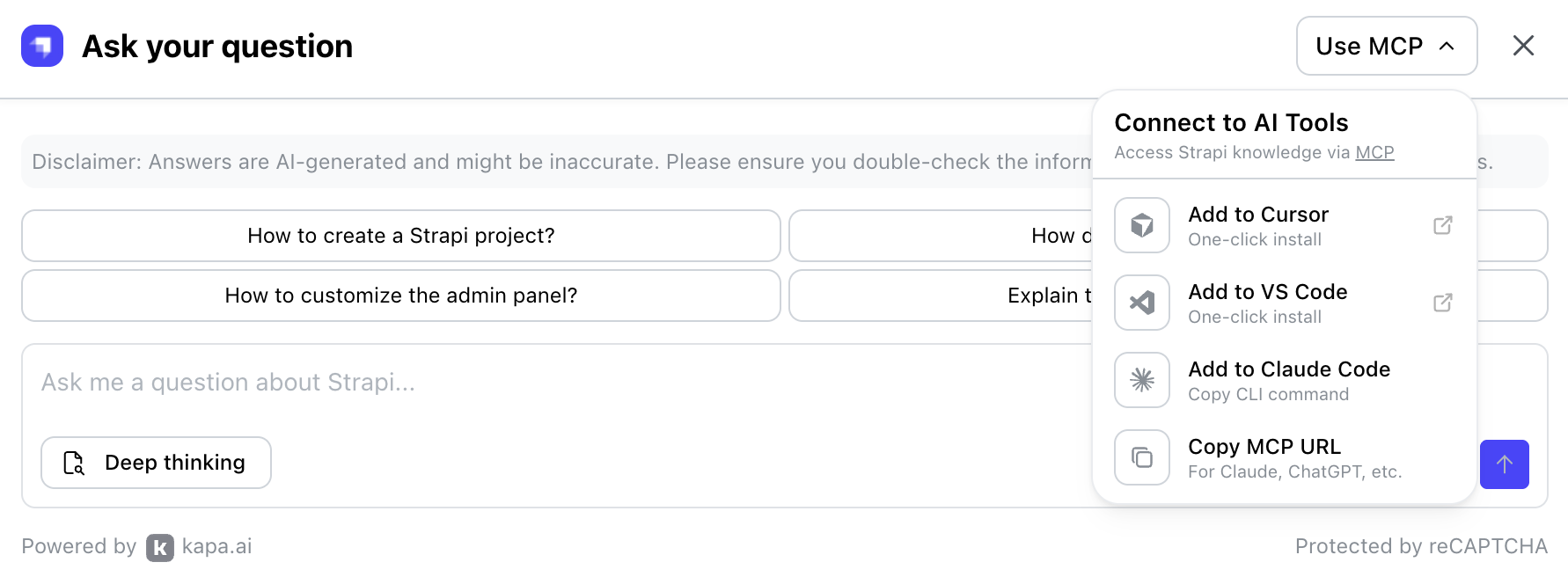
打开 Ask AI 窗口时,你应该会在右上角看到一个 使用 MCP 下拉菜单。点击它并选择你想要连接的工具:
🌐 When opening the Ask AI window, you should see a Use MCP dropdown in the top right corner. Click on it and choose which tool you'd like to connect:
如果需要手动配置 MCP 服务器:
🌐 If manual MCP server configuration is required:
-
从下拉菜单中点击 复制 MCP URL。服务器 URL 应该是:
https://strapi-docs.mcp.kapa.ai -
将服务器添加到你的 IDE 的 MCP 配置文件中:
- Cursor
- VS Code
- Windsurf
添加到你的
.cursor/mcp.json文件中:.cursor/mcp.json{
"mcpServers": {
"strapi-docs": {
"url": "https://strapi-docs.mcp.kapa.ai"
}
}
}添加到你的
.vscode/mcp.json文件中:.vscode/mcp.json{
"servers": {
"strapi-docs": {
"type": "http",
"url": "https://strapi-docs.mcp.kapa.ai"
}
}
}添加到你的
~/.codeium/windsurf/mcp_config.json文件中:~/.codeium/windsurf/mcp_config.json{
"mcpServers": {
"strapi-docs": {
"serverUrl": "https://strapi-docs.mcp.kapa.ai"
}
}
}
身份验证
🌐 Authentication
Docs MCP 服务器需要 OAuth。没有携带 bearer token 的请求,包括 MCP initialize 方法,会返回 HTTP 401。受 OAuth 保护的资源元数据发布在 https://strapi-docs.mcp.kapa.ai/.well-known/oauth-protected-resource。
🌐 The Docs MCP server requires OAuth. A request without a bearer token, including the MCP initialize method, returns HTTP 401. OAuth protected-resource metadata is published at https://strapi-docs.mcp.kapa.ai/.well-known/oauth-protected-resource.
该元数据将授权服务器命名为 https://mcp.kapa.ai/auth/public,将作用域命名为 openid,并在 Authorization 头中使用承载令牌。
🌐 That metadata names the authorization server https://mcp.kapa.ai/auth/public, the openid scope, and bearer tokens in the Authorization header.
一旦连接,你的 AI 编码助手可以直接查询 Strapi 文档来回答问题、提供实现建议并验证 API 的使用。
🌐 Once connected, your AI coding assistant can query the Strapi documentation directly to answer questions, suggest implementations, and verify API usage.
对于与文档相关的问题,请在提示开头使用 Use the strapi-docs MCP server to answer:。这将确保工具查询 docs.strapi.io,而不是基于其可能已过时的训练数据返回答案。
🌐 For docs-related questions, start your prompts with Use the strapi-docs MCP server to answer:. This will ensure the tool queries docs.strapi.io instead of returning answers based on its training data, which can be outdated.
获取更好效果的小窍门
🌐 Tips for better results
以下提示将帮助你优化提示以获得最佳结果:
🌐 The following tips will help you fine-tune your prompts to get the best results:
- 在你的 IDE 中使用 Docs MCP 服务器 以获得最快的开发者体验。对于与文档相关的问题,在提示前加上
Use the strapi-docs MCP server to answer:,这样工具会查询 docs.strapi.io,而不是使用可能过时的训练数据。 - 包含页面网址,以便助手在正确的上下文中提供答案。
- 提到你的 Strapi 版本(例如,Strapi 5)以避免过时的建议。
- 在分享
llms-code.txt的代码片段时,将代码示例与其来源页面配对。 - 在请求代码生成时,优先使用有文档的 API 而不是私有内部接口。