GraphQL 插件
🌐 GraphQL plugin
Page summary:
GraphQL 插件添加了一个 GraphQL 端点和基于 Apollo 的沙箱,用于创建查询和变更。配置/plugins 中的选项可以让你调整深度、项目限制以及其他 Apollo Server 设置,这些内容在本指南中有详细说明。
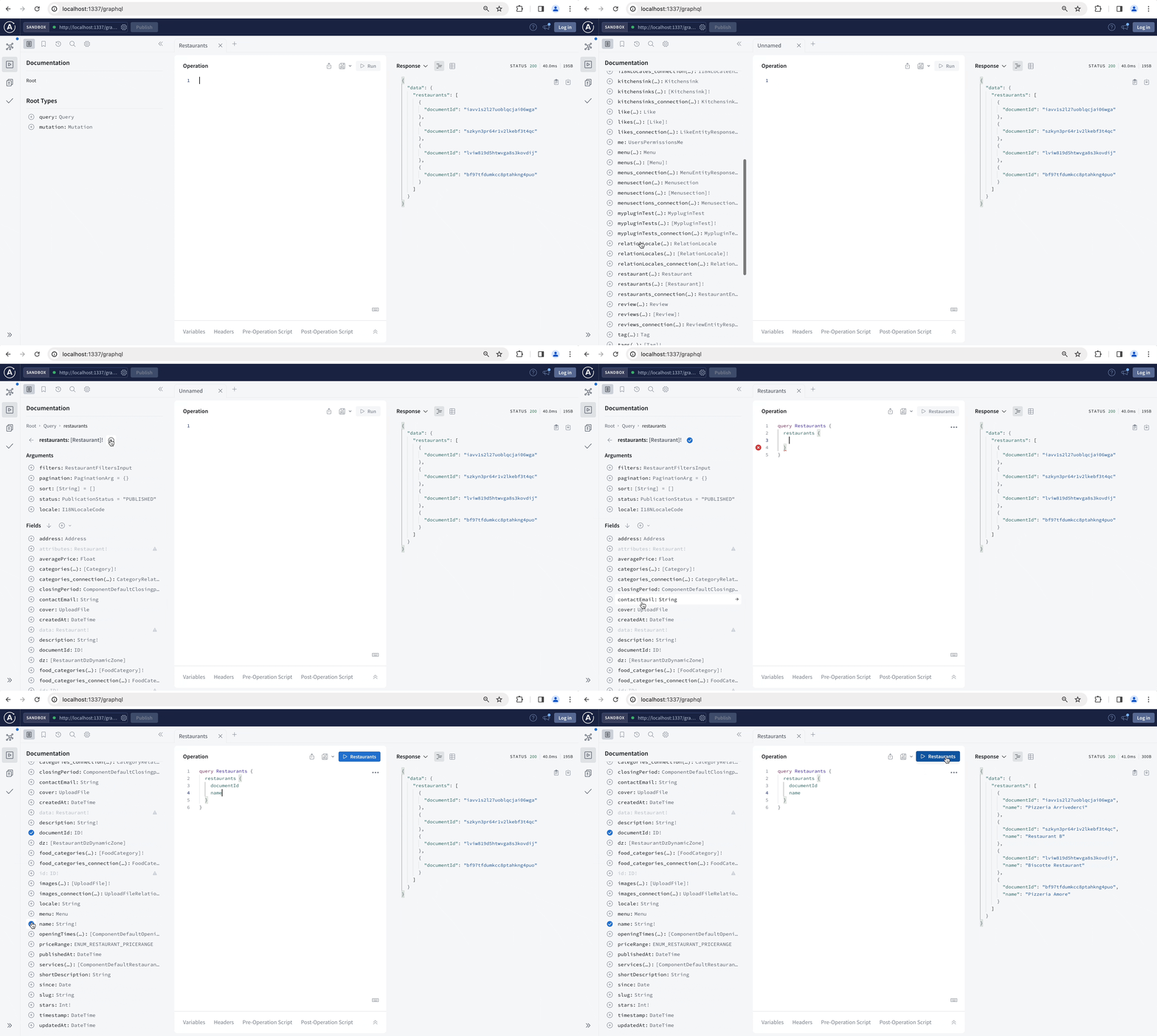
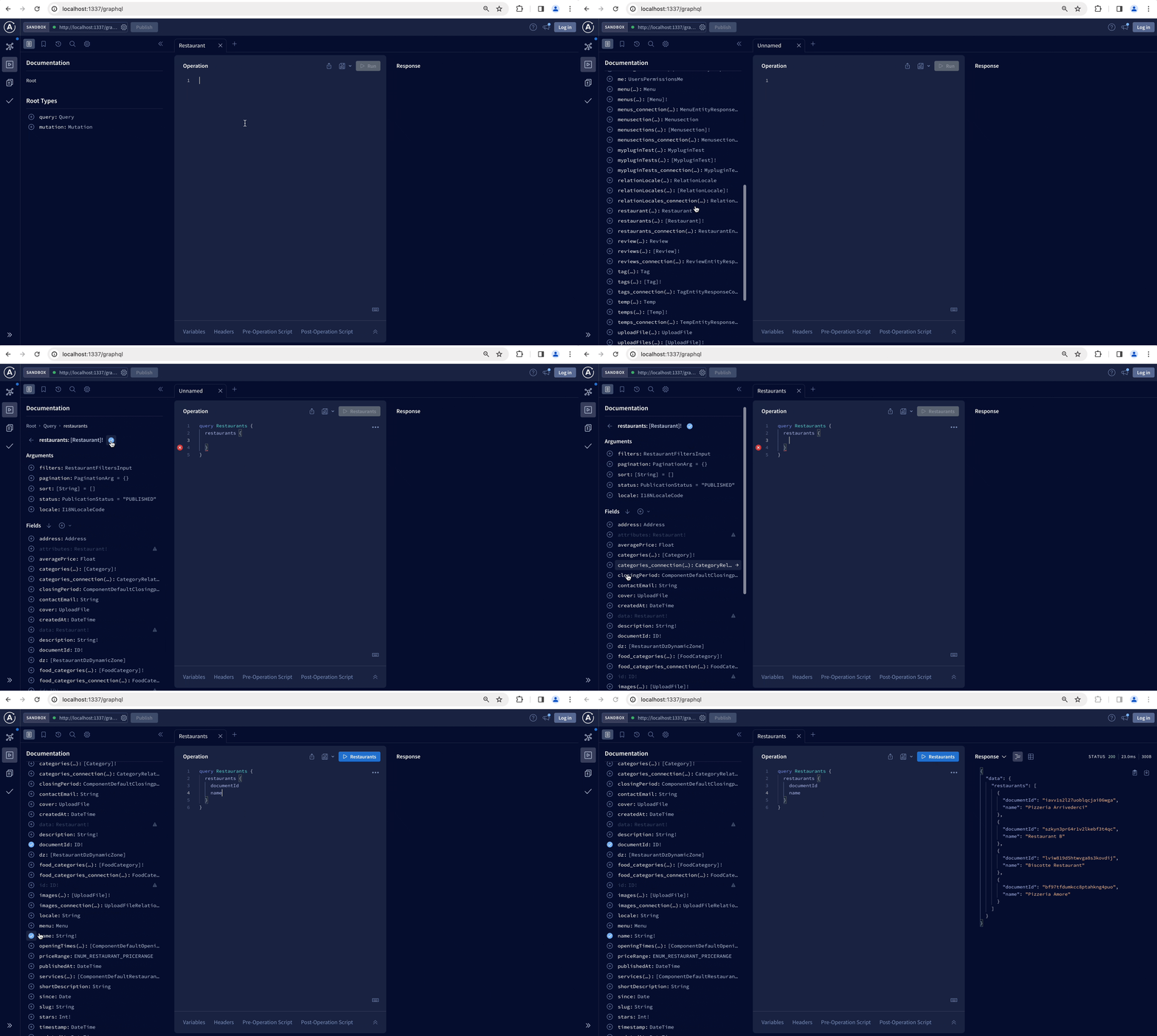
默认情况下,Strapi 会为你的每个内容类型创建 REST 端点。GraphQL 插件会添加一个 GraphQL 端点,以获取和修改你的内容。安装 GraphQL 插件后,你可以使用基于 Apollo Server 的 GraphQL 沙箱交互式地构建查询和变更,并查看针对你的内容类型定制的文档。
🌐 By default Strapi create REST endpoints for each of your content-types. The GraphQL plugin adds a GraphQL endpoint to fetch and mutate your content. With the GraphQL plugin installed, you can use the Apollo Server-based GraphQL Sandbox to interactively build your queries and mutations and read documentation tailored to your content types.
安装
🌐 Installation
要安装 GraphQL 插件,请在终端中运行以下命令:
🌐 To install the GraphQL plugin, run the following command in your terminal:
- Yarn
- NPM
yarn add @strapi/plugin-graphql
npm install @strapi/plugin-graphql
安装完成后,GraphQL 沙箱可以通过 /graphql URL 访问,并可用于交互式地构建你的查询和变更操作,以及阅读针对你的内容类型定制的文档。
🌐 Once installed, the GraphQL sandbox is accessible at the /graphql URL and can be used to interactively build your queries and mutations and read documentation tailored to your content-types.
一旦插件安装完成,当你的 Strapi 应用服务器运行时,GraphQL Sandbox 可以通过 /graphql 路由访问(例如, localhost:1337/graphql)。
配置
🌐 Configuration
文档插件的大多数配置选项都通过你的 Strapi 项目的代码处理,尽管 GraphQL 在线运行也提供了一些非特定的 Strapi 设置。
🌐 Most configuration options for the Documentation plugin are handled via your Strapi project's code, though the GraphQL playground also offers some non-specific Strapi settings.
管理面板设置
🌐 Admin panel settings
Strapi 管理面板不提供针对 GraphQL 插件的 Strapi 特定设置。然而,可在 /graphql 路由访问的 GraphQL Playground 是一个嵌入的 Apollo Server Playground,因此它包含该实例可用的所有配置和设置。详情请参阅官方 GraphQL playground documentation 。
基于代码的配置
🌐 Code-based configuration
插件配置在 config/plugins.js 文件 中定义。该配置文件可以包含一个 graphql.config 对象,以定义 GraphQL 插件的特定配置。
🌐 Plugins configuration are defined in the config/plugins.js file. This configuration file can include a graphql.config object to define specific configurations for the GraphQL plugin.
可用选项
🌐 Available options
Apollo Server 选项可以通过 graphql.config.apolloServer 配置对象直接传递给 Apollo。Apollo Server 选项可用于例如启用 tracing feature,GraphQL Sandbox 支持该功能以跟踪查询每个部分的响应时间。Apollo Server 默认缓存选项是 cache: 'bounded'。你可以在 apolloServer 配置中更改它。更多信息请访问 Apollo Server Docs。
GraphQL 插件具有以下特定配置选项,应在 config/plugins 文件中的 graphql.config 对象内声明。所有参数都是可选的:
🌐 The GraphQL plugin has the following specific configuration options that should be declared in a graphql.config object within the config/plugins file. All parameters are optional:
| 选项 | 类型 | 描述 | 默认值 | 备注 |
|---|---|---|---|---|
endpoint | 字符串 | 设置 GraphQL 端点路径。 | '/graphql' | 示例:/custom-graphql |
shadowCRUD | 布尔值 | 启用或禁用内容类型的自动模式生成功能。 | true | |
depthLimit | 数字 | 限制 GraphQL 查询的深度以防止过度嵌套。 | 10 | 使用此选项以减轻潜在的拒绝服务(DoS)攻击。 |
amountLimit | 数字 | 限制单次响应返回的最大条目数。 | 100 | 谨慎使用以避免性能问题。 |
playgroundAlways | 布尔值 | [已弃用] 在所有环境中启用 GraphQL Playground(已弃用)。 | false | 建议改用 landingPage。 |
| “landingPage” | 布尔 |功能 | 启用或禁用 GraphQL 的着陆页面。接受布尔值、返回布尔值的函数,或实现“renderLandingPage”的 ApolloServerPlugin。 | 生产环境中的“false”,其他环境中的“true” | |
apolloServer | 对象 | 将配置选项直接传递给 Apollo Server。 | {} | 示例: { tracing: true } |
响应返回的最大项目数量默认限制为100。可以使用 amountLimit 配置选项更改此值,但应在仔细考虑后再进行更改:大量查询可能导致DDoS(分布式拒绝服务)攻击,并可能对你的Strapi服务器以及数据库服务器造成异常负载。
🌐 The maximum number of items returned by the response is limited to 100 by default. This value can be changed using the amountLimit configuration option, but should only be changed after careful consideration: a large query can cause a DDoS (Distributed Denial of Service) and may cause abnormal load on your Strapi server, as well as your database server.
GraphQL 沙盒在所有环境中默认启用,但生产环境除外。将 landingPage 配置选项设置为 true,即可在生产环境中也启用 GraphQL 沙盒。
🌐 The GraphQL Sandbox is enabled by default in all environments except production. Set the landingPage configuration option to true to also enable the GraphQL Sandbox in production environments.
以下是自定义配置示例:
🌐 The following is an example custom configuration:
- JavaScript
- TypeScript
module.exports = {
  graphql: {
    config: {
      endpoint: '/graphql',
      shadowCRUD: true,
      landingPage: false, // disable Sandbox everywhere
      depthLimit: 7,
      amountLimit: 100,
      apolloServer: {
        tracing: false,
      },
    },
  },
};
export default () => ({
  graphql: {
    config: {
      endpoint: '/graphql',
      shadowCRUD: true,
      landingPage: false, // disable Sandbox everywhere
      depthLimit: 7,
      amountLimit: 100,
      apolloServer: {
        tracing: false,
      },
    },
  },
})
动态启用 Apollo Sandbox
🌐 Dynamically enable Apollo Sandbox
你可以使用一个函数根据环境动态启用 Apollo Sandbox:
🌐 You can use a function to dynamically enable Apollo Sandbox depending on the environment:
- JavaScript
- TypeScript
module.exports = ({ env }) => {
  graphql: {
    config: {
      endpoint: '/graphql',
      shadowCRUD: true,
      landingPage: (strapi) => {
        if (env("NODE_ENV") !== "production") {
          return true;
        } else {
          return false;
        }
      },
    },
  },
};
export default ({ env }) => {
  graphql: {
    config: {
      endpoint: '/graphql',
      shadowCRUD: true,
      landingPage: (strapi) => {
        if (env("NODE_ENV") !== "production") {
          return true;
        } else {
          return false;
        }
      },
    },
  },
};
登录页面的 CORS 异常
🌐 CORS exceptions for Landing Page
如果在生产环境中启用了登录页面(不推荐),则必须手动添加 Apollo Server 登录页面的 CORS 标头。
🌐 If the landing page is enabled in production environments (which is not recommended), CORS headers for the Apollo Server landing page must be added manually.
要全局添加它们,你可以将以下内容合并到中间件配置中:
🌐 To add them globally, you can merge the following into your middleware configuration:
{
  name: "strapi::security",
  config: {
    contentSecurityPolicy: {
      useDefaults: true,
      directives: {
        "connect-src": ["'self'", "https:", "apollo-server-landing-page.cdn.apollographql.com"],
        "img-src": ["'self'", "data:", "blob:", "apollo-server-landing-page.cdn.apollographql.com"],
        "script-src": ["'self'", "'unsafe-inline'", "apollo-server-landing-page.cdn.apollographql.com"],
        "style-src": ["'self'", "'unsafe-inline'", "apollo-server-landing-page.cdn.apollographql.com"],
        "frame-src": ["sandbox.embed.apollographql.com"]
      }
    }
  }
}
要仅为 /graphql 路径添加这些例外(推荐),你可以创建一个新的中间件来处理它。例如:
🌐 To add these exceptions only for the /graphql path (recommended), you can create a new middleware to handle it. For example:
- JavaScript
- TypeScript
module.exports = (config, { strapi }) => {
  return async (ctx, next) => {
    if (ctx.request.path === '/graphql') {
      ctx.set('Content-Security-Policy', "default-src 'self'; script-src 'self' 'unsafe-inline' cdn.jsdelivr.net apollo-server-landing-page.cdn.apollographql.com; connect-src 'self' https:; img-src 'self' data: blob: apollo-server-landing-page.cdn.apollographql.com; media-src 'self' data: blob: apollo-server-landing-page.cdn.apollographql.com; frame-src sandbox.embed.apollographql.com; manifest-src apollo-server-landing-page.cdn.apollographql.com;");
    }
    await next();
  };
};
export default (config, { strapi }) => {
  return async (ctx, next) => {
    if (ctx.request.path === '/graphql') {
      ctx.set('Content-Security-Policy', "default-src 'self'; script-src 'self' 'unsafe-inline' cdn.jsdelivr.net apollo-server-landing-page.cdn.apollographql.com; connect-src 'self' https:; img-src 'self' data: blob: apollo-server-landing-page.cdn.apollographql.com; media-src 'self' data: blob: apollo-server-landing-page.cdn.apollographql.com; frame-src sandbox.embed.apollographql.com; manifest-src apollo-server-landing-page.cdn.apollographql.com;");
    }
    await next();
  };
};
影子 CRUD
🌐 Shadow CRUD
为了简化和自动化 GraphQL 架构的构建,我们引入了 Shadow CRUD 功能。它会根据你的模型自动生成类型定义、查询、变更和解析器。
🌐 To simplify and automate the build of the GraphQL schema, we introduced the Shadow CRUD feature. It automatically generates the type definitions, queries, mutations and resolvers based on your models.
示例:
如果你使用 交互式 strapi generate CLI 或管理面板生成了一个名为 Document 的 API,你的模型看起来像这样:
🌐 If you've generated an API called Document using the interactive strapi generate CLI or the administration panel, your model looks like this:
{
  "kind": "collectionType",
  "collectionName": "documents",
  "info": {
    "singularName": "document",
    "pluralName": "documents",
    "displayName": "document",
    "name": "document"
  },
  "options": {
    "draftAndPublish": true
  },
  "pluginOptions": {},
  "attributes": {
    "name": {
      "type": "string"
    },
    "description": {
      "type": "richtext"
    },
    "locked": {
      "type": "boolean"
    }
  }
}
生成的 GraphQL 类型和查询
# Document's Type definition
input DocumentFiltersInput {
  name: StringFilterInput
  description: StringFilterInput
  locked: BooleanFilterInput
  createdAt: DateTimeFilterInput
  updatedAt: DateTimeFilterInput
  publishedAt: DateTimeFilterInput
  and: [DocumentFiltersInput]
  or: [DocumentFiltersInput]
  not: DocumentFiltersInput
}

input DocumentInput {
  name: String
  description: String
  locked: Boolean
  createdAt: DateTime
  updatedAt: DateTime
  publishedAt: DateTime
}

type Document {
  name: String
  description: String
  locked: Boolean
  createdAt: DateTime
  updatedAt: DateTime
  publishedAt: DateTime
}

type DocumentEntity {
  id: ID
  attributes: Document
}

type DocumentEntityResponse {
  data: DocumentEntity
}

type DocumentEntityResponseCollection {
  data: [DocumentEntity!]!
  meta: ResponseCollectionMeta!
}

type DocumentRelationResponseCollection {
  data: [DocumentEntity!]!
}

# Queries to retrieve one or multiple restaurants.
type Query  {
  document(id: ID): DocumentEntityResponse
  documents(
    filters: DocumentFiltersInput
    pagination: PaginationArg = {}
    sort: [String] = []
    publicationState: PublicationState = LIVE
):DocumentEntityResponseCollection
}

# Mutations to create, update or delete a restaurant.
type Mutation {
  createDocument(data: DocumentInput!): DocumentEntityResponse
  updateDocument(id: ID!, data: DocumentInput!): DocumentEntityResponse
  deleteDocument(id: ID!): DocumentEntityResponse
}
自定义
🌐 Customization
Strapi 提供了一个编程 API 来自定义 GraphQL,它允许:
🌐 Strapi provides a programmatic API to customize GraphQL, which allows:
- 为 Shadow CRUD 禁用某些操作
- 使用 getter 来返回关于允许操作的信息
- 注册和使用一个
extension对象来扩展现有的模式(例如扩展类型或定义自定义解析器、策略和中间件)
GraphQL 自定义示例
- JavaScript
- TypeScript
module.exports = {
  /**
   * An asynchronous register function that runs before
   * your application is initialized.
   *
   * This gives you an opportunity to extend code.
   */
  register({ strapi }) {
    const extensionService = strapi.plugin('graphql').service('extension');

    extensionService.shadowCRUD('api::restaurant.restaurant').disable();
    extensionService.shadowCRUD('api::category.category').disableQueries();
    extensionService.shadowCRUD('api::address.address').disableMutations();
    extensionService.shadowCRUD('api::document.document').field('locked').disable();
    extensionService.shadowCRUD('api::like.like').disableActions(['create', 'update', 'delete']);

    const extension = ({ nexus }) => ({
      // Nexus
      types: [
        nexus.objectType({
          name: 'Book',
          definition(t) {
            t.string('title');
          },
        }),
      ],
      plugins: [
        nexus.plugin({
          name: 'MyPlugin',
          onAfterBuild(schema) {
            console.log(schema);
          },
        }),
      ],
      // GraphQL SDL
      typeDefs: `
          type Article {
              name: String
          }
      `,
      resolvers: {
        Query: {
          address: {
            resolve() {
              return { value: { city: 'Montpellier' } };
            },
          },
        },
      },
      resolversConfig: {
        'Query.address': {
          auth: false,
        },
      },
    });
    extensionService.use(extension);
  },
};
export default {
  /**
   * An asynchronous register function that runs before
   * your application is initialized.
   *
   * This gives you an opportunity to extend code.
   */
  register({ strapi }) {
    const extensionService = strapi.plugin('graphql').service('extension');

    extensionService.shadowCRUD('api::restaurant.restaurant').disable();
    extensionService.shadowCRUD('api::category.category').disableQueries();
    extensionService.shadowCRUD('api::address.address').disableMutations();
    extensionService.shadowCRUD('api::document.document').field('locked').disable();
    extensionService.shadowCRUD('api::like.like').disableActions(['create', 'update', 'delete']);

    const extension = ({ nexus }) => ({
      // Nexus
      types: [
        nexus.objectType({
          name: 'Book',
          definition(t) {
            t.string('title');
          },
        }),
      ],
      plugins: [
        nexus.plugin({
          name: 'MyPlugin',
          onAfterBuild(schema) {
            console.log(schema);
          },
        }),
      ],
      // GraphQL SDL
      typeDefs: `
          type Article {
              name: String
          }
      `,
      resolvers: {
        Query: {
          address: {
            resolve() {
              return { value: { city: 'Montpellier' } };
            },
          },
        },
      },
      resolversConfig: {
        'Query.address': {
          auth: false,
        },
      },
    });
    extensionService.use(extension);
  },
};
在 Shadow CRUD 中禁用操作
🌐 Disabling operations in the Shadow CRUD
extension 服务与 GraphQL 插件一起提供,公开的功能可以用于禁用内容类型的操作:
🌐 The extension service provided with the GraphQL plugin exposes functions that can be used to disable operations on Content-Types:
| 内容类型功能 | 描述 | 参数类型 | 可能的参数值 || --- | --- | --- | --- || disable() | 完全禁用内容类型 | - | - || disableQueries() | 仅禁用内容类型的查询 | - | - || disableMutations() | 仅禁用内容类型的变更 | - | - || disableAction() | 禁用内容类型的特定操作 | 字符串 | 列表中的一个值:
createfindfindOneupdatedelete
disableActions() | 禁用内容类型的特定操作 | 字符串数组 | 列表中的多个值: createfindfindOneupdatedelete
还可以在字段级别禁用操作,具有以下功能:
🌐 Actions can also be disabled at the field level, with the following functions:
| 字段功能 | 描述 || --- | --- || disable() | 完全禁用该字段 || disableOutput() | 禁用字段的输出 || disableInput() | 禁用字段的输入 || disableFilters() | 禁用字段的过滤输入 |
示例:
// Disable the 'find' operation on the 'restaurant' content-type in the 'restaurant' API
strapi
  .plugin('graphql')
  .service('extension')
  .shadowCRUD('api::restaurant.restaurant')
  .disableAction('find')

// Disable the 'name' field on the 'document' content-type in the 'document' API
strapi
  .plugin('graphql')
  .service('extension')
  .shadowCRUD('api::document.document')
  .field('name')
  .disable()
使用 getter 方法
🌐 Using getters
以下 getter 可用于检索有关内容类型上允许的操作的信息:
🌐 The following getters can be used to retrieve information about operations allowed on content-types:
| 内容类型获取器 | 描述 | 参数类型 | 可能的参数值 |
|---|---|---|---|
isEnabled() | 返回内容类型是否已启用 | - | - |
isDisabled() | 返回内容类型是否被禁用 | - | - |
areQueriesEnabled() | 返回内容类型上查询是否已启用 | - | - |
areQueriesDisabled() | 返回内容类型上的查询是否被禁用 | - | - |
areMutationsEnabled() | 返回内容类型上是否启用了变更 | - | - |
areMutationsDisabled() | 返回内容类型上的变更是否被禁用 | - | - |
isActionEnabled(action) | 返回指定 action 是否在内容类型上启用 | 字符串 | 列表中的一个值:
|
isActionDisabled(action) | 返回指定 action 在内容类型中是否被禁用 | 字符串 | 列表中的一个值:
|
以下 getter 可用于检索有关字段上允许的操作的信息:
🌐 The following getters can be used to retrieve information about operations allowed on fields:
| 字段获取器 | 描述 || --- | --- || isEnabled() | 返回字段是否启用 || isDisabled() | 返回字段是否禁用 || hasInputEnabled() | 返回字段是否启用输入 || hasOutputEnabled() | 返回字段是否启用输出 || hasFiltersEnabled() | 返回字段是否启用过滤 |
扩展模式
🌐 Extending the schema
可以通过注册扩展来扩展 Content API 生成的架构。
🌐 The schema generated by the Content API can be extended by registering an extension.
此扩展,可以定义为对象或返回对象的函数,将由由 GraphQL 插件提供的 extension 服务 暴露的 use() 函数使用。
🌐 This extension, defined either as an object or a function returning an object, will be used by the use() function exposed by the extension service provided with the GraphQL plugin.
描述扩展的对象接受以下参数:
🌐 The object describing the extension accepts the following parameters:
| 参数 | 类型 | 描述 || --- | --- | --- || types | 数组 | 允许使用基于 Nexus的类型定义扩展模式类型 || typeDefs | 字符串 | 允许使用 GraphQL SDL 扩展模式类型 || plugins | 数组 | 允许使用 Nexus plugins 扩展模式 || resolvers | 对象 | 定义自定义解析器 || resolversConfig | 对象 | 定义解析器的配置选项,例如授权、策略和中间件 |
types 和 plugins 参数基于 Nexus。要使用它们,请将扩展注册为一个以 nexus 作为参数的函数:
示例:
- JavaScript
- TypeScript
module.exports = {
  register({ strapi }) {
    const extension = ({ nexus }) => ({
      types: [
        nexus.objectType({
          …
        }),
      ],
      plugins: [
        nexus.plugin({
          …
        })
      ]
    })

    strapi.plugin('graphql').service('extension').use(extension)
  }
}
export default {
  register({ strapi }) {
    const extension = ({ nexus }) => ({
      types: [
        nexus.objectType({
          …
        }),
      ],
      plugins: [
        nexus.plugin({
          …
        })
      ]
    })

    strapi.plugin('graphql').service('extension').use(extension)
  }
}
解析器的自定义配置
🌐 Custom configuration for resolvers
解析器是 GraphQL 查询或变更处理器(即一个函数,或一组函数,用于为 GraphQL 查询或变更生成响应)。每个字段都有一个默认解析器。
🌐 A resolver is a GraphQL query or mutation handler (i.e. a function, or a collection of functions, that generate(s) a response for a GraphQL query or mutation). Each field has a default resolver.
当扩展 GraphQL 架构时,resolversConfig 键可以用来为解析器定义自定义配置,其中可以包括:
🌐 When extending the GraphQL schema, the resolversConfig key can be used to define a custom configuration for a resolver, which can include:
- 授权配置 使用
auth密钥 - 带有
policies键的策略 - 以及带有
middlewares键的 中间件
高级查询 指南可能包含适用于你的使用场景的其他信息,包括多级查询和自定义解析器示例。
🌐 The advanced queries guide might contain additional information suitable for your use case, including multi-level queries and custom resolvers examples.
授权配置
🌐 Authorization configuration
默认情况下,GraphQL 请求的授权由已注册的授权策略处理,该策略可以是 API 令牌 或通过 用户与权限插件。用户与权限插件提供了更细粒度的控制。
🌐 By default, the authorization of a GraphQL request is handled by the registered authorization strategy that can be either API token or through the Users & Permissions plugin. The Users & Permissions plugin offers a more granular control.
使用“用户与权限”插件进行授权
使用用户和权限插件,如果授予适当的权限,则允许 GraphQL 请求。
🌐 With the Users & Permissions plugin, a GraphQL request is allowed if the appropriate permissions are given.
例如,如果存在“类别”内容类型,并且通过 GraphQL 使用 Query.categories 处理器进行查询,则如果为“类别”内容类型授予了相应的 find 权限,请求将被允许。
🌐 For instance, if a 'Category' content-type exists and is queried through GraphQL with the Query.categories handler, the request is allowed if the appropriate find permission for the 'Categories' content-type is given.
要查询单个类别,可以使用 Query.category 处理程序,如果授予了 findOne 权限,则允许该请求。
🌐 To query a single category, which is done with the Query.category handler, the request is allowed if the the findOne permission is given.
请参阅用户指南,了解如何使用 Users & Permissions 插件定义权限。
要更改授权的配置,请使用在 resolversConfig.[MyResolverName] 定义的解析器配置。授权可以配置为:
🌐 To change how the authorization is configured, use the resolver configuration defined at resolversConfig.[MyResolverName]. The authorization can be configured:
- 或者使用
auth: false完全绕过授权系统并允许所有请求, - 或者使用一个接受字符串数组的
scope属性来定义授权请求所需的权限。
授权配置示例
- JavaScript
- TypeScript
module.exports = {
  register({ strapi }) {
    const extensionService = strapi.plugin('graphql').service('extension');

    extensionService.use({
      resolversConfig: {
        'Query.categories': {
          /**
           * Querying the Categories content-type
           * bypasses the authorization system.
           */
          auth: false
        },
        'Query.restaurants': {
          /**
           * Querying the Restaurants content-type
           * requires the find permission
           * on the 'Address' content-type
           * of the 'Address' API
           */
          auth: {
            scope: ['api::address.address.find']
          }
        },
      }
    })
  }
}
export default {
  register({ strapi }) {
    const extensionService = strapi.plugin('graphql').service('extension');

    extensionService.use({
      resolversConfig: {
        'Query.categories': {
          /**
           * Querying the Categories content-type
           * bypasses the authorization system.
           */
          auth: false
        },
        'Query.restaurants': {
          /**
           * Querying the Restaurants content-type
           * requires the find permission
           * on the 'Address' content-type
           * of the 'Address' API
           */
          auth: {
            scope: ['api::address.address.find']
          }
        },
      }
    })
  }
}
政策
🌐 Policies
策略 可以通过 resolversConfig.[MyResolverName].policies 键应用于 GraphQL 解析器。
policies 键是一个数组,接受策略列表,该列表中的每一项要么是对已注册策略的引用,要么是直接传入的实现(参见 策略配置文档)。
🌐 The policies key is an array accepting a list of policies, each item in this list being either a reference to an already registered policy or an implementation that is passed directly (see policies configuration documentation).
在 resolversConfig 中直接实现的策略是函数,它们以 context 对象和 strapi 实例作为参数。
context 对象提供访问权限:
🌐 Policies directly implemented in resolversConfig are functions that take a context object and the strapi instance as arguments.
The context object gives access to:
应用于解析器的 GraphQL 策略示例
- JavaScript
- TypeScript
module.exports = {
  register({ strapi }) {
    const extensionService = strapi.plugin('graphql').service('extension');

    extensionService.use({
      resolversConfig: {
        'Query.categories': {
          policies: [
            (context, { strapi }) => {
              console.log('hello', context.parent)
              /**
               * If 'categories' have a parent, the function returns true,
               * so the request won't be blocked by the policy.
               */
              return context.parent !== undefined;
            }
            /**
             * Uses a policy already created in Strapi.
             */
            "api::model.policy-name",

            /**
             * Uses a policy already created in Strapi with a custom configuration
             */
            {name:"api::model.policy-name", config: {/* all config values I want to pass to the strapi policy */} },
          ],
          auth: false,
        },
      }
    })
  }
}
export default {
  register({ strapi }) {
    const extensionService = strapi.plugin('graphql').service('extension');

    extensionService.use({
      resolversConfig: {
        'Query.categories': {
          policies: [
            (context, { strapi }) => {
              console.log('hello', context.parent)
              /**
               * If 'categories' have a parent, the function returns true,
               * so the request won't be blocked by the policy.
               */
              return context.parent !== undefined;
            }
            /**
             * Uses a policy already created in Strapi.
             */
            "api::model.policy-name",

            /**
             * Uses a policy already created in Strapi with a custom configuration
             */
            {name:"api::model.policy-name", config: {/* all the configuration values to pass to the strapi policy */} },
          ],
          auth: false,
        },
      }
    })
  }
}
高级策略 指南可能包含适合你使用场景的额外信息。
🌐 The advanced policies guide might contain additional information suitable for your use case.
中间件
🌐 Middlewares
中间件 可以通过 resolversConfig.[MyResolverName].middlewares 键应用到 GraphQL 解析器。GraphQL 和 REST 实现之间的唯一区别是 config 键变成了 options。
middlewares 键是一个数组,接受中间件列表,该列表中的每一项要么是对已注册中间件的引用,要么是直接传入的实现(参见 中间件配置文档)。
🌐 The middlewares key is an array accepting a list of middlewares, each item in this list being either a reference to an already registered middleware or an implementation that is passed directly (see middlewares configuration documentation).
直接在 resolversConfig 中实现的中间件可以将 GraphQL 解析器的 `parent`、`args`、`context` 和 `info` 对象 作为参数。
🌐 Middlewares directly implemented in resolversConfig can take the GraphQL resolver's `parent`, `args`, `context` and `info` objects as arguments.
使用 GraphQL 的中间件甚至可以作用于嵌套解析器,这提供了比 REST 更精细的控制。
🌐 Middlewares with GraphQL can even act on nested resolvers, which offer a more granular control than with REST.
应用于解析器的 GraphQL 中间件示例
- JavaScript
- TypeScript
module.exports = {
  register({ strapi }) {
    const extensionService = strapi.plugin('graphql').service('extension');

    extensionService.use({
      resolversConfig: {
        'Query.categories': {
          middlewares: [
            /**
             * Basic middleware example #1
             * Log resolving time in console
             */
            async (next, parent, args, context, info) => {
              console.time('Resolving categories');

              // call the next resolver
              const res = await next(parent, args, context, info);

              console.timeEnd('Resolving categories');

              return res;
            },
            /**
             * Basic middleware example #2
             * Enable server-side shared caching
             */
            async (next, parent, args, context, info) => {
              info.cacheControl.setCacheHint({ maxAge: 60, scope: "PUBLIC" });
              return next(parent, args, context, info);
            },
            /**
             * Basic middleware example #3
             * change the 'name' attribute of parent with id 1 to 'foobar'
             */
            (resolve, parent, ...rest) => {
              if (parent.id === 1) {
                return resolve({...parent, name: 'foobar' }, ...rest);
              }

              return resolve(parent, ...rest);
            }
            /**
             * Basic middleware example #4
             * Uses a middleware already created in Strapi.
             */
            "api::model.middleware-name",

            /**
             * Basic middleware example #5
             * Uses a middleware already created in Strapi with a custom configuration
             */
            { name: "api::model.middleware-name", options: { /* all config values I want to pass to the strapi middleware */ } },
          ],
          auth: false,
        },
      }
    })
  }
}
export default {
  register({ strapi }) {
    const extensionService = strapi.plugin('graphql').service('extension');

    extensionService.use({
      resolversConfig: {
        'Query.categories': {
          middlewares: [
            /**
             * Basic middleware example #1
             * Log resolving time in console
             */
            async (next, parent, args, context, info) => {
              console.time('Resolving categories');

              // call the next resolver
              const res = await next(parent, args, context, info);

              console.timeEnd('Resolving categories');

              return res;
            },
            /**
             * Basic middleware example #2
             * Enable server-side shared caching
             */
            async (next, parent, args, context, info) => {
              info.cacheControl.setCacheHint({ maxAge: 60, scope: "PUBLIC" });
              return next(parent, args, context, info);
            },
            /**
             * Basic middleware example #3
             * change the 'name' attribute of parent with id 1 to 'foobar'
             */
            (resolve, parent, ...rest) => {
              if (parent.id === 1) {
                return resolve({...parent, name: 'foobar' }, ...rest);
              }

              return resolve(parent, ...rest);
            }

            /**
             * Basic middleware example #4
             * Uses a middleware already created in Strapi.
             */
            "api::model.middleware-name",

            /**
             * Basic middleware example #5
             * Uses a middleware already created in Strapi with a custom configuration
             */
            {name:"api::model.middleware-name", options: {/* all the configuration values to pass to the middleware */} },
          ],
          auth: false,
        },
      }
    })
  }
}
安全
🌐 Security
GraphQL 是一种查询语言,允许用户使用比传统 REST API 更广泛的输入。GraphQL API 本质上容易受到安全风险的影响,例如凭证泄露和拒绝服务攻击,但通过采取适当的预防措施可以减少这些风险。
🌐 GraphQL is a query language allowing users to use a broader panel of inputs than traditional REST APIs. GraphQL APIs are inherently prone to security risks, such as credential leakage and denial of service attacks, that can be reduced by taking appropriate precautions.
在生产环境中禁用自我检查和沙箱
🌐 Disable introspection and Sandbox in production
在生产环境中,强烈建议禁用 GraphQL Sandbox 和 introspection 查询。如果你没有编辑配置文件,在生产环境中它默认已经被禁用。
🌐 In production environments, disabling the GraphQL Sandbox and the introspection query is strongly recommended. If you haven't edited the configuration file, it is already disabled in production by default.
限制最大深度和复杂性
🌐 Limit max depth and complexity
恶意用户可能会发送深度极高的查询,这可能会使你的服务器过载。使用 depthLimit 配置参数 来限制单个请求中可查询的嵌套字段的最大数量。默认情况下,depthLimit 设置为 10,但在测试和开发期间可以设置为更高的值。
🌐 A malicious user could send a query with a very high depth, which could overload your server. Use the depthLimit configuration parameter to limit the maximum number of nested fields that can be queried in a single request. By default, depthLimit is set to 10 but can be set to a higher value during testing and development.
为了进一步提高 GraphQL 的安全性,可以使用第三方工具。请参阅关于 using GraphQL Armor with Strapi on the forum的指南。
使用
🌐 Usage
GraphQL 插件添加了一个可访问的 GraphQL 终端,并提供了对 GraphQL Playground 的访问,可以在 Strapi 管理面板的 /graphql 路由处访问,用于交互式构建查询和变更操作,并阅读针对你的内容类型定制的文档。有关如何使用 GraphQL Playground 的详细说明,请参阅官方 Apollo Server documentation。
Strapi 使用 documentId 作为实体的唯一标识符,而不是 id。在将 Apollo Client 与 Strapi 的 GraphQL API 一起使用时,你需要配置 InMemoryCache 以使用 documentId 进行缓存规范化:
🌐 Strapi uses documentId as the unique identifier for entities instead of id. When using Apollo Client with Strapi's GraphQL API, you need to configure the InMemoryCache to use documentId for cache normalization:
import { ApolloClient, InMemoryCache, HttpLink } from '@apollo/client';

const client = new ApolloClient({
  link: new HttpLink({ uri: "http://localhost:1337/graphql" }),
  cache: new InMemoryCache({
    dataIdFromObject: (o) => `${o.__typename}:${o["documentId"]}`,
  }),
});
这确保 Apollo Client 能够根据 Strapi 的标识符结构正确缓存和更新你的 GraphQL 数据。
🌐 This ensures that Apollo Client correctly caches and updates your GraphQL data based on Strapi's identifier structure.
与用户与权限功能的使用
🌐 Usage with the Users & Permissions feature
用户与权限功能 允许通过完整的身份验证过程来保护 API。
🌐 The Users & Permissions feature allows protecting the API with a full authentication process.
注册
🌐 Registration
通常,你需要注册或注册才能被识别为用户,然后执行授权请求。
🌐 Usually you need to sign up or register before being recognized as a user then perform authorized requests.
mutation {
  register(input: { username: "username", email: "email", password: "password" }) {
    jwt
    user {
      username
      email
    }
  }
}
你应该在 Strapi 管理面板的 Users 集合类型中看到一个新用户已被创建。
🌐 You should see a new user is created in the Users collection type in your Strapi admin panel.
身份验证
🌐 Authentication
要执行授权请求,你必须首先获取 JWT:
🌐 To perform authorized requests, you must first get a JWT:
mutation {
  login(input: { identifier: "email", password: "password" }) {
    jwt
  }
}
然后在每个请求中,发送一个 Authorization 头,其形式为 { "Authorization": "Bearer YOUR_JWT_GOES_HERE" }。这可以在你的 GraphQL Sandbox 的 HTTP 头部分设置。
🌐 Then on each request, send along an Authorization header in the form of { "Authorization": "Bearer YOUR_JWT_GOES_HERE" }. This can be set in the HTTP Headers section of your GraphQL Sandbox.
使用 API 令牌
🌐 Usage with API tokens
要使用 API 令牌进行身份验证,请使用格式 Bearer your-api-token 在 Authorization 头中传递令牌。
🌐 To use API tokens for authentication, pass the token in the Authorization header using the format Bearer your-api-token.
在 GraphQL Sandbox 中使用 API 令牌需要在 HTTP HEADERS 选项卡中添加带有你的令牌的授权头:
🌐 Using API tokens in the the GraphQL Sandbox requires adding the authorization header with your token in the HTTP HEADERS tab:
{
  "Authorization" : "Bearer <TOKEN>"
}
用你在 Strapi 管理面板中生成的 API 令牌替换 <TOKEN>。
🌐 Replace <TOKEN> with your API token generated in the Strapi Admin panel.
GraphQL API
GraphQL 插件添加了一个可以通过 Strapi 的 GraphQL API 访问的 GraphQL 端点:
🌐 The GraphQL plugin adds a GraphQL endpoint that can accessed through Strapi's GraphQL API: