示例手册:自定义策略
🌐 Examples cookbook: Custom policies
Page summary:自定义策略通过允许或阻止请求来控制对内容类型端点的访问,并且可以使用
PolicyError抛出自定义错误,以实现更好的错误处理和前端集成。🌐 Custom policies control access to content-type endpoints by allowing or blocking requests, and can throw custom errors using
PolicyErrorfor better error handling and front-end integration.
这些示例是围绕 FoodAdvisor构建的,而 FoodAdvisor不再是Strapi的特色演示应用(它已被 LaunchPad取代)。这里重要的是理解所展示的后端机制,而不是FoodAdvisor本身。这些页面将被重新访问以使用LaunchPad。
此页面是后端自定义示例手册的一部分。请确保你已阅读其介绍。
🌐 This page is part of the back end customization examples cookbook. Please ensure you've read its introduction.
开箱即用, FoodAdvisor 不使用任何可以控制内容类型端点访问的自定义策略或路由中间件。
在 Strapi 中,可以使用策略或路由中间件来控制对内容类型端点的访问:
🌐 In Strapi, controlling access to a content-type endpoint can be done either with a policy or route middleware:
- 策略是只读的,允许请求传递或返回错误,
- 而路由中间件可以执行额外的逻辑。
在我们的示例中,我们使用一个策略。
🌐 In our example, let's use a policy.
创建自定义策略
🌐 Creating a custom policy
💭 上下文:
假设我们想要自定义 FoodAdvisor 的后台,以防止餐厅老板使用前端网站上之前创建的表单为他们的业务创建虚假评论。
🎯 目标:
- 为仅适用于“评论”集合类型的策略创建一个新文件夹。
- 创建新的策略文件。
- 当到达
/reviews端点时,使用文档服务 API 的findMany()方法获取餐厅所有者的信息。 - 如果经过身份验证的用户是餐厅的所有者,则返回错误,或者在其他情况下让请求通过。
🧑💻 代码示例:
在 FoodAdvisor 项目的/api文件夹中,创建一个新的src/api/review/policies/is-owner-review.js文件,并输入以下代码:
module.exports = async (policyContext, config, { strapi }) => {
  const { body } = policyContext.request;
  const { user } = policyContext.state;

  // Return an error if there is no authenticated user with the request
  if (!user) {
    return false;
  }
  /**
   * Queries the Restaurants collection type
   * using the Document Service API
   * to retrieve information about the restaurant's owner.
   */
  const [restaurant] = await strapi.documents('api::restaurant.restaurant').findMany({
    filters: {
      slug: body.restaurant,
    },
    populate: ['owner'],
  });
  if (!restaurant) {
    return false;
  }

  /**
   * If the user submitting the request is the restaurant's owner,
   * we don't allow the review creation.
   */
  if (user.id === restaurant.owner.id) {
    return false;
  }

  return true;
};
策略或路由中间件应在路由配置中声明,以实际控制访问。有关路由的更多信息,请参阅参考文档或在路由示例手册中查看示例。
🌐 Policies or route middlewares should be declared in the configuration of a route to actually control access. Read more about routes in the reference documentation or see an example in the routes cookbook.
通过策略发送自定义错误
🌐 Sending custom errors through policies
💭 上下文:
开箱即用时, FoodAdvisor 在策略拒绝访问某条路由时会发送默认错误。假设我们想自定义当之前创建的自定义策略不允许创建评论时发送的错误。
🎯 目标:
配置自定义策略以引发自定义错误而不是默认错误。
🌐 Configure the custom policy to throw a custom error instead of the default error.
🧑💻 代码示例:
在 FoodAdvisor 项目的 /api 文件夹中,按如下方式更新之前创建的 is-owner-review 自定义策略(高亮显示的行是唯一修改的行):
const { errors } = require('@strapi/utils');
const { PolicyError } = errors;

module.exports = async (policyContext, config, { strapi }) => {
  const { body } = policyContext.request;
  const { user } = policyContext.state;

  // Return an error if there is no authenticated user with the request
  if (!user) {
    return false;
  }
  /**
   * Queries the Restaurants collection type
   * using the Document Service API
   * to retrieve information about the restaurant's owner.
   */
  const filteredRestaurants = await strapi.documents('api::restaurant.restaurant').findMany({
    filters: {
      slug: body.restaurant,
    },
    populate: ['owner'],
  });

  const restaurant = filteredRestaurants[0];

  if (!restaurant) {
    return false;
  }

  /**
   * If the user submitting the request is the restaurant's owner,
   * we don't allow the review creation.
   */
  if (user.id === restaurant.owner.id) {
    /**
     * Throws a custom policy error
     * instead of just returning false
     * (which would result into a generic Policy Error).
     */
    throw new PolicyError('The owner of the restaurant cannot submit reviews', {
      errCode: 'RESTAURANT_OWNER_REVIEW', // can be useful for identifying different errors on the front end
    });
  }

  return true;
};
使用默认策略错误与自定义策略错误发送的响应:
- Default error response
- Custom error response
当策略拒绝访问路由并引发默认错误时,尝试通过 REST API 查询内容类型时将发送以下响应:
🌐 When a policy refuses access to a route and a default error is thrown, the following response will be sent when trying to query the content-type through the REST API:
{
  "data": null,
  "error": {
      "status": 403,
      "name": "PolicyError",
      "message": "Policy Failed",
      "details": {}
  }
}
当策略拒绝访问路由并且自定义策略抛出上面代码示例中定义的自定义错误时,尝试通过 REST API 查询内容类型时将发送以下响应:
🌐 When a policy refuses access to a route and the custom policy throws the custom error defined in the code example above, the following response will be sent when trying to query the content-type through the REST API:
{
  "data": null,
  "error": {
    "status": 403,
    "name": "PolicyError",
    "message": "The owner of the restaurant cannot submit reviews",
    "details": {
        "policy": "is-owner-review",
        "errCode": "RESTAURANT_OWNER_REVIEW"
    }
  }
}
在前端使用自定义错误
🌐 Using custom errors on the front end
💭 上下文:
开箱即用时,随 FoodAdvisor 提供的由 Next.js 驱动的前端网站在访问内容时不会在前端网站上显示错误或成功消息。例如,当使用之前创建的表单添加新评论不可行时,网站不会通知用户。
假设我们想要自定义 FoodAdvisor 的前端,以捕获由先前创建的自定义策略抛出的自定义错误,并使用 React Hot Toast notification将其显示给用户。作为额外功能,当评论成功创建时,还会显示另一个 toast 通知。
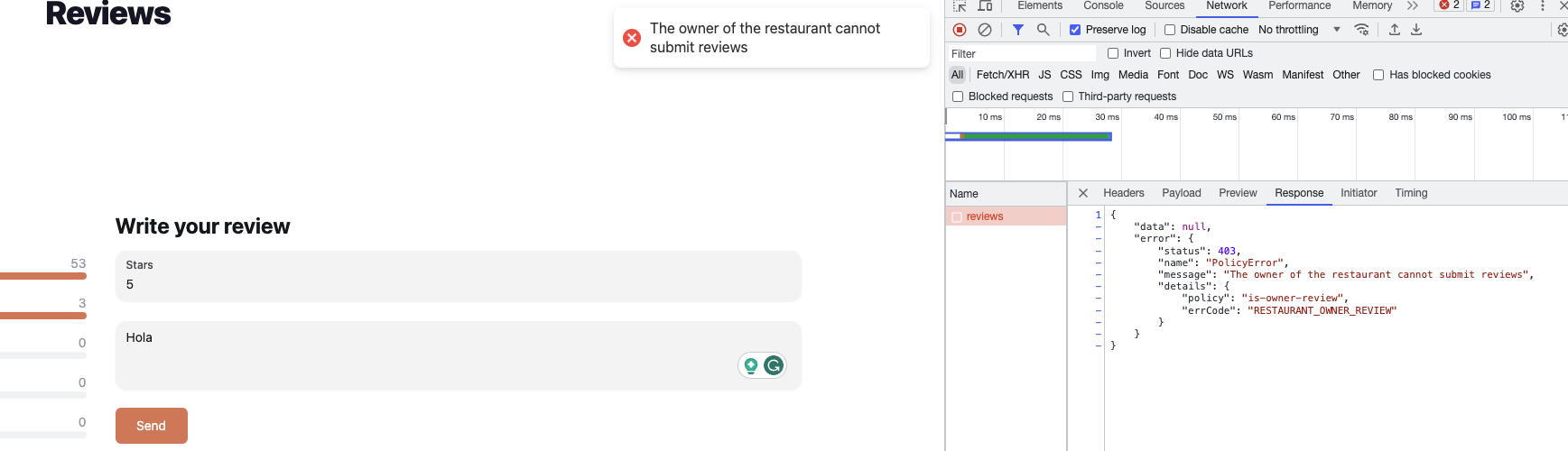
🎯 目标:
- 在前端网站上捕获错误并将其显示在通知中。
- 如果政策允许创建新评论,请发送另一条通知。
🧑💻 代码示例:
在 FoodAdvisor 项目的/client文件夹中,你可以按如下方式更新之前创建的new-review组件(修改的行已高亮):
用于显示自定义错误或成功创建评论的 toast 通知的示例前端代码:
import { Button, Input, Textarea } from '@nextui-org/react';
import { useFormik } from 'formik';
import { useRouter } from 'next/router';
import React from 'react';
import { getStrapiURL } from '../../../../../utils';
/**
 * A notification will be displayed on the front-end using React Hot Toast
 * (See https://github.com/timolins/react-hot-toast).
 * React Hot Toast should be added to your project's dependencies;
 * Use yarn or npm to install it and it will be added to your package.json file.
 */
import toast from 'react-hot-toast';

class UnauthorizedError extends Error {
  constructor(message) {
    super(message);
  }
}

const NewReview = () => {
  const router = useRouter();

  const { handleSubmit, handleChange, values } = useFormik({
    initialValues: {
      note: '',
      content: '',
    },
    onSubmit: async (values) => {
      /**
       * The previously added code is wrapped in a try/catch block.
       */
      try {
        const res = await fetch(getStrapiURL('/reviews'), {
          method: 'POST',
          body: JSON.stringify({
            restaurant: router.query.slug,
            ...values,
          }),
          headers: {
            Authorization: `Bearer ${localStorage.getItem('token')}`,
            'Content-Type': 'application/json',
          },
        });

        const { data, error } = await res.json();
        /**
         * If the Strapi backend server returns an error,
         * we use the custom error message to throw a custom error.
         * If the request is a success, we display a success message.
         * In both cases, a toast notification is displayed on the front-end.
         */
        if (error) {
          throw new UnauthorizedError(error.message);
        }
        toast.success('Review created!');
        return data;
      } catch (err) {
        toast.error(err.message);
        console.error(err);
      }
    },
  });
  return (
    <div className="my-6">
      <h1 className="font-bold text-2xl mb-3">Write your review</h1>
      <form onSubmit={handleSubmit} className="flex flex-col gap-y-4">
        <Input
          onChange={handleChange}
          name="note"
          type="number"
          min={1}
          max={5}
          label="Stars"
        />
        <Textarea
          name="content"
          onChange={handleChange}
          placeholder="What do you think about this restaurant?"
        />
        <Button
          type="submit"
          className="bg-primary text-white rounded-md self-start"
        >
          Send
        </Button>
      </form>
    </div>
  );
};

export default NewReview;
了解更多关于如何配置 自定义路由 以使用你的自定义策略,以及如何使用这些自定义路由来调整基于 Strapi 的应用的内容。
🌐 Learn more about how to configure custom routes to use your custom policies, and how these custom routes can be used to tweak a Strapi-based application.