示例手册:自定义全局中间件
🌐 Examples cookbook: Custom global middlewares
Page summary:自定义全局中间件在控制器执行之前拦截传入请求,使你能够添加诸如分析跟踪等逻辑。此示例创建了一个中间件,将餐厅页面访问记录到 Google 表格中。
🌐 Custom global middlewares intercept incoming requests before controller execution, enabling you to add logic like analytics tracking. This example creates a middleware that logs restaurant page visits to a Google Sheet.
这些示例是围绕 FoodAdvisor构建的,而 FoodAdvisor不再是Strapi的特色演示应用(它已被 LaunchPad取代)。这里重要的是理解所展示的后端机制,而不是FoodAdvisor本身。这些页面将被重新访问以使用LaunchPad。
此页面是后端自定义示例手册的一部分。请确保你已阅读其介绍。
🌐 This page is part of the back end customization examples cookbook. Please ensure you've read its introduction.
开箱即用, FoodAdvisor 不提供任何可以使用传入请求并在执行控制器代码之前执行一些额外逻辑的自定义中间件。
Strapi 中有两种类型的中间件:路由中间件 控制对某个路由的访问,而 全局中间件 的作用范围更广(参见参考文档中的 中间件自定义)。
🌐 There are 2 types of middlewares in Strapi: route middlewares control access to a route while global middlewares have a wider scope (see reference documentation for middlewares customization).
可以使用自定义路由中间件来代替策略控制终端的访问(参见 policies cookbook),并且可以在将上下文传递给 Strapi 服务器的核心其他元素之前修改上下文。此页面不会介绍自定义路由中间件,而是说明 自定义全局中间件 的更复杂用法。
🌐 Custom route middlewares could be used instead of policies to control access to an endpoint (see policies cookbook) and could modify the context before passing it down to further core elements of the Strapi server. This page will not cover custom route middlewares but rather illustrate a more elaborated usage for custom global middlewares.
使用自定义中间件在 Google 表格中填充分析仪表板
🌐 Populating an analytics dashboard in Google Sheets with a custom middleware
💭 上下文:
本质上,中间件是在请求到达服务器和控制器函数执行之间执行的。因此,例如,中间件是执行某些分析的好地方。
🌐 In essence, a middleware gets executed between a request arriving at the server and the controller function getting executed. So, for instance, a middleware is a good place to perform some analytics.
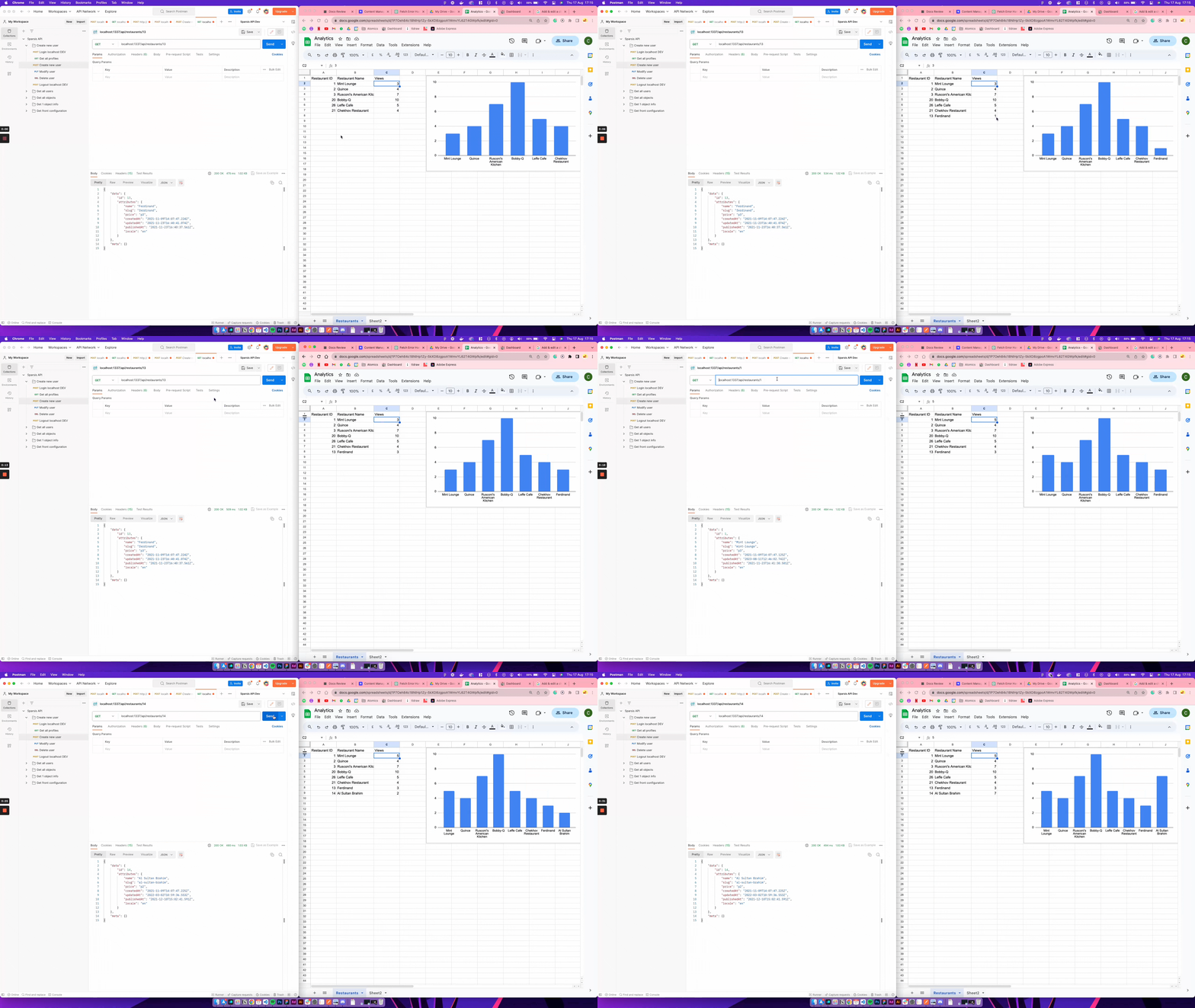
让我们创建一个用 Google 电子表格制作的基础分析仪表板示例,以了解 FoodAdvisor 的哪些餐厅页面访问量更高。
🎯 目标:
- 创建一些与 Google Sheets 交互的实用函数。
- 创建一个自定义 Strapi 中间件,每次我们收到对 FoodAdvisor 项目的餐厅页面的传入请求时,该中间件都会创建和/或更新现有的 Google Sheet 文档。
- 将自定义中间件附加到我们希望执行它的路由。
更多信息可以在 中间件自定义 文档中找到。
🌐 Additional information can be found in the middlewares customization documentation.
🧑💻 代码示例:
- 在 FoodAdvisor 项目的
/api文件夹中,创建一个包含以下示例代码的/restaurant/middlewares/utils.js文件:
可用于读取、写入和更新 Google 电子表格的示例实用函数:
以下代码允许在给定从 JSON 文件读取的 API 密钥和从 URL 检索的电子表格 ID 的情况下读取、写入和更新 Google 电子表格:

更多信息可以在官方 Google Sheets API documentation中找到。
const { google } = require('googleapis');

const createGoogleSheetClient = async ({
  keyFile,
  sheetId,
  tabName,
  range,
}) => {
  async function getGoogleSheetClient() {
    const auth = new google.auth.GoogleAuth({
      keyFile,
      scopes: ['https://www.googleapis.com/auth/spreadsheets'],
    });
    const authClient = await auth.getClient();
    return google.sheets({
      version: 'v4',
      auth: authClient,
    });
  }

  const googleSheetClient = await getGoogleSheetClient();

  const writeGoogleSheet = async (data) => {
    googleSheetClient.spreadsheets.values.append({
      spreadsheetId: sheetId,
      range: `${tabName}!${range}`,
      valueInputOption: 'USER_ENTERED',
      insertDataOption: 'INSERT_ROWS',
      resource: {
        majorDimension: 'ROWS',
        values: data,
      },
    });
  };

  const updateoogleSheet = async (cell, data) => {
    googleSheetClient.spreadsheets.values.update({
      spreadsheetId: sheetId,
      range: `${tabName}!${cell}`,
      valueInputOption: 'USER_ENTERED',
      resource: {
        majorDimension: 'ROWS',
        values: data,
      },
    });
  };

  const readGoogleSheet = async () => {
    const res = await googleSheetClient.spreadsheets.values.get({
      spreadsheetId: sheetId,
      range: `${tabName}!${range}`,
    });

    return res.data.values;
  };

  return {
    writeGoogleSheet,
    updateoogleSheet,
    readGoogleSheet,
  };
};

module.exports = {
  createGoogleSheetClient,
};
- 在 FoodAdvisor 项目的
/api文件夹中,创建一个自定义的analytics中间件,并使用以下代码:
'use strict';

const { createGoogleSheetClient } = require('./utils');

const serviceAccountKeyFile = './gs-keys.json';
// Replace the sheetId value with the corresponding id found in your own URL
const sheetId = '1P7Oeh84c18NlHp1Zy-5kXD8zgpoA1WmvYL62T4GWpfk';
const tabName = 'Restaurants';
const range = 'A2:C';

const VIEWS_CELL = 'C';

const transformGSheetToObject = (response) =>
  response.reduce(
    (acc, restaurant) => ({
      ...acc,
      [restaurant[0]]: {
        id: restaurant[0],
        name: restaurant[1],
        views: restaurant[2],
        cellNum: Object.keys(acc).length + 2 // + 2 because we need to consider the header and that the initial length is 0, so our first real row would be 2,
      },
    }),
    {}
  );

module.exports = (config, { strapi }) => {
  return async (context, next) => {
    // Generating google sheet client
    const { readGoogleSheet, updateoogleSheet, writeGoogleSheet } =
      await createGoogleSheetClient({
        keyFile: serviceAccountKeyFile,
        range,
        sheetId,
        tabName,
      });

    // Get the restaurant documentId from the params in the URL
    const restaurantId = context.params.id;
    const restaurant = await strapi.documents('api::restaurant.restaurant').findOne({
      documentId: restaurantId,
    });

    // Read the spreadsheet to get the current data
    const restaurantAnalytics = await readGoogleSheet();

    /**
     * The returned data comes in the shape [1, "Mint Lounge", 23],
     * and we need to transform it into an object: {id: 1, name: "Mint Lounge", views: 23, cellNum: 2}
     */
    const requestedRestaurant =
      transformGSheetToObject(restaurantAnalytics)[restaurantId];

    if (requestedRestaurant) {
      await updateoogleSheet(
        `${VIEWS_CELL}${requestedRestaurant.cellNum}:${VIEWS_CELL}${requestedRestaurant.cellNum}`,
        [[Number(requestedRestaurant.views) + 1]]
      );
    } else {
      /** If we don't have the restaurant in the spreadsheet already,
       * we create it with 1 view.
       */
      const newRestaurant = [[restaurant.id, restaurant.name, 1]];
      await writeGoogleSheet(newRestaurant);
    }

    // Call next to continue with the flow and get to the controller
    await next();
  };
};
- 配置“Restaurants”内容类型的路由,以便在查询餐厅页面时执行自定义的
analytics中间件。为此,请使用以下代码:
'use strict';

const { createCoreRouter } = require('@strapi/strapi').factories;

module.exports = createCoreRouter('api::restaurant.restaurant', {
  config: {
    findOne: {
      auth: false,
      policies: [],
      middlewares: ['api::restaurant.analytics'],
    },
  },
});