云计费与使用
🌐 Cloud billing & usage
Page summary:Strapi Cloud 提供三种方案(入门版、专业版和企业版),按照使用量计费,费用根据 API 请求次数、资源存储和带宽而异,超出部分每月收费;未支付发票或违反方案条款的项目可能会被暂停。
🌐 Strapi Cloud offers three plans (Starter, Pro, and Business) with usage-based pricing that varies by API requests, asset storage, and bandwidth, plus overages charged monthly; projects may be suspended for unpaid invoices or plan violations.
此页面包含与你的 Strapi Cloud 账户和项目的使用及计费相关的一般信息。
🌐 This page contains general information related to the usage and billing of your Strapi Cloud account and projects.
Strapi Cloud 提供 3 种计划:Starter、Pro 和 Business(请参见 定价页面)。下表总结了 Strapi Cloud 按使用量计费的计划,涵盖一般功能和使用情况:
🌐 Strapi Cloud offers 3 plans: Starter, Pro, and Business (see Pricing page). The table below summarizes Strapi Cloud usage-based pricing plans, for general features and usage:
| 功能 | 初级版 | 专业版 | 商务版 |
|---|---|---|---|
| 数据库条目 | 无限* | 无限* | 无限* |
| 资源存储 | 50GB | 250GB | 1,000GB |
| 资源带宽(每月) | 50GB | 500GB | 1,000GB |
| API 请求(每月) | 100,000 | 1,000,000 | 10,000,000 |
| 备份 | 不适用 | 每周 | 每日 |
| 自定义域名 | 包含 | 包含 | 包含 |
| 环境 | 不适用 | 包含 0 个(最多可增加 99 个) | 包含 1 个(最多可增加 99 个) |
| 电子邮件(每月) | 无限* | 无限* | 无限* |
- 一般特性与使用方式:
- 数据库条目是你的数据库中的条目数量。
- 资源存储是你的资源所使用的存储量。
- 资源带宽是你的资源所使用的带宽量。
- API 请求是对你的 API 发出的请求数量。这包括对 GraphQL 和 REST API 的请求,但不包括计入 CDN 带宽和存储的文件和媒体资源请求。所有 API 请求都计入你的每月使用量,无论响应类型如何。
- 云特定功能:
环境管理
🌐 Environments management
环境是你的 Strapi Cloud 项目的隔离实例。所有项目都有一个默认的生产环境,但对于 Pro 或 Business 计划的项目,可以从项目设置的 环境 标签中配置其他额外环境(请参见 Environments)。Strapi Cloud 项目可以配置的额外环境数量没有限制。
🌐 Environments are isolated instances of your Strapi Cloud project. All projects have a default production environment, but other additional environments can be configured for projects on a Pro or Business plan, from the Environments tab of the project settings (see Environments). There is no limit to the number of additional environments that can be configured for a Strapi Cloud project.
额外环境的使用限制与项目的生产环境相同(例如,Pro 计划中的额外环境在资源存储上将限制为 250GB,超出部分将按照与生产环境相同的方式收费)。但请注意,资源带宽和 API 调用是基于项目的,而不是基于环境的,因此即使有额外环境,这些使用限制也不会改变。
🌐 The usage limits of additional environments are the same as for the project's production environment (e.g. an additional environment on the Pro plan will be limited at 250GB for asset storage, and overages will be charged the same way as for the production environment). Note however that the asset bandwidth and API calls are project-based, not environment-based, so these usage limits do not change even with additional environments.
账单
🌐 Billing
计费是基于你 Strapi Cloud 项目的使用情况。项目计划和附加组件会根据你的计费周期按月或按年计费,而超出部分按月计费。你可以在项目设置的计费与发票标签中查看你的计费信息。
🌐 Billing is based on the usage of your Strapi Cloud projects. Project plans and addons are either billed monthly or yearly, depending on your billing cycle, while overages are billed monthly. You can view your billing information in the Billing & Invoices tab of your project settings.
税收
🌐 Taxes
对于美国、英国、加拿大、印度和欧盟的账单地址,你的发票可能会加收当地税费。税额根据你的账单地址和增值税/税务识别号状态计算,并在结账时以及发票上显示。
🌐 For billing addresses in the US, UK, Canada, India, and EU, local taxes may be added to your invoices. Tax amounts are calculated based on your billing address and VAT/Tax ID status, and are displayed during checkout and on invoices.
你可以在你的 账户账单 设置中添加或更新你的增值税/税号。
🌐 You can add or update your VAT/Tax ID from your Account Billing settings.
超额
🌐 Overages
如果你超出了 API 请求、资源带宽或资源存储的计划限制,你将被收取相应的超额费用。
🌐 If you exceed the limits of your plan for API Requests, Asset Bandwidth, or Asset Storage, you will be charged for the corresponding overages.
例如,如果你在专业版计划的资源带宽中超过 500GB 的限制,超出部分将在当前计费周期结束时或项目删除时收费。超额部分不按比例计算,将全额收费。
🌐 For example, if you exceed the 500GB limit in asset bandwidth of the Pro plan, you will be charged for the excess bandwidth at the end of the current billing period or on project deletion. Overages are not prorated and are charged in full.
超出部分按月收费,费率如下:
🌐 Overages are charged monthly, according to the following rates:
| 功能 | 价格 |
|---|---|
| API 请求 | $1.50 / 25,000 次请求 |
| 资源带宽 | $30.00 / 100GB |
| 资源存储 | $0.60 / GB 每月 |
项目暂停
🌐 Project suspension
项目可能由于各种原因最终处于暂停状态,包括未支付的发票或违反 Strapi Cloud 的 terms of service。
如果你的项目被暂停,你将无法再访问 Strapi 管理面板,也无法触发新的部署。你的项目仪表板上将会显示一个横幅,说明暂停的原因。你也会收到电子邮件通知。
🌐 If your project is suspended, you will no longer be able to access the Strapi admin panel, nor trigger new deployments. A banner will appear in your project's dashboard, indicating the cause of the suspension. You will also be notified by email.
由于账单问题项目暂停
🌐 Project suspension due to billing issues
如果你有未支付的发票,你的项目订阅将会自动被取消,项目将会被暂停。
🌐 If you have unpaid invoices, the subscription of your project will automatically be canceled and the project suspended.
要重新激活你的项目订阅:
🌐 To reactivate your project subscription:
- 点击项目横幅中的 立即付款 按钮,或在 设置 > 账单与发票 中点击
- 在外部支付页面支付你的逾期发票
- 等待最多1分钟以重新激活你的项目
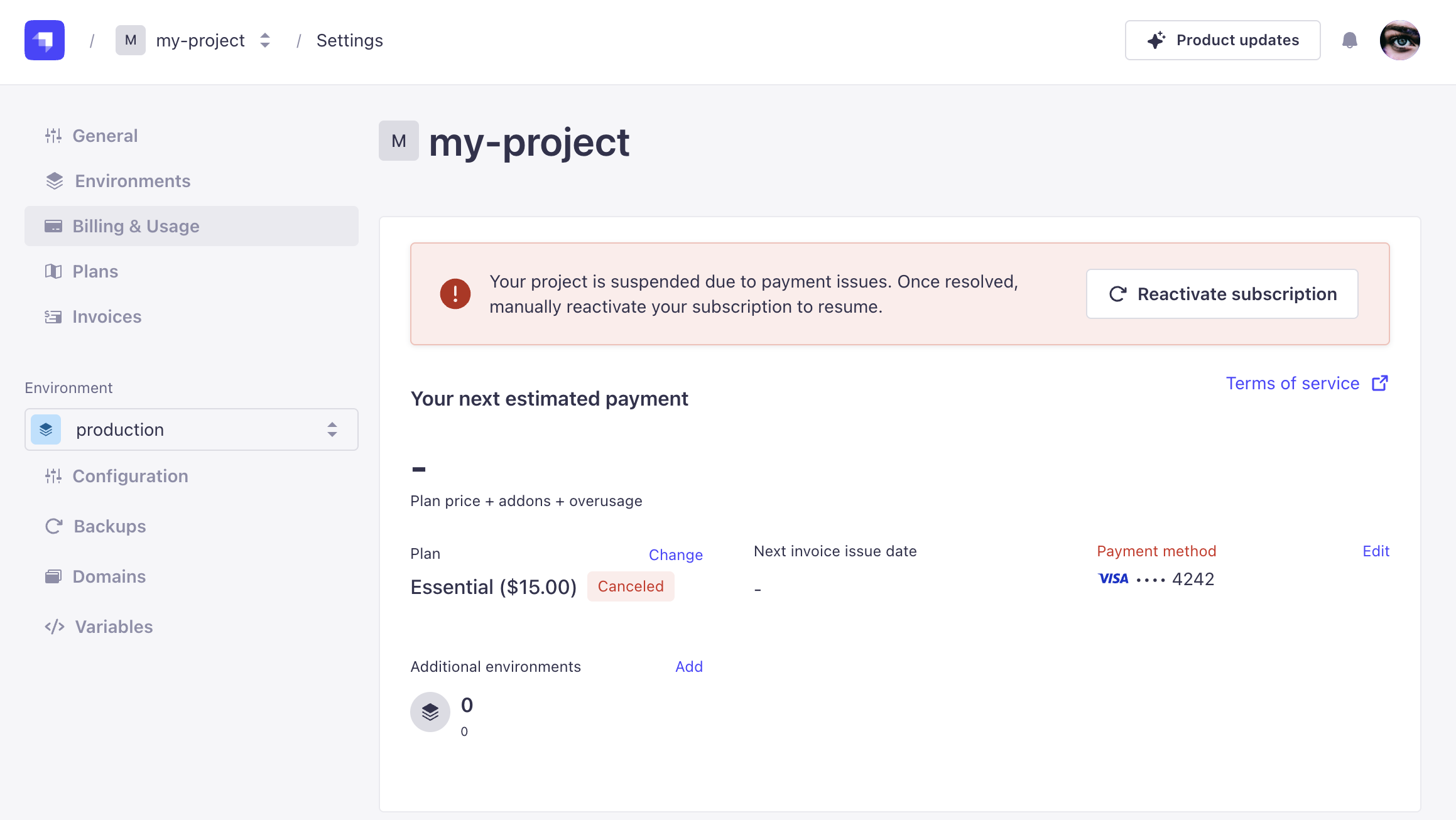
如果你在30天内不解决该问题,你的暂停项目将被删除,所有数据将永久丢失。
🌐 If you do not resolve the issue within 30 days, your suspended project will be deleted and all its data will be permanently lost.
因其他原因暂停项目
🌐 Project suspension for other reasons
如果你的项目因除未支付发票导致订阅取消以外的原因而被暂停,你可能无法自行重新激活项目。你应该会收到一封包含如何解决问题说明的电子邮件。如果你没有收到邮件通知,请联系 Strapi Support platform。
取消订阅
🌐 Subscription cancellation
如果你想取消你的 Strapi Cloud 订阅,你有两种选择:
🌐 If you want to cancel your Strapi Cloud subscription, you have 2 options:
- 要么删除你的项目(参见 删除 Strapi Cloud 项目 文档),
- 或完全删除你的账户(参见 删除 Strapi Cloud 账户 文档)。