# 服务
> Source: https://strapi.nodejs.cn/cms/backend-customization/services
🌐 Services
服务存储可重用的函数,以保持控制器简洁并遵循 DRY 原则。本文件说明了如何使用 `createCoreService` 生成或扩展服务,以及如何为 API 或插件组织它们。
服务是一组可重用的功能。它们对于遵循“不要重复自己”(DRY)编程理念以及简化[控制器](/cms/backend-customization/controllers.md)的逻辑特别有用。
🌐 Services are a set of reusable functions. They are particularly useful to respect the "don’t repeat yourself" (DRY) programming concept and to simplify [controllers](/cms/backend-customization/controllers.md) logic.
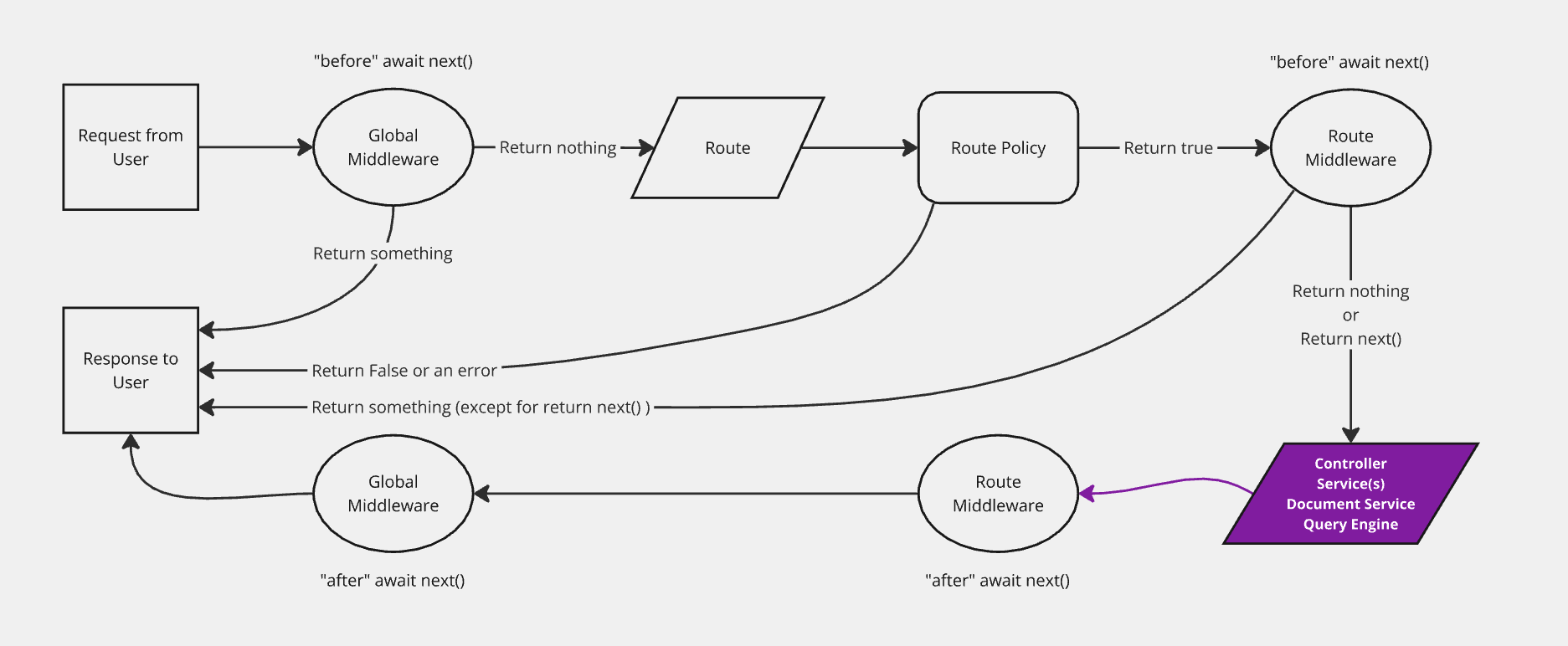
该图表示请求在 Strapi 后端传递的简化版本,并高亮了服务。后端自定义介绍页面包括完整的、 交互式图表。
## 实现 {#implementation}
🌐 Implementation
服务可以[手动生成或添加](#adding-a-new-service)。Strapi 提供了一个 `createCoreService` 工厂函数,能够自动生成核心服务,并允许构建自定义服务或[扩展或替换生成的服务](#extending-core-services)。
🌐 Services can be [generated or added manually](#adding-a-new-service). Strapi provides a `createCoreService` factory function that automatically generates core services and allows building custom ones or [extend or replace the generated services](#extending-core-services).
### 添加新服务 {#adding-a-new-service}
🌐 Adding a new service
可以实现一个新的服务:
🌐 A new service can be implemented:
- 使用 [交互式 CLI 命令 `strapi generate`](/cms/cli#strapi-generate)
- 或者通过在相应的文件夹中创建一个 JavaScript 文件手动完成(参见 [项目结构](/cms/project-structure.md)):
- `./src/api/[api-name]/services/` 用于 API 服务
- 或用于[插件服务](/cms/plugins-development/server-controllers-services)的 `./src/plugins/[plugin-name]/services/`。
要手动创建一个服务,请导出一个工厂函数,该函数返回服务实现(即包含方法的对象)。该工厂函数接收 `strapi` 实例:
🌐 To manually create a service, export a factory function that returns the service implementation (i.e. an object with methods). This factory function receives the `strapi` instance:
```js title="./src/api/restaurant/services/restaurant.js"
const { createCoreService } = require('@strapi/strapi').factories;
module.exports = createCoreService('api::restaurant.restaurant', ({ strapi }) => ({
// Method 1: Creating an entirely new custom service
async exampleService(...args) {
let response = { okay: true }
if (response.okay === false) {
return { response, error: true }
}
return response
},
// Method 2: Wrapping a core service (leaves core logic in place)
async find(...args) {
// Calling the default core controller
const { results, pagination } = await super.find(...args);
// some custom logic
results.forEach(result => {
result.counter = 1;
});
return { results, pagination };
},
// Method 3: Replacing a core service
async findOne(documentId, params = {}) {
return strapi.documents('api::restaurant.restaurant').findOne({
documentId,
// Use super to keep core fetch parameter formatting
...super.getFetchParams(params),
});
}
}));
```
```ts title="./src/api/restaurant/services/restaurant.ts"
// Method 1: Creating an entirely custom service
async exampleService(...args) {
let response = { okay: true }
if (response.okay === false) {
return { response, error: true }
}
return response
},
// Method 2: Wrapping a core service (leaves core logic in place)
async find(...args) {
// Calling the default core controller
const { results, pagination } = await super.find(...args);
// some custom logic
results.forEach(result => {
result.counter = 1;
});
return { results, pagination };
},
// Method 3: Replacing a core service
async findOne(documentId, params = {}) {
return strapi.documents('api::restaurant.restaurant').findOne({
documentId,
// Use super to keep core fetch parameter formatting
...super.getFetchParams(params) }) as any;
}
}));
```
:::strapi Document Service API
要开始创建你自己的服务,请参阅 Strapi 的内置函数,详见 [文档服务 API](/cms/api/document-service) 文档。
🌐 To get started creating your own services, see Strapi's built-in functions in the [Document Service API](/cms/api/document-service) documentation.
:::
自定义电子邮件服务示例(使用 Nodemailer)
服务的目标是存储可重复使用的函数。一个 `sendNewsletter` 服务可能在我们的代码库中从不同函数发送电子邮件时非常有用,这些函数有特定的用途:
🌐 The goal of a service is to store reusable functions. A `sendNewsletter` service could be useful to send emails from different functions in our codebase that have a specific purpose:
```js title="./src/api/restaurant/services/restaurant.js"
const { createCoreService } = require('@strapi/strapi').factories;
const nodemailer = require('nodemailer'); // Requires nodemailer to be installed (npm install nodemailer)
// Create reusable transporter object using SMTP transport.
const transporter = nodemailer.createTransport({
service: 'Gmail',
auth: {
user: 'user@gmail.com',
pass: 'password',
},
});
module.exports = createCoreService('api::restaurant.restaurant', ({ strapi }) => ({
sendNewsletter(from, to, subject, text) {
// Setup e-mail data.
const options = {
from,
to,
subject,
text,
};
// Return a promise of the function that sends the email.
return transporter.sendMail(options);
},
}));
```
```ts title="./src/api/restaurant/services/restaurant.ts"
const nodemailer = require('nodemailer'); // Requires nodemailer to be installed (npm install nodemailer)
// Create reusable transporter object using SMTP transport.
const transporter = nodemailer.createTransport({
service: 'Gmail',
auth: {
user: 'user@gmail.com',
pass: 'password',
},
});
sendNewsletter(from, to, subject, text) {
// Setup e-mail data.
const options = {
from,
to,
subject,
text,
};
// Return a promise of the function that sends the email.
return transporter.sendMail(options);
},
}));
```
该服务现在可以通过 `strapi.service('api::restaurant.restaurant').sendNewsletter(...args)` 全局变量使用。它可以在代码库的其他部分使用,例如在以下控制器中:
🌐 The service is now available through the `strapi.service('api::restaurant.restaurant').sendNewsletter(...args)` global variable. It can be used in another part of the codebase, like in the following controller:
```js title="./src/api/restaurant/controllers/restaurant.js"
module.exports = createCoreController('api::restaurant.restaurant', ({ strapi }) => ({
// GET /hello
async signup(ctx) {
const { userData } = ctx.body;
// Store the new user in database.
const user = await strapi.service('plugin::users-permissions.user').add(userData);
// Send an email to validate his subscriptions.
strapi.service('api::restaurant.restaurant').sendNewsletter('welcome@mysite.com', user.email, 'Welcome', '...');
// Send response to the server.
ctx.send({
ok: true,
});
},
}));
```
```js title="./src/api/restaurant/controllers/restaurant.ts"
// GET /hello
async signup(ctx) {
const { userData } = ctx.body;
// Store the new user in database.
const user = await strapi.service('plugin::users-permissions.user').add(userData);
// Send an email to validate his subscriptions.
strapi.service('api::restaurant.restaurant').sendNewsletter('welcome@mysite.com', user.email, 'Welcome', '...');
// Send response to the server.
ctx.send({
ok: true,
});
},
}));
```
:::note
当创建新的 [内容类型](/cms/backend-customization/models.md#content-types) 时,Strapi 会生成一个带有占位符代码的通用服务,准备进行自定义。
🌐 When a new [content-type](/cms/backend-customization/models.md#content-types) is created, Strapi builds a generic service with placeholder code, ready to be customized.
:::
### 扩展核心服务 {#extending-core-services}
🌐 Extending core services
核心服务是为每种内容类型创建的,可以被[控制器](/cms/backend-customization/controllers.md)使用,以在 Strapi 项目中执行可重用的逻辑。核心服务可以自定义以实现你自己的逻辑。以下代码示例应能帮助你入门。
🌐 Core services are created for each content-type and could be used by [controllers](/cms/backend-customization/controllers.md) to execute reusable logic through a Strapi project. Core services can be customized to implement your own logic. The following code examples should help you get started.
:::tip
核心服务可以完全通过[创建自定义服务](#adding-a-new-service)来替代,并将其命名为与核心服务相同(例如 `find`、`findOne`、`create`、`update` 或 `delete`)。
🌐 A core service can be replaced entirely by [creating a custom service](#adding-a-new-service) and naming it the same as the core service (e.g. `find`, `findOne`, `create`, `update`, or `delete`).
:::
集合类型示例
```js
async find(params) {
// some logic here
const { results, pagination } = await super.find(params);
// some more logic
return { results, pagination };
}
```
```js
async findOne(documentId, params) {
// some logic here
const result = await super.findOne(documentId, params);
// some more logic
return result;
}
```
```js
async create(params) {
// some logic here
const result = await super.create(params);
// some more logic
return result;
}
```
```js
async update(documentId, params) {
// some logic here
const result = await super.update(documentId, params);
// some more logic
return result;
}
```
```js
async delete(documentId, params) {
// some logic here
const result = await super.delete(documentId, params);
// some more logic
return result;
}
```
单类型示例
```js
async find(params) {
// some logic here
const document = await super.find(params);
// some more logic
return document;
}
```
```js
async createOrUpdate({ data, ...params }) {
// some logic here
const document = await super.createOrUpdate({ data, ...params });
// some more logic
return document;
}
```
```js
async delete(params) {
// some logic here
const document = await super.delete(params);
// some more logic
return document;
}
```
## 使用 {#usage}
🌐 Usage
一旦服务被创建,就可以从[控制器](/cms/backend-customization/controllers.md)或其他服务访问它:
🌐 Once a service is created, it's accessible from [controllers](/cms/backend-customization/controllers.md) or from other services:
```js
// access an API service
strapi.service('api::apiName.serviceName').FunctionName();
// access a plugin service
strapi.service('plugin::pluginName.serviceName').FunctionName();
```
在上面的语法示例中,`serviceName` 是 API 服务的服务文件名称,或者用于将服务文件导出到 `services/index.js` 的插件服务使用的名称。
🌐 In the syntax examples above, `serviceName` is the name of the service file for API services or the name used to export the service file to `services/index.js` for plugin services.
:::tip
要列出所有可用的服务,请运行 `yarn strapi services:list`。
🌐 To list all the available services, run `yarn strapi services:list`.
:::
### 核心服务方法 {#core-service-methods}
🌐 Core service methods
使用 `createCoreService` 生成的服务继承了封装 [文档服务 API](/cms/api/document-service) 的方法。可用的方法取决于内容类型:
🌐 Services generated with `createCoreService` inherit methods that wrap the [Document Service API](/cms/api/document-service). The available methods depend on the content-type:
#### 集合类型 {#collection-types}
🌐 Collection types
| 方法 | 描述 |
| --- | --- |
| `find(params)` | [`findMany`](/cms/api/document-service#findmany) 的封装;返回文档的分页列表。 |
| `findOne(documentId, params)` | [`findOne`](/cms/api/document-service#findone) 的封装器;通过其 `documentId` 返回单个文档。 |
| `create(params)` | [`create`](/cms/api/document-service#create) 的封装器;创建一个新文档。 |
| `update(documentId, params)` | [`update`](/cms/api/document-service#update) 的封装器;更新现有文档。 |
| `delete(documentId, params)` | [`delete`](/cms/api/document-service#delete) 的封装器;删除一个文档。 |
| `count(params)` | [`count`](/cms/api/document-service#count) 的封装器;返回匹配文档的数量。 |
| `publish(documentId, params)` | [`publish`](/cms/api/document-service#publish) 的封装器;发布草稿文档。 |
| `unpublish(documentId, params)` | [`unpublish`](/cms/api/document-service#unpublish) 的封装;取消发布文档。 |
| `discardDraft(documentId, params)` | [`discardDraft`](/cms/api/document-service#discarddraft) 的封装器;删除草稿副本。 |
#### 单一类型 {#single-types}
🌐 Single types
| 方法 | 描述 |
| --- | --- |
| `find(params)` | 返回单个文档(内部使用 [`findFirst`](/cms/api/document-service#findfirst))。 |
| `createOrUpdate({ data, ...params })` | 如果文档不存在则创建,或更新文档(使用 [`update`](/cms/api/document-service#update))。 |
| `delete(params)` | 删除文档(使用 [`delete`](/cms/api/document-service#delete))。 |
| `count(params)` | 计算匹配过滤条件的文档数量(使用 [`count`](/cms/api/document-service#count))。 |
| `publish(params)` | 发布草稿文档(使用 [`publish`](/cms/api/document-service#publish))。 |
| `unpublish(params)` | 取消发布文档(使用 [`unpublish`](/cms/api/document-service#unpublish))。 |
| `discardDraft(params)` | 删除草稿副本(使用 [`discardDraft`](/cms/api/document-service#discarddraft))。 |
#### 参数和默认行为 {#parameters-and-default-behavior}
🌐 Parameters and default behavior
核心服务方法接受与其底层的 [Document Service API](/cms/api/document-service) 调用相同的参数,例如 `fields`、`filters`、`sort`、`pagination`、`populate`、`locale` 和 `status`。当未提供 `status` 时,Strapi 会自动设置 `status: 'published'`,因此只返回已发布的内容。要查询草稿文档,请明确传递 `status: 'draft'` 或 Document Service 支持的其他值。
🌐 Core service methods accept the same parameters as their underlying [Document Service API](/cms/api/document-service) calls, such as `fields`, `filters`, `sort`, `pagination`, `populate`, `locale`, and `status`. When no `status` is provided, Strapi automatically sets `status: 'published'` so only published content is returned. To query draft documents, explicitly pass `status: 'draft'` or another value supported by the Document Service.
`createCoreService` 工厂还提供了一个 `getFetchParams(params)` 辅助工具,它可以将控制器的查询对象转换为这些方法期望的参数格式。在重写核心方法以将清理后的参数传递给 `strapi.documents()` 时,可以重复使用此辅助工具。
🌐 The `createCoreService` factory also exposes a `getFetchParams(params)` helper that converts a controller's query object into the parameter format expected by these methods. This helper can be reused when overriding core methods to forward sanitized parameters to `strapi.documents()`.