# 路线
> Source: https://strapi.nodejs.cn/cms/backend-customization/routes
🌐 Routes
路由将传入的 URL 映射到控制器,并为每种内容类型预生成页面。本文档展示了如何添加或自定义核心和自定义路由,并附加策略或中间件以实现额外控制。
发送到 Strapi 上任何 URL 的请求都由路由处理。默认情况下,Strapi 会为所有内容类型生成路由(请参阅 [REST API 文档](/cms/api/rest))。路由可以被 [添加](#implementation) 和配置:
🌐 Requests sent to Strapi on any URL are handled by routes. By default, Strapi generates routes for all the content-types (see [REST API documentation](/cms/api/rest)). Routes can be [added](#implementation) and configured:
- 使用 [策略](#policies),这是一种阻止访问某个路线的方法,
- 以及使用 [中间件](#middlewares),中间件是一种控制和改变请求流程及请求本身的方式。
一旦路由存在,访问它会执行由控制器处理的一些代码(参见 [控制器文档](/cms/backend-customization/controllers))。要查看所有现有路由及其层级顺序,你可以运行 `yarn strapi routes:list`(参见 [CLI 参考](/cms/cli))。
🌐 Once a route exists, reaching it executes some code handled by a controller (see [controllers documentation](/cms/backend-customization/controllers)). To view all existing routes and their hierarchal order, you can run `yarn strapi routes:list` (see [CLI reference](/cms/cli)).
:::tip
如果你只是自定义 Strapi 为某个内容类型生成的默认控制器操作(`find`、`findOne`、`create`、`update` 或 `delete`),你可以保持路由不变。这些核心路由已经指向相同的处理程序名称,并会运行你新的控制器逻辑。只有在你需要一个全新的 HTTP 路径/方法或想要暴露自定义控制器操作时,才需要添加或编辑路由。
🌐 If you only customize the default controller actions (`find`, `findOne`, `create`, `update`, or `delete`) that Strapi generates for a content-type, you can leave the router as-is. Those core routes already target the same handler names and will run your new controller logic. Add or edit a route only when you need a brand-new HTTP path/method or want to expose a custom controller action.
:::
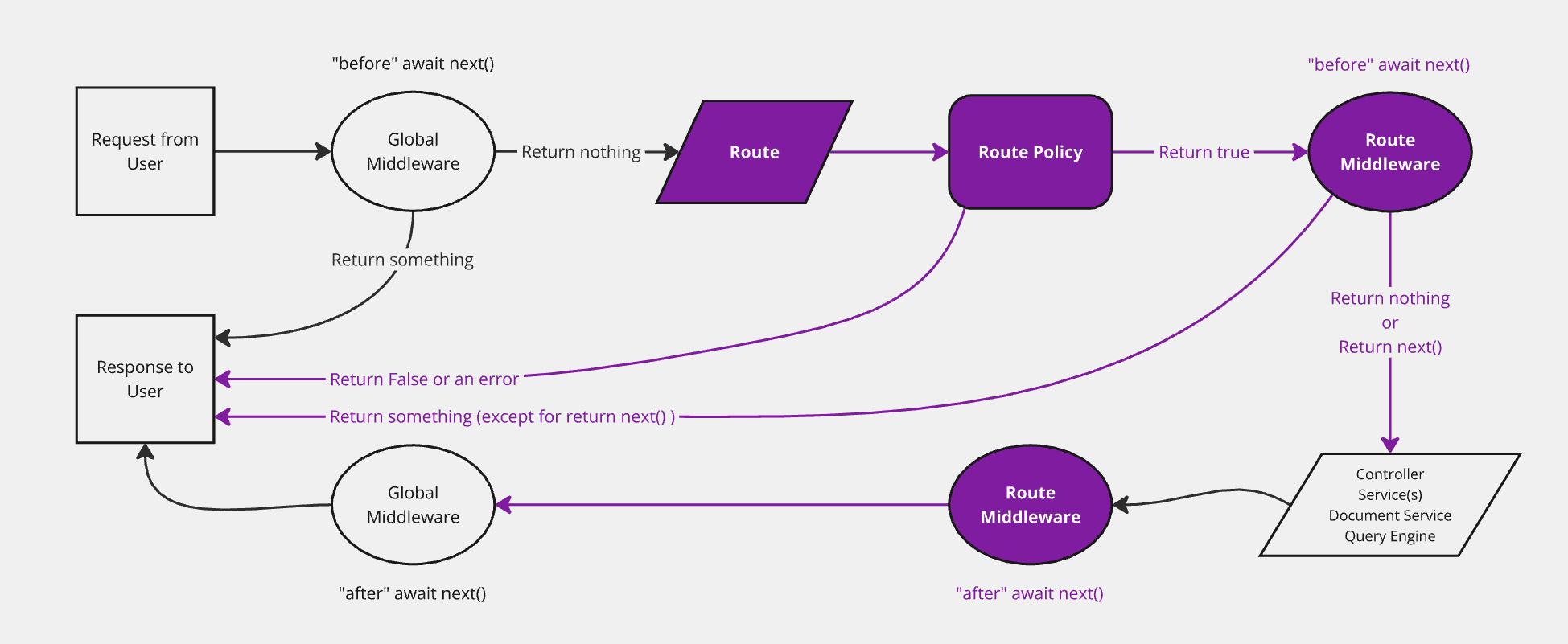
该图表示请求在 Strapi 后端传输的简化版本,并标出了路由。后端自定义介绍页面包括完整的、 交互式图表。
## 实现 {#implementation}
🌐 Implementation
实现一个新路由包括在 `./src/api/[apiName]/routes` 文件夹中的路由文件中定义它(参见 [项目结构](/cms/project-structure))。
🌐 Implementing a new route consists in defining it in a router file within the `./src/api/[apiName]/routes` folder (see [project structure](/cms/project-structure)).
根据用例,有 2 种不同的路由文件结构:
🌐 There are 2 different router file structures, depending on the use case:
- 配置[核心路由](#configuring-core-routers)
- 或创建[自定义路由](#creating-custom-routers)。
### 配置核心路由 {#configuring-core-routers}
🌐 Configuring core routers
核心路由(即 `find`、`findOne`、`create`、`update` 和 `delete`)对应于当创建新的 [内容类型](/cms/backend-customization/models#model-creation) 时 Strapi 自动创建的 [默认路由](/cms/api/rest#endpoints)。
🌐 Core routers (i.e. `find`, `findOne`, `create`, `update`, and `delete`) correspond to [default routes](/cms/api/rest#endpoints) automatically created by Strapi when a new [content-type](/cms/backend-customization/models#model-creation) is created.
Strapi 提供了一个 `createCoreRouter` 工厂函数,它会自动生成核心路由并允许:
🌐 Strapi provides a `createCoreRouter` factory function that automatically generates the core routers and allows:
- 将配置选项传递给每个路由
- 并禁用一些核心路由以[创建自定义路由](#creating-custom-routers)。
核心路由文件是一个 JavaScript 文件,导出对 `createCoreRouter` 调用的结果,该调用具有以下参数:
🌐 A core router file is a JavaScript file exporting the result of a call to `createCoreRouter` with the following parameters:
| 参数 | 描述 | 类型 |
| --- | --- | --- |
| `prefix` | 允许传入自定义前缀,添加到该模型的所有路由(例如 `/test`) | `String` |
| `only` | 仅会加载的核心路由
| `Object` |
可以使用参数和正则表达式创建动态路由。这些参数将会在 `ctx.params` 对象中暴露。更多详情,请参阅 [PathToRegex](https://github.com/pillarjs/path-to-regexp) 文档。
:::caution
路由文件按字母顺序加载。要在核心路由之前加载自定义路由,请确保适当地命名自定义路由(例如 `01-custom-routes.js` 和 `02-core-routes.js`)。
🌐 Routes files are loaded in alphabetical order. To load custom routes before core routes, make sure to name custom routes appropriately (e.g. `01-custom-routes.js` and `02-core-routes.js`).
:::
:::info Controller handler naming reference
`handler` 字符串充当指向应为该路由运行的控制器操作的指针。Strapi 支持以下格式:
🌐 The `handler` string acts as a pointer to the controller action that should run for the route. Strapi supports the following formats:
- API 控制器:`api::..`(例如 `api::restaurant.restaurant.exampleAction`)。`` 来自 `./src/api//controllers/` 内的控制器文件名。
- 插件控制器:当控制器位于插件中时为 `plugin::..`。
为了向后兼容,Strapi 也接受 API 控制器的简短 `.` 字符串,但使用完全限定的形式可以使路由更明确,并避免不同 API 和插件之间的命名冲突。
🌐 For backwards compatibility, Strapi also accepts a short `.` string for API controllers, but using the fully-qualified form makes the route more explicit and avoids naming collisions across APIs and plugins.
:::
使用 URL 参数和正则表达式进行路由的自定义路由示例
在以下示例中,自定义路由文件名以 `01-` 为前缀,以确保在核心路由之前访问该路由。
🌐 In the following example, the custom routes file name is prefixed with `01-` to make sure the route is reached before the core routes.
```js title="./src/api/restaurant/routes/01-custom-restaurant.js"
/** @type {import('@strapi/strapi').Core.RouterConfig} */
const config = {
type: 'content-api',
routes: [
{ // Path defined with an URL parameter
method: 'POST',
path: '/restaurants/:id/review',
handler: 'api::restaurant.restaurant.review',
},
{ // Path defined with a regular expression
method: 'GET',
path: '/restaurants/:category([a-z]+)', // Only match when the URL parameter is composed of lowercase letters
handler: 'api::restaurant.restaurant.findByCategory',
}
]
}
module.exports = config
```
```js title="./src/api/restaurant/routes/01-custom-restaurant.ts"
const config: Core.RouterConfig = {
type: 'content-api',
routes: [
{ // Path defined with a URL parameter
method: 'GET',
path: '/restaurants/:category/:id',
handler: 'api::restaurant.restaurant.findOneByCategory',
},
{ // Path defined with a regular expression
method: 'GET',
path: '/restaurants/:region(\\d{2}|\\d{3})/:id', // Only match when the first parameter contains 2 or 3 digits.
handler: 'api::restaurant.restaurant.findOneByRegion',
}
]
}
```
## 配置 {#configuration}
🌐 Configuration
核心路由和自定义路由都有相同的配置选项。路由配置在一个 `config` 对象中定义,该对象可以用来处理策略和中间件,或将路由设为公开。
🌐 Both [core routers](#configuring-core-routers) and [custom routers](#creating-custom-routers) have the same configuration options. The routes configuration is defined in a `config` object that can be used to handle [policies](#policies) and [middlewares](#middlewares) or to [make the route public](#public-routes).
### 政策 {#policies}
🌐 Policies
可以将[策略](/cms/backend-customization/policies)添加到路由配置中:
- 通过指向在 `./src/policies` 中注册的策略,无论是否传递自定义配置
- 或者通过直接声明策略实现,将其作为一个函数,该函数以 `policyContext` 扩展 [Koa](https://koa.nodejs.cn/#context) (`ctx`) 和 `strapi` 实例作为参数(参见 [策略文档](/cms/backend-customization/routes))
```js title="./src/api/restaurant/routes/restaurant.js"
const { createCoreRouter } = require('@strapi/strapi').factories;
module.exports = createCoreRouter('api::restaurant.restaurant', {
config: {
find: {
policies: [
// point to a registered policy
'policy-name',
// point to a registered policy with some custom configuration
{ name: 'policy-name', config: {} },
// pass a policy implementation directly
(policyContext, config, { strapi }) => {
return true;
},
]
}
}
});
```
```js title="./src/api/restaurant/routes/restaurant.ts"
config: {
find: {
policies: [
// point to a registered policy
'policy-name',
// point to a registered policy with some custom configuration
{ name: 'policy-name', config: {} },
// pass a policy implementation directly
(policyContext, config, { strapi }) => {
return true;
},
]
}
}
});
```
```js title="./src/api/restaurant/routes/custom-restaurant.js"
module.exports = {
routes: [
{
method: 'GET',
path: '/articles/customRoute',
handler: 'api::api-name.controllerName.functionName', // or 'plugin::plugin-name.controllerName.functionName' for a plugin-specific controller
config: {
policies: [
// point to a registered policy
'policy-name',
// point to a registered policy with some custom configuration
{ name: 'policy-name', config: {} },
// pass a policy implementation directly
(policyContext, config, { strapi }) => {
return true;
},
]
},
},
],
};
```
```js title="./src/api/restaurant/routes/custom-restaurant.ts"
routes: [
{
method: 'GET',
path: '/articles/customRoute',
handler: 'api::api-name.controllerName.functionName', // or 'plugin::plugin-name.controllerName.functionName' for a plugin-specific controller
config: {
policies: [
// point to a registered policy
'policy-name',
// point to a registered policy with some custom configuration
{ name: 'policy-name', config: {} },
// pass a policy implementation directly
(policyContext, config, { strapi }) => {
return true;
},
]
},
},
],
};
```
### 中间件 {#middlewares}
🌐 Middlewares
可以将[中间件](/cms/backend-customization/middlewares)添加到路由配置中:
- 通过指向在 `./src/middlewares` 中注册的中间件,无论是否传递自定义配置
- 或者直接通过声明中间件实现,作为一个函数,该函数以 [Koa](https://koa.nodejs.cn/#context) (`ctx`) 和 `strapi` 实例作为参数:
```js title="./src/api/restaurant/routes/restaurant.js"
const { createCoreRouter } = require('@strapi/strapi').factories;
module.exports = createCoreRouter('api::restaurant.restaurant', {
config: {
find: {
middlewares: [
// point to a registered middleware
'middleware-name',
// point to a registered middleware with some custom configuration
{ name: 'middleware-name', config: {} },
// pass a middleware implementation directly
(ctx, next) => {
return next();
},
]
}
}
});
```
```js title="./src/api/restaurant/routes/restaurant.ts"
config: {
find: {
middlewares: [
// point to a registered middleware
'middleware-name',
// point to a registered middleware with some custom configuration
{ name: 'middleware-name', config: {} },
// pass a middleware implementation directly
(ctx, next) => {
return next();
},
]
}
}
});
```
```js title="./src/api/restaurant/routes/custom-restaurant.js"
module.exports = {
routes: [
{
method: 'GET',
path: '/articles/customRoute',
handler: 'api::api-name.controllerName.functionName', // or 'plugin::plugin-name.controllerName.functionName' for a plugin-specific controller
config: {
middlewares: [
// point to a registered middleware
'middleware-name',
// point to a registered middleware with some custom configuration
{ name: 'middleware-name', config: {} },
// pass a middleware implementation directly
(ctx, next) => {
return next();
},
],
},
},
],
};
```
```js title="./src/api/restaurant/routes/custom-restaurant.ts"
routes: [
{
method: 'GET',
path: '/articles/customRoute',
handler: 'api::api-name.controllerName.functionName', // or 'plugin::plugin-name.controllerName.functionName' for a plugin-specific controller
config: {
middlewares: [
// point to a registered middleware
'middleware-name',
// point to a registered middleware with some custom configuration
{ name: 'middleware-name', config: {} },
// pass a middleware implementation directly
(ctx, next) => {
return next();
},
],
},
},
],
};
```
将中间件应用于内容类型的所有核心路由
`createCoreRouter` 每个操作附加 `middlewares`。要在每个默认内容 API 操作(`find`、`findOne`、`create`、`update`、`delete`)上运行相同的中间件,可以在 `config` 的每个键下列出它,或者只构建一次该对象:
```js title="./src/api/restaurant/routes/restaurant.js"
const { createCoreRouter } = require('@strapi/strapi').factories;
const audit = ['global::audit-log'];
const actions = ['find', 'findOne', 'create', 'update', 'delete'];
module.exports = createCoreRouter('api::restaurant.restaurant', {
config: Object.fromEntries(actions.map((action) => [action, { middlewares: audit }])),
});
```
```ts title="./src/api/restaurant/routes/restaurant.ts"
const audit = ['global::audit-log'] as const;
const actions = ['find', 'findOne', 'create', 'update', 'delete'] as const;
config: Object.fromEntries(actions.map((action) => [action, { middlewares: [...audit] }])),
});
```
如果你使用 `only` 或 `except`,请构建 `actions` 数组以匹配你实际注册的路由,这样你就不会将中间件附加到已禁用的处理程序上。
🌐 If you use `only` or `except`, build the `actions` array to match the routes you actually register so you do not attach middlewares to disabled handlers.
:::tip Centralizing population logic
路由级中间件是推荐用于在整个 API 中执行一致的填充规则的地方。这可以防止意外的过度获取,并确保响应大小可预测。请参阅 Strapi 博客上的 [Building High-Performance Strapi Applications](https://strapi.io/blog/building-high-performance-strapi-applications-common-pitfalls-and-best-practices) 。
:::
### 公共路线 {#public-routes}
🌐 Public routes
默认情况下,路由受 Strapi 的身份验证系统保护,该系统基于[API 令牌](/cms/features/api-tokens)或使用[用户与权限插件](/cms/features/users-permissions)。
🌐 By default, routes are protected by Strapi's authentication system, which is based on [API tokens](/cms/features/api-tokens) or on the use of the [Users & Permissions plugin](/cms/features/users-permissions).
在某些情况下,将某条路由公开并在正常的 Strapi 身份验证系统之外控制访问可能是有用的。这可以通过将路由的 `auth` 配置参数设置为 `false` 来实现:
🌐 In some scenarios, it can be useful to have a route publicly available and control the access outside of the normal Strapi authentication system. This can be achieved by setting the `auth` configuration parameter of a route to `false`:
```js title="./src/api/restaurant/routes/restaurant.js"
const { createCoreRouter } = require('@strapi/strapi').factories;
module.exports = createCoreRouter('api::restaurant.restaurant', {
config: {
find: {
auth: false
}
}
});
```
```js title="./src/api/restaurant/routes/restaurant.ts"
config: {
find: {
auth: false
}
}
});
```
```js title="./src/api/restaurant/routes/custom-restaurant.js"
module.exports = {
routes: [
{
method: 'GET',
path: '/articles/customRoute',
handler: 'api::api-name.controllerName.functionName', // or 'plugin::plugin-name.controllerName.functionName' for a plugin-specific controller
config: {
auth: false,
},
},
],
};
```
```js title="./src/api/restaurant/routes/custom-restaurant.ts"
routes: [
{
method: 'GET',
path: '/articles/customRoute',
handler: 'api::api-name.controllerName.functionName', // or 'plugin::plugin-name.controllerName.functionName' for a plugin-specific controller
config: {
auth: false,
},
},
],
};
```
## 自定义内容 API 参数 {#custom-content-api-parameters}
🌐 Custom Content API parameters
你可以通过在 [register](/cms/configurations/functions#register) 生命周期中注册,将允许在内容 API 路由上的 `query` 和 body 参数扩展。注册的参数随后会像核心参数一样被验证和清理。客户端可以发送额外的查询键(例如 `?search=...`)或根级 body 键(例如 `clientMutationId`),而无需自定义路由或控制器。
🌐 You can extend the `query` and body parameters allowed on Content API routes by registering them in the [register](/cms/configurations/functions#register) lifecycle. Registered parameters are then validated and sanitized like core parameters. Clients can send extra query keys (e.g. `?search=...`) or root-level body keys (e.g. `clientMutationId`) without requiring custom routes or controllers.
| 什么 | 哪里 |
|------|--------|
| 启用严格参数(拒绝未知的查询/主体键) | [API 配置](/cms/configurations/api):在 `./config/api.js`(或 `./config/api.ts`)中设置 `rest.strictParams: true`。 |
| 添加允许的参数(应用) | 在 `./src/index.js` 或 `./src/index.ts` 的 [注册](/cms/configurations/functions#register) 中调用 `addQueryParams` / `addInputParams`。 |
| 添加允许的参数(插件) | 在插件的 [注册](/cms/plugins-development/server-lifecycle#register) 生命周期中调用 `addQueryParams` / `addInputParams`。 |
当启用 `rest.strictParams` 时,仅接受核心参数和每个路由请求模式上的参数;你注册的参数会合并到该模式中。模式请使用来自 `@strapi/utils`(或 `zod/v4`)的 `z` 实例。
🌐 When `rest.strictParams` is enabled, only core parameters and parameters on each route's request schema are accepted; the parameters you register are merged into that schema. Use the `z` instance from `@strapi/utils` (or `zod/v4`) for schemas.
### `addQueryParams`
`strapi.contentAPI.addQueryParams(options)` 注册额外的 `query` 参数。模式必须是标量或标量数组(字符串、数字、布尔值、枚举)。对于嵌套结构,请改用 `addInputParams`。每个条目可以有一个可选的 `matchRoute: (route) => boolean` 回调,仅将参数添加到回调返回 true 的路由。你不能将核心查询参数名称(例如 `filters`、`sort`、`fields`)注册为额外参数;它们是保留的。
### `addInputParams`
`strapi.contentAPI.addInputParams(options)` 注册额外的输入参数:请求体中的根级键(例如与 `data` 并列),可以使用任何 Zod 类型。可选的 `matchRoute` 回调的作用与 `addQueryParams` 相同。你不能将保留名称如 `id` 或 `documentId` 注册为输入参数。
### `matchRoute`
`matchRoute` 回调接收一个具有以下属性的 `route` 对象:
🌐 The `matchRoute` callback receives a `route` object with the following properties:
- `route.method`:HTTP 方法(`'GET'`、`'POST'` 等)
- `route.path`:路线路径
- `route.handler`:控制器操作字符串
- `route.info`:关于路线的元数据
例如,要仅针对 GET 路由,请使用 `matchRoute: (route) => route.method === 'GET'`。要仅针对路径包含 `articles` 的路由,请使用 `matchRoute: (route) => route.path.includes('articles')`。
🌐 For example, to target only GET routes, use `matchRoute: (route) => route.method === 'GET'`. To target only routes whose path includes `articles`, use `matchRoute: (route) => route.path.includes('articles')`.
```js title="./src/index.js"
module.exports = {
register({ strapi }) {
strapi.contentAPI.addQueryParams({
search: {
schema: (z) => z.string().max(200).optional(),
matchRoute: (route) => route.path.includes('articles'),
},
});
strapi.contentAPI.addInputParams({
clientMutationId: {
schema: (z) => z.string().max(100).optional(),
},
});
},
};
```
```ts title="./src/index.ts"
register({ strapi }) {
strapi.contentAPI.addQueryParams({
search: {
schema: (z) => z.string().max(200).optional(),
matchRoute: (route) => route.path.includes('articles'),
},
});
strapi.contentAPI.addInputParams({
clientMutationId: {
schema: (z) => z.string().max(100).optional(),
},
});
},
};
```