# 中间件
> Source: https://strapi.nodejs.cn/cms/backend-customization/middlewares
🌐 Middlewares customization
中间件在应用或 API 级别上改变请求或响应的流程。本文档区分了全局中间件与路由中间件,并通过生成模式展示了自定义实现方法。
:::strapi Different types of middlewares
在 Strapi 中,3 个中间件概念共存:
🌐 In Strapi, 3 middleware concepts coexist:
- **全局中间件** 是为整个 Strapi 服务器应用[配置和启用](/cms/configurations/middlewares)的。这些中间件可以应用于应用级别或 API 级别。 本指南描述了如何实现它们。 插件也可以添加全局中间件(参见[服务器 API 文档](/cms/plugins-development/server-api))。
- **路由中间件** 的作用范围更有限,并且作为路由级别的中间件进行配置和使用。它们在 [路由文档](/cms/backend-customization/routes#middlewares) 中有描述。
- **文档服务中间件** 适用于文档服务 API,并且有其自己的 [实现](/cms/api/document-service/middlewares) 和相关的 [生命周期钩子](/cms/migration/v4-to-v5/breaking-changes/lifecycle-hooks-document-service#table)。
:::
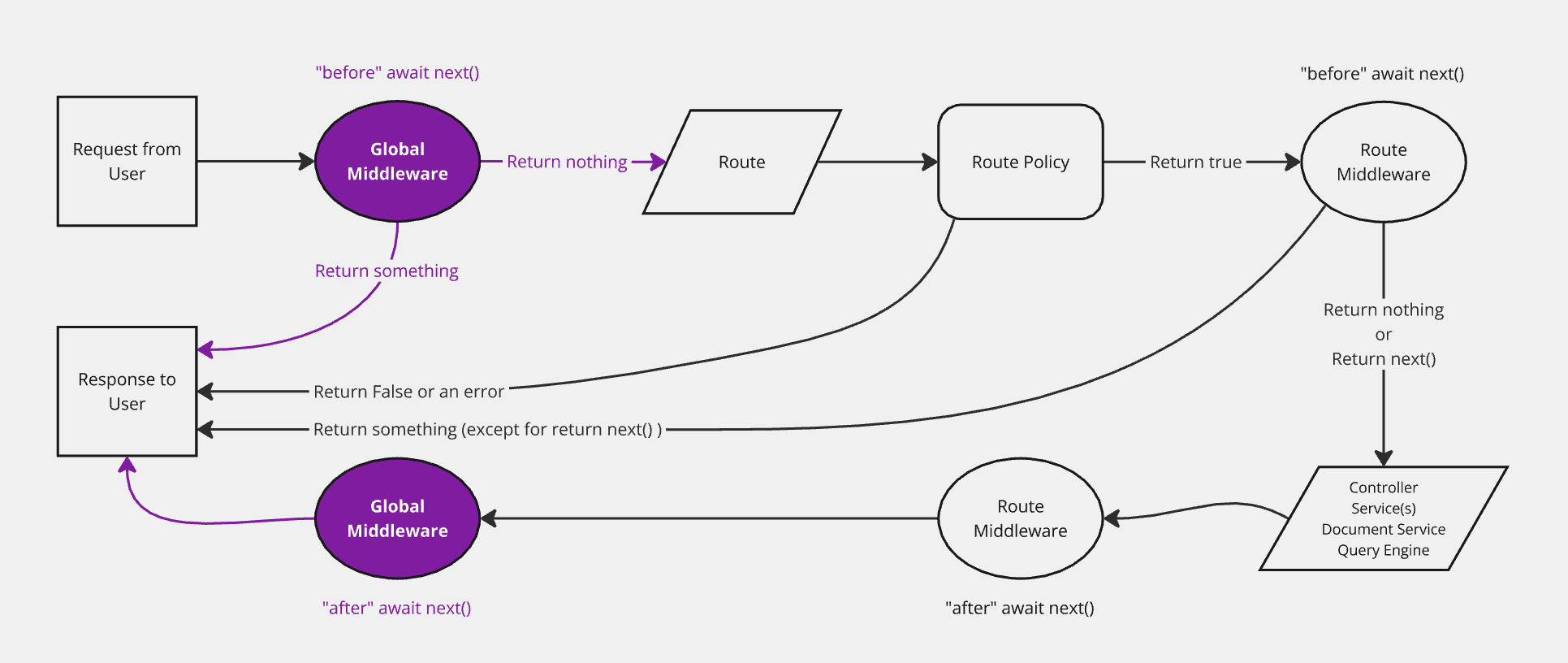
该图表示请求在 Strapi 后端中传输的简化版本,重点展示了全局中间件。后端自定义介绍页面包含一个完整的、 交互式图表。
## 实现 {#implementation}
🌐 Implementation
可以实现新的应用级或 API 级中间件:
🌐 A new application-level or API-level middleware can be implemented:
- 使用 [交互式 CLI 命令 `strapi generate`](/cms/cli#strapi-generate)
- 或者通过在相应的文件夹中创建一个 JavaScript 文件手动完成(参见 [项目结构](/cms/project-structure)):
- `./src/middlewares/` 用于应用级中间件
- `./src/api/[api-name]/middlewares/` 用于 API 级中间件
- `./src/plugins/[plugin-name]/middlewares/` 用于 [插件中间件](/cms/plugins-development/server-policies-middlewares)
使用 REST API 的中间件具有如下功能:
🌐 Middlewares working with the REST API are functions like the following:
```js title="./src/middlewares/my-middleware.js or ./src/api/[api-name]/middlewares/my-middleware.js"
module.exports = (config, { strapi })=> {
return (context, next) => {};
};
```
```js title="./src/middlewares/my-middleware.js or ./src/api/[api-name]/middlewares/my-middleware.ts"
return (context, next) => {};
};
```
全局作用域的自定义中间件应该添加到 [中间件配置文件](/cms/configurations/middlewares#loading-order),否则 Strapi 将无法加载它们。
🌐 Globally scoped custom middlewares should be added to the [middlewares configuration file](/cms/configurations/middlewares#loading-order) or Strapi won't load them.
API 级别和插件中间件可以添加到与其相关的特定路由中,如下所示:
🌐 API level and plugin middlewares can be added into the specific router that they are relevant to like the following:
```js title="./src/api/[api-name]/routes/[collection-name].js or ./src/plugins/[plugin-name]/server/routes/index.js"
module.exports = {
routes: [
{
method: "GET",
path: "/[collection-name]",
handler: "[controller].find",
config: {
middlewares: ["[middleware-name]"],
// See the usage section below for middleware naming conventions
},
},
],
};
```
自定义计时器中间件示例
```js title="/config/middlewares.js"
module.exports = () => {
return async (ctx, next) => {
const start = Date.now();
await next();
const delta = Math.ceil(Date.now() - start);
ctx.set('X-Response-Time', delta + 'ms');
};
};
```
```ts title="/config/middlewares.ts"
return async (ctx, next) => {
const start = Date.now();
await next();
const delta = Math.ceil(Date.now() - start);
ctx.set('X-Response-Time', delta + 'ms');
};
};
```
GraphQL 插件还允许[实现自定义中间件](/cms/plugins/graphql#middlewares),语法有所不同。
🌐 The GraphQL plugin also allows [implementing custom middlewares](/cms/plugins/graphql#middlewares), with a different syntax.
:::tip Discover loaded middlewares
运行 `yarn strapi middlewares:list` 列出所有已注册的中间件,并在将它们连接到路由时仔细检查名称。
🌐 Run `yarn strapi middlewares:list` to list all registered middlewares and double‑check naming when wiring them in routers.
:::
## 使用 {#usage}
🌐 Usage
中间件根据其范围有不同的调用方式:
🌐 Middlewares are called different ways depending on their scope:
- 在应用级中间件中使用 `global::middleware-name`
- 使用 `api::api-name.middleware-name` 进行 API 级中间件
- 使用 `plugin::plugin-name.middleware-name` 作为插件中间件
:::tip
要列出所有已注册的中间件,运行 `yarn strapi middlewares:list`。
🌐 To list all the registered middlewares, run `yarn strapi middlewares:list`.
:::
### 使用“是所有者策略”限制内容访问 {#restricting-content-access-with-an-is-owner-policy}
🌐 Restricting content access with an "is-owner policy"
通常要求条目的作者是唯一被允许编辑或删除该条目的用户。在 Strapi 的早期版本中,这被称为“is-owner 策略”。在 Strapi v4 中,实现此行为的推荐方式是使用中间件。
🌐 It is often required that the author of an entry is the only user allowed to edit or delete the entry. In previous versions of Strapi, this was known as an "is-owner policy". With Strapi v4, the recommended way to achieve this behavior is to use a middleware.
正确的实现很大程度上取决于你的项目的需求和自定义代码,但最基本的实现可以通过以下过程来实现:
🌐 Proper implementation largely depends on your project's needs and custom code, but the most basic implementation could be achieved with the following procedure:
1. 在你的项目文件夹中,通过在终端运行 `yarn strapi generate`(或 `npm run strapi generate`)命令,使用 Strapi CLI 生成器创建一个中间件。
2. 使用键盘箭头从列表中选择 `middleware`,然后按回车键。
3. 给中间件起一个名字,例如 `isOwner`。
4. 从列表中选择 `Add middleware to an existing API`。
5. 选择你希望中间件应用哪个 API。
6. 将 `/src/api/[your-api-name]/middlewares/isOwner.js` 文件中的代码替换为以下内容,并在第 22 行将 `api::restaurant.restaurant` 替换为你在第 5 步选择的 API 对应的标识符(例如,如果你的 API 名称是 `blog-post`,则替换为 `api::blog-post.blog-post`):
```js showLineNumbers title="src/api/blog-post/middlewares/isOwner.js"
"use strict";
/**
* `isOwner` middleware
*/
module.exports = (config, { strapi }) => {
// Add your own logic here.
return async (ctx, next) => {
const user = ctx.state.user;
const entryId = ctx.params.id ? ctx.params.id : undefined;
let entry = {};
/**
* Gets all information about a given entry,
* populating every relations to ensure
* the response includes author-related information
*/
if (entryId) {
entry = await strapi.documents('api::restaurant.restaurant').findOne(
entryId,
{ populate: "*" }
);
}
/**
* Compares user id and entry author id
* to decide whether the request can be fulfilled
* by going forward in the Strapi backend server
*/
if (user.id !== entry.author.id) {
return ctx.unauthorized("This action is unauthorized.");
} else {
return next();
}
};
};
```
7. 确保中间件配置应用于某些路由。在 `src/api/[your-api–name]/routes/[your-content-type-name].js` 文件中找到的 `config` 对象中,定义你希望中间件应用的动作键(`find`、`findOne`、`create`、`update`、`delete` 等),并为这些路由声明 `isOwner` 中间件。
例如,如果你希望允许 GET 请求(对应 `find` 和 `findOne` 动作)和 POST 请求(即 `create` 动作)对任何用户在 `restaurant` API 中的 `restaurant` 内容类型生效,但希望将 PUT(即 `update` 动作)和 DELETE 请求限制为仅对创建该条目的用户生效,你可以在 `src/api/restaurant/routes/restaurant.js` 文件中使用以下代码:
```js title="src/api/restaurant/routes/restaurant.js"
/**
* restaurant router
*/
const { createCoreRouter } = require("@strapi/strapi").factories;
module.exports = createCoreRouter("api::restaurant.restaurant", {
config: {
update: {
middlewares: ["api::restaurant.is-owner"],
},
delete: {
middlewares: ["api::restaurant.is-owner"],
},
},
});
```
:::info
你可以在 [路由文档](/cms/backend-customization/routes) 中找到有关路由中间件的更多信息。
🌐 You can find more information about route middlewares in the [routes documentation](/cms/backend-customization/routes).
:::
:::tip Middlewares for performance
路由级中间件是集中处理数据填充逻辑和防止意外过度获取的好地方。请参见 Strapi 博客上的 [Building High-Performance Strapi Applications](https://strapi.io/blog/building-high-performance-strapi-applications-common-pitfalls-and-best-practices) 获取模式和示例。
:::