# 控制器
> Source: https://strapi.nodejs.cn/cms/backend-customization/controllers
🌐 Controllers
控制器将处理业务逻辑的操作打包在 Strapi 的 MVC 模式中的每个路由内。本文档演示了如何生成控制器、使用 `createCoreController` 扩展核心控制器,以及将繁重的逻辑委托给服务。
控制器是包含一组方法(称为动作)的 JavaScript 文件,客户端可以根据请求的[路由](/cms/backend-customization/routes)访问这些方法。每当客户端请求该路由时,动作会执行业务逻辑代码并返回[响应](/cms/backend-customization/requests-responses)。控制器代表模型-视图-控制器(MVC)模式中的 C。
🌐 Controllers are JavaScript files that contain a set of methods, called actions, reached by the client according to the requested [route](/cms/backend-customization/routes). Whenever a client requests the route, the action performs the business logic code and sends back the [response](/cms/backend-customization/requests-responses). Controllers represent the C in the model-view-controller (MVC) pattern.
在大多数情况下,控制器将包含项目大部分的业务逻辑。但随着控制器的逻辑变得越来越复杂,使用[服务](/cms/backend-customization/services)将代码组织成可重用的部分是一种好习惯。
🌐 In most cases, the controllers will contain the bulk of a project's business logic. But as a controller's logic becomes more and more complicated, it's a good practice to use [services](/cms/backend-customization/services) to organize the code into re-usable parts.
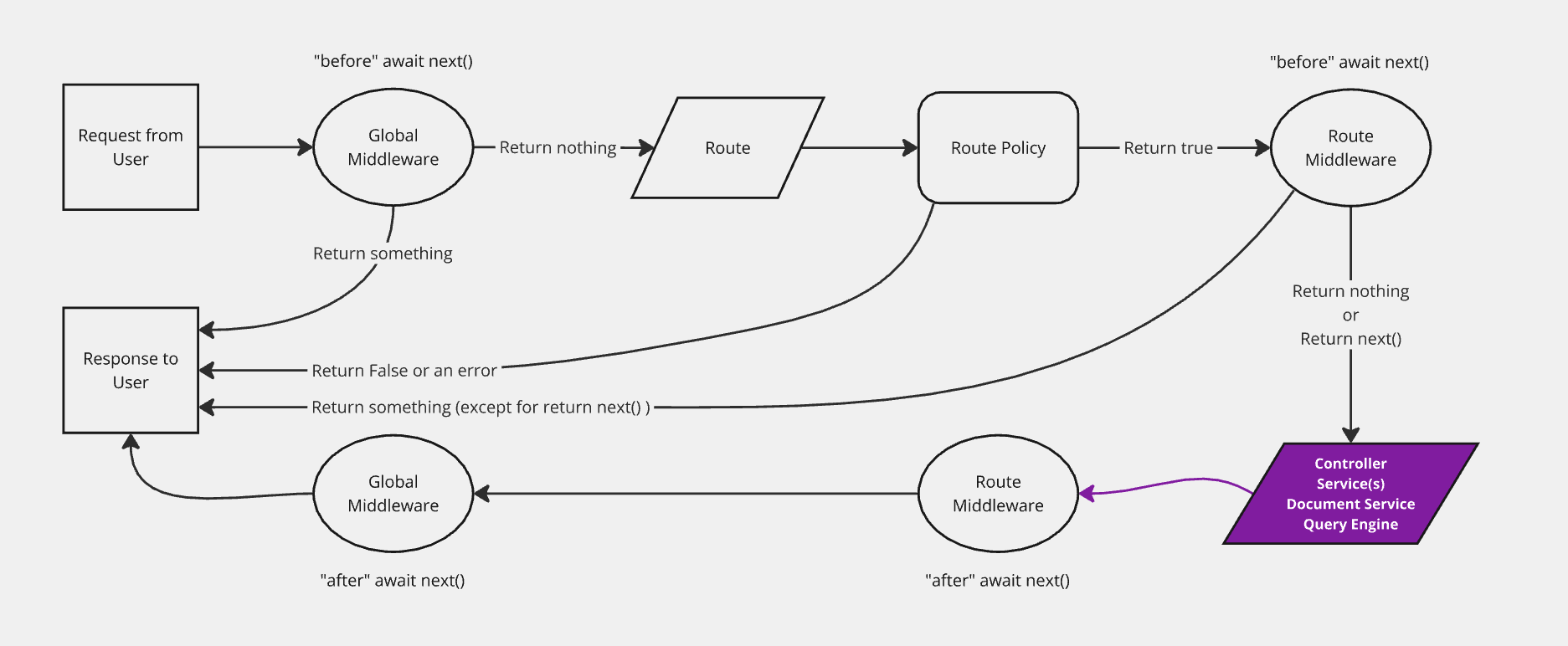
该图表示请求在 Strapi 后端传递的简化版本,控制器被高亮。后端自定义介绍页面包含一个完整的, 交互式图表。
:::caution Sanitize inputs and outputs
在重写核心操作时,始终验证和清理查询和响应,以避免泄露私有字段或绕过访问规则。在从自定义操作返回数据之前,使用 `validateQuery`(可选)、`sanitizeQuery`(推荐)和 `sanitizeOutput`。请参见下面的示例,了解安全的 `find` 重写。
🌐 When overriding core actions, always validate and sanitize queries and responses to avoid leaking private fields or bypassing access rules. Use `validateQuery` (optional), `sanitizeQuery` (recommended), and `sanitizeOutput` before returning data from custom actions. See the example below for a safe `find` override.
:::
## 实现 {#implementation}
🌐 Implementation
控制器可以[生成或手动添加](#adding-a-new-controller)。Strapi 提供了一个 `createCoreController` 工厂函数,可以自动生成核心控制器,并允许构建自定义控制器或[扩展或替换生成的控制器](#extending-core-controllers)。
🌐 Controllers can be [generated or added manually](#adding-a-new-controller). Strapi provides a `createCoreController` factory function that automatically generates core controllers and allows building custom ones or [extend or replace the generated controllers](#extending-core-controllers).
### 添加新控制器 {#adding-a-new-controller}
🌐 Adding a new controller
可以实现一个新的控制器:
🌐 A new controller can be implemented:
- 使用 [交互式 CLI 命令 `strapi generate`](/cms/cli)
- 或通过创建 JavaScript 文件手动:
- 在 `./src/api/[api-name]/controllers/` 中用于 API 控制器(此位置很重要,因为 Strapi 会从这里自动加载控制器)
- 或者在像 `./src/plugins/[plugin-name]/server/controllers/` 这样的文件夹中用于插件控制器,尽管它们可以创建在其他地方,只要插件接口在 `strapi-server.js` 文件中正确导出(参见 [插件的服务器 API 文档](/cms/plugins-development/server-api))
```js title="./src/api/restaurant/controllers/restaurant.js"
const { createCoreController } = require('@strapi/strapi').factories;
module.exports = createCoreController('api::restaurant.restaurant', ({ strapi }) => ({
// Method 1: Creating an entirely custom action
async exampleAction(ctx) {
try {
ctx.body = 'ok';
} catch (err) {
ctx.body = err;
}
},
// Method 2: Wrapping a core action (leaves core logic in place)
async find(ctx) {
// some custom logic here
ctx.query = { ...ctx.query, local: 'en' }
// Calling the default core action
const { data, meta } = await super.find(ctx);
// some more custom logic
meta.date = Date.now()
return { data, meta };
},
// Method 3: Replacing a core action with proper sanitization
async find(ctx) {
// validateQuery (optional)
// to throw an error on query params that are invalid or the user does not have access to
await this.validateQuery(ctx);
// sanitizeQuery to remove any query params that are invalid or the user does not have access to
// It is strongly recommended to use sanitizeQuery even if validateQuery is used
const sanitizedQueryParams = await this.sanitizeQuery(ctx);
const { results, pagination } = await strapi.service('api::restaurant.restaurant').find(sanitizedQueryParams);
const sanitizedResults = await this.sanitizeOutput(results, ctx);
return this.transformResponse(sanitizedResults, { pagination });
}
}));
```
```ts title="./src/api/restaurant/controllers/restaurant.ts"
// Method 1: Creating an entirely custom action
async exampleAction(ctx) {
try {
ctx.body = 'ok';
} catch (err) {
ctx.body = err;
}
},
// Method 2: Wrapping a core action (leaves core logic in place)
async find(ctx) {
// some custom logic here
ctx.query = { ...ctx.query, local: 'en' }
// Calling the default core action
const { data, meta } = await super.find(ctx);
// some more custom logic
meta.date = Date.now()
return { data, meta };
},
// Method 3: Replacing a core action with proper sanitization
async find(ctx) {
// validateQuery (optional)
// to throw an error on query params that are invalid or the user does not have access to
await this.validateQuery(ctx);
// sanitizeQuery to remove any query params that are invalid or the user does not have access to
// It is strongly recommended to use sanitizeQuery even if validateQuery is used
const sanitizedQueryParams = await this.sanitizeQuery(ctx);
const { results, pagination } = await strapi.service('api::restaurant.restaurant').find(sanitizedQueryParams);
// sanitizeOutput to ensure the user does not receive any data they do not have access to
const sanitizedResults = await this.sanitizeOutput(results, ctx);
return this.transformResponse(sanitizedResults, { pagination });
}
}));
```
每个控制器动作可以是 `async` 或 `sync` 函数。每个动作都接收一个上下文对象(`ctx`)作为参数。`ctx` 包含 [请求上下文](/cms/backend-customization/requests-responses#ctxrequest) 和 [响应上下文](/cms/backend-customization/requests-responses#ctxresponse)。
🌐 Each controller action can be an `async` or `sync` function.
Every action receives a context object (`ctx`) as a parameter. `ctx` contains the [request context](/cms/backend-customization/requests-responses#ctxrequest) and the [response context](/cms/backend-customization/requests-responses#ctxresponse).
示例:GET /hello 路由调用一个基本控制器
定义了一个特定的 `GET /hello` [路由](/cms/backend-customization/routes),路由文件的名称(即 `index`)用于调用控制器处理程序(即 `index`)。每次向服务器发送 `GET /hello` 请求时,Strapi 会在 `hello.js` 控制器中调用 `index` 操作,并返回 `Hello World!`:
🌐 A specific `GET /hello` [route](/cms/backend-customization/routes) is defined, the name of the router file (i.e. `index`) is used to call the controller handler (i.e. `index`). Every time a `GET /hello` request is sent to the server, Strapi calls the `index` action in the `hello.js` controller, which returns `Hello World!`:
```js "title="./src/api/hello/routes/hello.js"
module.exports = {
routes: [
{
method: 'GET',
path: '/hello',
handler: 'api::hello.hello.index',
}
]
}
```
```js title="./src/api/hello/controllers/hello.js"
module.exports = {
async index(ctx, next) { // called by GET /hello
ctx.body = 'Hello World!'; // we could also send a JSON
},
};
```
```js title="./src/api/hello/routes/hello.ts"
routes: [
{
method: 'GET',
path: '/hello',
handler: 'api::hello.hello.index',
}
]
}
```
```js title="./src/api/hello/controllers/hello.ts"
async index(ctx, next) { // called by GET /hello
ctx.body = 'Hello World!'; // we could also send a JSON
},
};
```
:::note
当创建一个新的 [内容类型](/cms/backend-customization/models#content-types) 时,Strapi 会生成一个带有占位代码的通用控制器,准备进行自定义。
🌐 When a new [content-type](/cms/backend-customization/models#content-types) is created, Strapi builds a generic controller with placeholder code, ready to be customized.
:::
:::tip
要了解自定义控制器可能的高级用法,请阅读后端自定义示例手册的 [服务和控制器](/cms/backend-customization/examples/services-and-controllers) 页面。
🌐 To see a possible advanced usage for custom controllers, read the [services and controllers](/cms/backend-customization/examples/services-and-controllers) page of the backend customization examples cookbook.
:::
### 控制器与路由:路由如何到达控制器动作 {#controllers--routes-how-routes-reach-controller-actions}
🌐 Controllers & Routes: How routes reach controller actions
- 核心映射是自动的:当你生成一个内容类型时,Strapi 会创建匹配的控制器和一个已经指向标准操作(`find`、`findOne`、`create`、`update` 和 `delete`)的路由文件。在生成的控制器中覆盖这些操作中的任何一个不需要修改路由——路由保持相同的处理程序字符串并执行你更新后的逻辑。
- 添加路由应仅针对新的操作或路径进行。如果引入一个全新的方法,例如 `exampleAction`,则创建或更新一个路由条目,其 `handler` 指向该操作,以便 HTTP 请求可以访问它。使用完整限定的处理程序语法 `::..`(例如 API 控制器的 `api::restaurant.restaurant.exampleAction` 或插件控制器的 `plugin::menus.menu.exampleAction`)。
- 关于控制器和路由文件名:默认的控制器名称来自 `./src/api/[api-name]/controllers/` 中的文件名。使用 `createCoreRouter` 创建的核心路由采用相同的名称,因此生成的处理程序字符串会自动匹配。自定义路由可以遵循任何文件命名方案,只要 `handler` 字符串引用一个导出的控制器操作。
:::note About core mapping
Strapi 为内容类型生成的 REST 路由将每个 HTTP 方法指向一个处理器字符串(例如 `api::restaurant.restaurant.find`)。该字符串已经标识了控制器文件和导出的动作名称(`find`、`findOne`、`create`、`update` 或 `delete`)。当你更改这些导出中的实现但保留名称时,路由仍然会调用你的代码。只有在你添加默认 CRUD 集之外的新动作名称或路径时,才编辑路由文件。
🌐 The REST routes Strapi generates for a content-type point each HTTP method at a handler string (for example `api::restaurant.restaurant.find`). That string already identifies the controller file and the exported action name (`find`, `findOne`, `create`, `update`, or `delete`). When you change the implementation inside those exports but keep the names, the router still calls your code. Edit the route file only when you add a new action name or path outside that default CRUD set.
:::
以下示例添加了一个新的控制器操作,并通过自定义路由将其公开,而不会重复现有的 CRUD 路由定义:
🌐 The example below adds a new controller action and exposes it through a custom route without duplicating the existing CRUD route definitions:
```js title="./src/api/restaurant/controllers/restaurant.js"
const { createCoreController } = require('@strapi/strapi').factories;
module.exports = createCoreController('api::restaurant.restaurant', ({ strapi }) => ({
async exampleAction(ctx) {
const specials = await strapi.service('api::restaurant.restaurant').find({ filters: { isSpecial: true } });
return this.transformResponse(specials.results);
},
}));
```
```js title="./src/api/restaurant/routes/01-custom-restaurant.js"
module.exports = {
routes: [
{
method: 'GET',
path: '/restaurants/specials',
handler: 'api::restaurant.restaurant.exampleAction',
},
],
};
```
### 控制器中的清理和验证 {#sanitization-and-validation-in-controllers}
🌐 Sanitization and Validation in controllers
:::warning
强烈建议你使用新的 `sanitizeQuery` 和 `validateQuery` 函数对传入的请求查询进行消毒(v4.8.0+)和/或验证(v4.13.0+),以防止私有数据泄露。
🌐 It's strongly recommended you sanitize (v4.8.0+) and/or validate (v4.13.0+) your incoming request query utilizing the new `sanitizeQuery` and `validateQuery` functions to prevent the leaking of private data.
:::
清理意味着对象被“清理”并返回。
🌐 Sanitization means that the object is “cleaned” and returned.
验证意味着断言数据已经干净,如果发现不应该存在的内容,则会引发错误。
🌐 Validation means an assertion is made that the data is already clean and throws an error if something is found that shouldn't be there.
在 Strapi 5 中,查询参数和输入数据(即创建和更新的请求体数据)都会被验证。任何包含以下无效输入的创建和更新数据请求都会抛出 `400 Bad Request` 错误:
🌐 In Strapi 5, both query parameters and input data (i.e., create and update body data) are validated. Any create and update data requests with the following invalid input will throw a `400 Bad Request` error:
- 用户无权创建的关系
- 模式中不存在的无法识别的值
- 不可写字段和内部时间戳,如 `createdAt` 和 `createdBy` 字段
- 设置或更新 `id` 字段(连接关系除外)
:::note Internal `entity-validator` service
Strapi 提供了一个低级别的 `entity-validator` 服务(可通过 `strapi.service('entity-validator')` 访问),它具有 `validateEntityCreation` 和 `validateEntityUpdate` 方法,文档服务在内部使用这些方法。这些方法不是公共 API 的一部分,其语义可能在不同版本之间发生变化。从自定义的控制器、服务或中间件中,应使用文档化的 `validateInput` 工厂助手或 [`strapi.contentAPI.validate.*` 助手](#sanitize-validate-custom-controllers)。它们应用相同的内容类型模式规则,并额外考虑权限、不可写字段以及请求身份验证策略。
🌐 Strapi exposes a low-level `entity-validator` service (accessible through `strapi.service('entity-validator')`) with `validateEntityCreation` and `validateEntityUpdate` methods that the document service uses internally. These are not part of the public API and their semantics can change between releases. From a custom controller, service, or middleware, use the documented `validateInput` factory helper or the [`strapi.contentAPI.validate.*` helpers](#sanitize-validate-custom-controllers) instead. They apply the same content-type schema rules and additionally account for permissions, non-writable fields, and the request authentication strategy.
:::
#### 使用控制器工厂时的消毒 {#sanitization-when-utilizing-controller-factories}
🌐 Sanitization when utilizing controller factories
在 Strapi 工厂中,公开了以下可用于清理和验证的函数:
🌐 Within the Strapi factories the following functions are exposed that can be used for sanitization and validation:
| 函数名称 | 参数 | 描述 |
|------------------|----------------------------|--------------------------------------------------------------------------------------|
| `sanitizeQuery` | `ctx` | 清理请求查询 |
| `sanitizeOutput` | `entity`/`entities`, `ctx` | 清理输出数据,其中实体/实体集合应为对象或数据数组 |
| `sanitizeInput` | `data`, `ctx` | 清理输入数据 |
| `validateQuery` | `ctx` | 验证请求查询(在参数无效时抛出错误) |
| `validateInput` | `data`, `ctx` | (实验性)验证输入数据(在数据无效时抛出错误) |
这些函数自动从模型继承清理设置,并根据内容类型架构和任何内容 API 身份验证策略(例如用户和权限插件或 API 令牌)相应地清理数据。
🌐 These functions automatically inherit the sanitization settings from the model and sanitize the data accordingly based on the content-type schema and any of the content API authentication strategies, such as the Users & Permissions plugin or API tokens.
:::warning
因为这些方法使用的是与当前控制器关联的模型,如果你查询的数据来自另一个模型(例如,在“restaurant”控制器方法中查找“menus”),你必须改为使用 `strapi.contentAPI` 方法,例如在 [Sanitizing Custom Controllers](#sanitize-validate-custom-controllers) 中描述的 `strapi.contentAPI.sanitize.query`,否则你的查询结果将会被错误的模型进行清理。
🌐 Because these methods use the model associated with the current controller, if you query data that is from another model (i.e., doing a find for "menus" within a "restaurant" controller method), you must instead use the `strapi.contentAPI` methods, such as `strapi.contentAPI.sanitize.query` described in [Sanitizing Custom Controllers](#sanitize-validate-custom-controllers), or else the result of your query will be sanitized against the wrong model.
:::
```js title="./src/api/restaurant/controllers/restaurant.js"
const { createCoreController } = require('@strapi/strapi').factories;
module.exports = createCoreController('api::restaurant.restaurant', ({ strapi }) => ({
async find(ctx) {
await this.validateQuery(ctx);
const sanitizedQueryParams = await this.sanitizeQuery(ctx);
const { results, pagination } = await strapi.service('api::restaurant.restaurant').find(sanitizedQueryParams);
const sanitizedResults = await this.sanitizeOutput(results, ctx);
return this.transformResponse(sanitizedResults, { pagination });
}
}));
```
```js title="./src/api/restaurant/controllers/restaurant.ts"
async find(ctx) {
const sanitizedQueryParams = await this.sanitizeQuery(ctx);
const { results, pagination } = await strapi.service('api::restaurant.restaurant').find(sanitizedQueryParams);
const sanitizedResults = await this.sanitizeOutput(results, ctx);
return this.transformResponse(sanitizedResults, { pagination });
}
}));
```
#### 构建自定义控制器时的清理和验证 {#sanitize-validate-custom-controllers}
🌐 Sanitization and validation when building custom controllers
在自定义控制器中,Strapi 通过 `strapi.contentAPI` 提供以下用于清理和验证的函数。要向内容 API 路由(例如在 `register` 中)添加自定义查询或请求体参数,请参见 [自定义内容 API 参数](/cms/backend-customization/routes#custom-content-api-parameters)。
🌐 Within custom controllers, Strapi exposes the following functions via `strapi.contentAPI` for sanitization and validation. To add custom query or body parameters to Content API routes (e.g. in `register`), see [Custom Content API parameters](/cms/backend-customization/routes#custom-content-api-parameters).
| 函数名 | 参数 | 描述 |
|------------------------------|--------------------|---------------------------------------------------------|
| `strapi.contentAPI.sanitize.input` | `data`,`schema`,`auth` | 清理请求输入,包括不可写字段,移除受限制的关系,以及其他由插件添加的嵌套“访问者” |
| `strapi.contentAPI.sanitize.output` | `data`、`schema`、`auth` | 清理响应输出,包括受限制的关系、私有字段、密码以及插件添加的其他嵌套“访问者” |
| `strapi.contentAPI.sanitize.query` | `ctx.query`、`schema`、`auth` | 清理请求查询,包括过滤器、排序、字段和填充 |
| `strapi.contentAPI.validate.query` | `ctx.query`、`schema`、`auth` | 验证请求查询,包括过滤器、排序、字段(当前未填充) |
| `strapi.contentAPI.validate.input` | `data`、`schema`、`auth` |(实验性)验证请求输入,包括不可写字段、移除受限关系,以及插件添加的其他嵌套“访问器”|
:::note
根据自定义控制器的复杂性,你可能需要 Strapi 目前无法考虑的额外清理,尤其是在组合多个来源的数据时。
🌐 Depending on the complexity of your custom controllers, you may need additional sanitization that Strapi cannot currently account for, especially when combining the data from multiple sources.
:::
```js title="./src/api/restaurant/controllers/restaurant.js"
module.exports = {
async findCustom(ctx) {
const contentType = strapi.contentType('api::test.test');
await strapi.contentAPI.validate.query(ctx.query, contentType, { auth: ctx.state.auth });
const sanitizedQueryParams = await strapi.contentAPI.sanitize.query(ctx.query, contentType, { auth: ctx.state.auth });
const documents = await strapi.documents(contentType.uid).findMany(sanitizedQueryParams);
return await strapi.contentAPI.sanitize.output(documents, contentType, { auth: ctx.state.auth });
}
}
```
```js title="./src/api/restaurant/controllers/restaurant.ts"
async findCustom(ctx) {
const contentType = strapi.contentType('api::test.test');
await strapi.contentAPI.validate.query(ctx.query, contentType, { auth: ctx.state.auth });
const sanitizedQueryParams = await strapi.contentAPI.sanitize.query(ctx.query, contentType, { auth: ctx.state.auth });
const documents = await strapi.documents(contentType.uid).findMany(sanitizedQueryParams);
return await strapi.contentAPI.sanitize.output(documents, contentType, { auth: ctx.state.auth });
}
}
```
### 扩展核心控制器 {#extending-core-controllers}
🌐 Extending core controllers
每种内容类型都会创建默认的控制器和操作。这些默认控制器用于响应 API 请求(例如,当访问 `GET /api/articles/3` 时,会调用 “Article” 内容类型默认控制器的 `findOne` 操作)。默认控制器可以自定义以实现你自己的逻辑。以下代码示例应能帮助你入门。
🌐 Default controllers and actions are created for each content-type. These default controllers are used to return responses to API requests (e.g. when `GET /api/articles/3` is accessed, the `findOne` action of the default controller for the "Article" content-type is called). Default controllers can be customized to implement your own logic. The following code examples should help you get started.
:::tip
- 核心控制器的一个操作可以完全通过[创建自定义操作](#adding-a-new-controller)来替换,并将该操作命名为与原操作相同的名称(例如 `find`、`findOne`、`create`、`update` 或 `delete`)。
- 在扩展核心控制器时,你无需重新实现任何清理功能,因为这些功能已经由你扩展的核心控制器处理。尽可能强烈建议扩展核心控制器,而不是创建自定义控制器。
:::
集合类型示例
:::tip
[后端自定义示例手册](/cms/backend-customization/examples)展示了如何覆盖默认的控制器操作,例如针对[`create`操作](/cms/backend-customization/examples/services-and-controllers#custom-controller)。
🌐 The [backend customization examples cookbook](/cms/backend-customization/examples) shows how you can overwrite a default controller action, for instance for the [`create` action](/cms/backend-customization/examples/services-and-controllers#custom-controller).
:::
```js
async find(ctx) {
// some logic here
const { data, meta } = await super.find(ctx);
// some more logic
return { data, meta };
}
```
```js
async findOne(ctx) {
// some logic here
const response = await super.findOne(ctx);
// some more logic
return response;
}
```
```js
async create(ctx) {
// some logic here
const response = await super.create(ctx);
// some more logic
return response;
}
```
```js
async update(ctx) {
// some logic here
const response = await super.update(ctx);
// some more logic
return response;
}
```
```js
async delete(ctx) {
// some logic here
const response = await super.delete(ctx);
// some more logic
return response;
}
```
单类型示例
```js
async find(ctx) {
// some logic here
const response = await super.find(ctx);
// some more logic
return response;
}
```
```js
async update(ctx) {
// some logic here
const response = await super.update(ctx);
// some more logic
return response;
}
```
```js
async delete(ctx) {
// some logic here
const response = await super.delete(ctx);
// some more logic
return response;
}
```
## 使用 {#usage}
🌐 Usage
控制器被声明并附加到一个路由上。当路由被调用时,控制器会自动被调用,因此通常不需要显式调用控制器。但是,[服务](/cms/backend-customization/services) 可以调用控制器,在这种情况下应使用以下语法:
🌐 Controllers are declared and attached to a route. Controllers are automatically called when the route is called, so controllers usually do not need to be called explicitly. However, [services](/cms/backend-customization/services) can call controllers, and in this case the following syntax should be used:
```js
// access an API controller
strapi.controller('api::api-name.controller-name');
// access a plugin controller
strapi.controller('plugin::plugin-name.controller-name');
```
:::tip
要列出所有可用的控制器,请运行 `yarn strapi controllers:list`。
🌐 To list all the available controllers, run `yarn strapi controllers:list`.
:::